

Available to buy here:
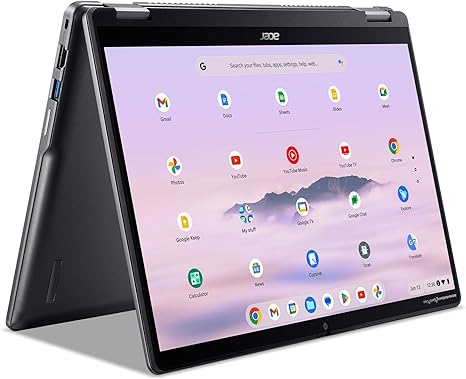
Welcome back to “Reviews inside tv,” where we take an in-depth look at the latest tech to see if it lives up to the hype. Today, we’ve got something a bit special for those in the market for a Chromebook—meet the Acer Chromebook Plus Spin 514. Aimed at those who need a reliable, secure, and fast laptop for work, study, and entertainment, this machine packs quite a punch with features that aim to elevate everyday computing. But does it actually deliver? Let’s find out.
First up, let’s talk specs. Under the hood, the Chromebook Plus Spin 514 is powered by an Intel Core i5-1200U processor, paired with 8GB of LPDDR5X RAM. This configuration sets the stage for solid multitasking and smooth day-to-day performance, whether you’re toggling between apps or working on a series of documents. The 256GB SSD provides ample space for storing files, media, and apps, while also offering much faster load times compared to older SATA-based drives.
Now, when it comes to the display, you’re getting a 14-inch WUXGA (1920×1200) IPS touchscreen panel. The 16:10 aspect ratio is a nice touch, giving you a bit more vertical screen real estate for work, while the Corning Gorilla Glass adds durability against everyday wear and tear. Color accuracy and brightness are decent, though not as punchy as you’d get on higher-end OLED or mini-LED displays. Still, it’s a good choice for browsing, media consumption, and light content creation.
The real magic here is in the Google AI integration. With 12 months of Google AI Pro included, you’ll get access to a suite of tools, including Gemini, that can boost productivity. From turning handwriting into editable text to simplifying complex content, the software helps users be more efficient, whether they’re working on a project or just organizing their digital life. And if you’re into gaming or creative work, the Chromebook’s support for Adobe Photoshop and LumaFusion means it’s ready for more than just emails and spreadsheets.
In terms of connectivity, the Spin 514 supports Wi-Fi 6E, which is a step up from standard Wi-Fi 5, offering faster and more reliable internet speeds. You also get Bluetooth 5.2 support, meaning you won’t have trouble connecting wireless peripherals. When it comes to ports, the Chromebook includes a USB-A port, USB-C, and HDMI, making it easy to connect to monitors and other peripherals. However, for those who like to work with external storage or cameras, the lack of a full-size SD card reader might be a downside.
But how does it actually perform? Well, for office tasks like web browsing, email, and document editing, this Chromebook is more than up to the job. You won’t see any slowdowns even with multiple tabs open, and apps like Google Docs and Microsoft 365 run smoothly. The 1080p FHD webcam is another strong point, delivering crisp video quality for calls. Plus, with AI-powered features like background blurring, noise cancellation, and lighting enhancements, video conferencing feels more professional.
If you’re into media consumption, the display’s color and brightness are adequate for streaming movies or shows. It won’t match the rich, deep blacks of OLED panels, but it does the job well enough for casual viewing. DTS audio further enhances the experience, providing clear sound even from the built-in speakers.
Now, let’s talk about performance under pressure. In lighter workloads, the Chromebook stays cool and quiet. However, as you start pushing it with more demanding tasks like content creation or running multiple apps simultaneously, it does warm up a bit. Still, it doesn’t suffer from any noticeable thermal throttling, making it more than capable of handling longer sessions. Fan noise is minimal under load, and for the most part, it stays quiet even when performing heavier tasks like photo editing or running multiple video streams.
Battery life on the Acer Chromebook Plus Spin 514 is impressive, with up to 10 hours of use on a single charge. Of course, this will depend on what you’re doing—lighter tasks like word processing and web browsing will get you closer to the upper end of that estimate, while video streaming and more demanding workloads might see a bit less. Charging speed is decent, but it’s not the fastest on the market.
When it comes to keyboard and trackpad, the Chromebook offers a pleasant typing experience. The key travel is just right for comfortable typing, and the OceanGlass trackpad is responsive, with good palm rejection and accuracy. For those who prefer extra input options, the laptop supports a fingerprint reader for quick, secure log-ins, though there’s no face unlock or stylus support here.
In terms of portability, the Chromebook weighs just 3.3 pounds, which makes it light enough to carry around in a bag without feeling like a burden. The slim design also means it won’t take up much space on your desk or in a backpack.
So, what are the pros and cons of the Acer Chromebook Plus Spin 514? Well, the biggest strengths are its solid performance for everyday tasks, long battery life, and sleek design. The inclusion of Google AI Pro and the ability to run apps like Adobe Photoshop and LumaFusion also sets it apart from many Chromebooks in this category. On the downside, the display, while good, doesn’t quite compare to higher-end options, and the lack of an SD card reader might limit its appeal for some creators.
In terms of value for money, this Chromebook is priced in line with other mid-range Chromebooks, but its inclusion of advanced AI tools and ability to run creative apps at a reasonable level makes it a solid investment for users who need a bit more than just basic browsing. If you’re a student or someone who mostly needs a device for work, this could be a great option. If you’re a heavy gamer or content creator looking for top-tier performance, however, you might want to look at other options with more powerful hardware.
When compared to similar models, the Acer Chromebook Plus Spin 514 holds its own, but it faces competition from other mid-range options like the Lenovo Chromebook Flex and HP Chromebook x360. However, Acer’s AI integration and support for professional apps make this an attractive option for users who need a bit more power and flexibility in their daily work.
The build quality here is solid, with MIL-STD-810H military-grade durability adding an extra layer of confidence that the Chromebook will hold up to the rigors of daily use. The hinge feels sturdy, and the overall design is sleek and professional.
Acer’s customer support reputation is generally strong, and you get the added benefit of a security-first approach with the built-in Titan C2 security chip, ensuring peace of mind when it comes to online safety.
To wrap things up, the Acer Chromebook Plus Spin 514 is a versatile, durable device that performs well in both work and play scenarios. If you’re looking for a fast, secure, and capable Chromebook with a few extra features like Google AI and creative app support, this is a solid choice. For students, office workers, and light creators, it offers great value for money. If you’re a power user who needs more raw performance, however, it might not quite hit the mark.
Thanks for tuning in today. Don’t forget to hit that like button, subscribe, and ring the bell so you never miss a review from “Reviews inside tv.” If you have any questions or if you’ve already used this Chromebook, drop a comment below—we’d love to hear from you. And as always, stay tech-savvy!
Available to buy here:


