

Available to buy here:
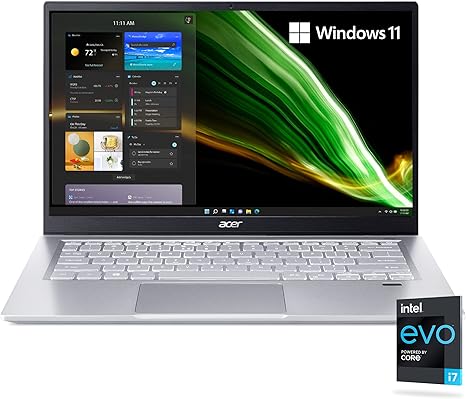
Welcome to “Reviews inside tv,” where we explore the latest laptops to help you make informed decisions. Today, we’re looking at the Acer Swift 3 Intel Evo Thin & Light Laptop, a sleek device that combines power and portability. Aimed at users who need a balance of performance, battery life, and design, this laptop targets students, professionals, and casual users alike. But does it live up to its promises? Let’s take a closer look.
The Acer Swift 3 is equipped with the Intel Core i7-1165G7 processor, a quad-core chip that can turbo boost up to 4.7 GHz. This means you’re getting strong single-core performance for daily tasks like web browsing, document editing, and multitasking. The processor also has 8 threads, so it’s not just for light tasks — it can handle some heavier workloads, like moderate photo editing or light video editing, without breaking a sweat.
When it comes to graphics, the Swift 3 relies on Intel Iris Xe Graphics. While not a gaming powerhouse, the Iris Xe handles casual gaming and media consumption with ease. You won’t be running the latest AAA titles at ultra settings, but games like “League of Legends” or “Minecraft” should run smoothly at medium to high settings. For anything more graphically intense, this laptop might struggle, but for work and everyday media, it gets the job done.
Inside, you’ll find 16GB of LPDDR4X memory. This is more than enough for most users, whether you’re multitasking with dozens of browser tabs or running multiple applications at once. The LPDDR4X memory also offers faster speeds compared to older RAM types, which can make a difference in tasks like video editing or compiling large documents. Storage is covered by a 512GB NVMe SSD. This is a major win, as NVMe drives are significantly faster than older SATA SSDs. Your files, apps, and games will load in a flash, and system performance feels snappy even when juggling multiple tasks.
The display is a 14-inch Full HD IPS panel, which is great for a laptop of this size. With 100% sRGB color coverage, it delivers vibrant, accurate colors, making it ideal for tasks like photo editing, web design, or simply watching videos. The IPS technology ensures wide viewing angles, so you can easily share your screen with others without the colors washing out. At 1920×1080 resolution, the screen isn’t ultra-high-definition, but it’s sharp enough for most tasks. The downside is that it doesn’t have the punch of OLED or mini-LED, so blacks aren’t as deep and contrast is more limited, but for the price, it’s a solid display.
On the battery front, Acer promises up to 16 hours of battery life. In real-world testing, you can expect between 8 to 12 hours of use, depending on how heavily you’re using it. Light tasks like web browsing or document work might push you closer to that 12-hour mark, while heavier tasks like video editing or streaming will bring it down a bit. The laptop charges via USB-C, and with Thunderbolt 4 support, it can quickly recharge when needed. If you’re constantly on the go, the lightweight 1.2 kg (2.65 lbs) chassis makes it a breeze to carry around.
When it comes to thermals, the Acer Swift 3 stays relatively cool during light usage, but you might notice some heat building up on the keyboard deck when you’re pushing it with heavier workloads. This is common for thin laptops, but it’s something to keep in mind if you’re using it on your lap for extended periods. The fan noise is noticeable but not overwhelming — it’s there during heavier loads, but it’s not loud enough to be distracting in a quiet environment.
As for the keyboard and trackpad, Acer has done a solid job here. The backlit keys have a nice amount of travel and offer good tactile feedback, making them comfortable for long typing sessions. The layout is standard, with a full-sized Enter key and an appropriate placement for the arrow keys. The trackpad is responsive with smooth gestures, though it might feel a little cramped for some users. There’s also a fingerprint scanner for quick logins, adding a touch of security without sacrificing convenience.
Connectivity-wise, you get a decent selection of ports. The USB-C port supports Thunderbolt 4 and DisplayPort, making it versatile for docking stations, external monitors, or even charging other devices. There’s also an HDMI 2.0 port, which is great for connecting to larger displays or TVs. Two additional USB-A ports and an SD card reader round out the ports, giving you plenty of options for peripherals and external storage. The Wi-Fi 6 support ensures fast, stable internet connections, while Bluetooth 5.0 offers seamless pairing with wireless accessories.
Let’s talk about performance, starting with a look at some real-world data. In benchmarks, the Acer Swift 3 performs well across a range of tasks. For gaming, it’s best suited to less demanding titles. In “Shadow of the Tomb Raider” at 1080p, the laptop hits around 50 FPS on medium settings, which is fine for casual gaming but not for high-end AAA titles. In “Far Cry 5,” it achieves around 40 FPS on medium settings. These numbers are respectable given the hardware but aren’t going to give you a smooth, competitive gaming experience at high settings. The laptop’s thermal performance is decent, but you might see some throttling during extended gaming sessions or heavy workloads like video rendering. The fans ramp up, but they don’t get uncomfortably loud.
For users focused on office work, media consumption, or light creative tasks, the Swift 3 is more than capable. Web browsing, document editing, and video calls are all handled effortlessly. Streaming video looks great on the Full HD display, and the speakers, while not amazing, are loud enough for casual media consumption. In content creation tasks like photo editing, the color accuracy of the screen is a major plus, though it might struggle with more demanding video editing or music production tasks.
For a device like this, the build quality feels solid. The chassis is made of aluminum, which adds to the premium feel without making it too heavy. It’s durable enough to withstand the rigors of daily use, though it doesn’t feel quite as robust as some high-end ultrabooks.
As for value, the Acer Swift 3 strikes a good balance between performance and price. At its current price point, it competes well with similar laptops like the Dell XPS 13 and the MacBook Air in terms of performance, portability, and battery life. It might not match those models in terms of premium design or absolute power, but it offers great performance for the price, especially for light-to-moderate workloads.
In conclusion, the Acer Swift 3 is a well-rounded laptop that should work well for students, professionals, and casual users who need a capable laptop without breaking the bank. It’s a good fit for anyone looking for a light, portable device that can handle everyday tasks and light creative work. However, if you’re a gamer or someone who needs top-tier performance for intensive video editing, you may want to look elsewhere.
Thanks for watching! If you’re interested in picking up the Acer Swift 3, check out the link in the comments below. And if you have any questions or experiences with the laptop, feel free to share them in the comments. Don’t forget to like, subscribe, and hit the bell icon for more reviews. See you next time!
Available to buy here:


