
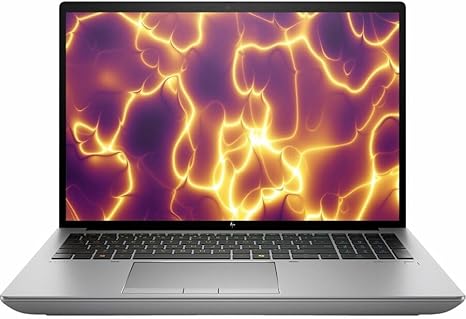

Available to buy here:
Welcome to “Reviews inside tv,” where we bring you all the details you need to make informed tech decisions. Today, we’re taking a look at the HP ZBook Fury G11, a 16-inch mobile workstation that’s designed for high-performance tasks. Whether you’re a creative professional, an engineer, or someone who needs serious computing power on the go, this device promises to deliver. But does it live up to its potential? Let’s dive in.
The HP ZBook Fury G11 comes with a 13th Gen Intel Core i7-13850HX processor, offering 20 cores for impressive multitasking and processing power. This is paired with 32GB of RAM and a 1TB SSD, giving you the speed and storage needed for demanding workflows. The 16-inch WUXGA display runs at a resolution of 1920 x 1200, providing sharp, clear visuals, especially when paired with Intel’s integrated UHD graphics. It also features Windows 11 Pro, ensuring you’re set for the latest software and security updates.
Now, let’s talk performance. The i7-13850HX is a powerhouse of a chip, with its 20-core configuration making it more than capable of handling heavy workloads. Whether you’re crunching numbers in spreadsheets, editing videos, or running simulations, this processor can keep up. For creators working with 3D rendering or software development, the ZBook Fury delivers solid CPU performance that can handle long rendering sessions or large-scale computational tasks. While the integrated Intel UHD graphics may not offer the same raw power as a dedicated GPU, it’s still suitable for less demanding tasks and lighter media consumption.
Moving on to the display, the 16-inch WUXGA screen delivers a solid viewing experience with decent color accuracy and clarity, though it won’t blow you away like an OLED panel would. With a resolution of 1920 x 1200, you’ll get sharp images and a respectable aspect ratio, but keep in mind that the display isn’t 4K, so for those who need ultra-high-definition visuals, you might want to look elsewhere. For day-to-day office work, media consumption, or light creative tasks, this display holds up well. However, if you’re editing detailed graphics or working in color-critical environments, the lack of ultra-wide color gamut support (like DCI-P3 or AdobeRGB) might limit your experience.
As far as storage goes, the 1TB SSD offers fast read and write speeds, which is essential when working with large files. From boot times to software loading, everything feels snappy. The 32GB of RAM is also a significant plus. It’s more than enough for multitasking, whether you’re switching between demanding programs or keeping dozens of browser tabs open without noticeable lag. For heavy-duty workloads like video editing or compiling code, this laptop’s memory will ensure smooth performance, even when running multiple applications simultaneously.
Battery life on a workstation like this can often be a concern, especially with such a powerful processor. The ZBook Fury G11 features a decent-sized battery, but expect between 6 to 8 hours of real-world use with moderate tasks. If you’re working with more demanding software or running extensive simulations, you’ll likely need to plug in sooner. The charging speed is relatively fast, but keep in mind that the laptop’s size and performance may still make it less ideal for those who need all-day battery life on the go.
The keyboard and trackpad are also worth noting. The keys have a solid amount of travel and offer a comfortable typing experience, which is critical if you spend hours on spreadsheets, documents, or coding. The trackpad is responsive and large enough for precise navigation, though if you’re doing a lot of CAD work or require pinpoint accuracy, you might want to pair it with an external mouse. There’s also a fingerprint reader, which is a nice touch for quick security, along with the full-sized layout that includes a number pad, making it convenient for data-heavy tasks.
On the connectivity front, the ZBook Fury G11 offers a variety of ports, including USB-A, USB-C, Thunderbolt, HDMI, and an SD card reader, which is great for professionals who need to connect external monitors, storage, or other peripherals. The inclusion of Thunderbolt is especially useful for those who need fast data transfer speeds, and with Wi-Fi 6, you can count on fast, stable connections even in crowded environments.
When it comes to thermals, the HP ZBook Fury G11 does a decent job of keeping temperatures under control. The fans can get a bit loud when the laptop is pushed to its limits, like during video rendering or while running high-performance simulations, but it doesn’t reach the point where it’s unbearable. That said, the laptop does get warm under heavy load, particularly on the underside, so if you’re working on it for extended periods in your lap, you might find it uncomfortable.
In terms of build quality, the ZBook Fury is well-constructed. The chassis feels sturdy, with a professional, industrial design that’s clearly built to last. At 5.2 pounds, it’s not the lightest mobile workstation out there, but given its performance capabilities, it’s fairly portable. It’s also fairly thick, which means it’s not as sleek as some ultrabooks, but the extra heft is necessary to house the powerful internals and maintain the necessary cooling.
Looking at the competition, the HP ZBook Fury G11 is certainly a capable contender for professionals in need of a mobile powerhouse. When compared to others like the Lenovo ThinkPad P Series or the Dell Precision 5000 Series, the ZBook holds its own with its strong CPU performance, a wide range of ports, and solid storage options. However, the lack of a dedicated GPU might limit its appeal for those who need more graphical power for tasks like gaming or 3D rendering. It’s also a bit on the heavier side, so if portability is your top priority, there are lighter alternatives out there.
In conclusion, the HP ZBook Fury G11 is a solid choice for professionals who need serious computing power in a mobile form. It’s well-suited for those working in fields like engineering, media creation, and other tasks that demand high-performance hardware. However, if you’re looking for a lighter, more portable option, or if you need better graphical performance, this might not be the right fit. It delivers exactly what it promises in terms of performance and build quality, but at a price that reflects its capabilities.
If you’re in the market for a reliable, powerful workstation that can handle virtually any task, the HP ZBook Fury G11 is worth considering. Thanks for watching, and don’t forget to check the comments box for a link to the laptop. Feel free to drop any questions or share your experiences if you’ve already used this model. Catch you in the next one!
Available to buy here:


