
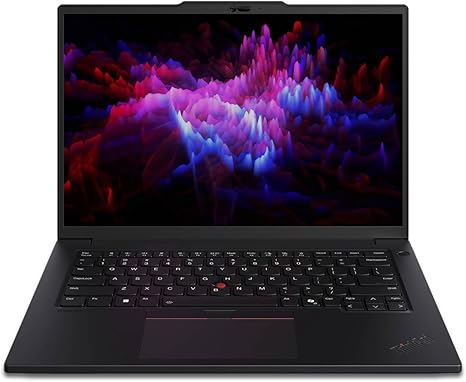

Available to buy here:
Welcome to Reviews inside tv, where we break down everything you need to know about the latest and greatest in tech. Today, we’re diving into the Lenovo ThinkPad P14s Gen 5, a powerful mobile workstation packed with features that promise to deliver both productivity and performance. Whether you’re a business professional, content creator, or someone who needs a reliable machine for demanding tasks, the P14s Gen 5 aims to meet a variety of needs. But does it deliver on that promise? Let’s find out.
The Lenovo ThinkPad P14s Gen 5 is designed for serious work. With an Intel Core Ultra 7 165H processor and vPro technology, it’s built for multitasking and demanding workloads. This workstation doesn’t hold back with 32 GB of DDR5 SDRAM, allowing you to run multiple programs simultaneously without a hitch. Whether you’re juggling office apps, video calls, or even light creative tasks, this system will keep up. And with 1 TB of SSD storage, you’ll have plenty of room to store large files like HD videos, high-res photos, or even entire projects. This is a machine that means business, with specs that suggest power and efficiency.
The P14s Gen 5 features a 14.5-inch WQXGA display with a 2560 x 1600 resolution. This is not your typical laptop screen—expect sharp details, vibrant colors, and a solid viewing experience, whether you’re working on documents or watching videos. The resolution strikes a good balance between full HD and 4K, giving you extra screen real estate without overwhelming your eyes. The 16:10 aspect ratio offers slightly more vertical space than the traditional 16:9, making it a good choice for productivity. However, the real standout is the NVIDIA RTX 500 Ada Generation discrete graphics card with 4 GB of dedicated VRAM. This isn’t just for gaming—this GPU is made to handle graphics-intensive tasks like video editing, CAD work, or rendering, all while maintaining smooth performance.
Now, how does this beast handle day-to-day tasks? When it comes to office and productivity work, the P14s Gen 5 shines. With its powerful processor and generous RAM, it takes on everything from heavy Excel spreadsheets to large PowerPoint presentations with ease. If you’re a multitasker, you’ll appreciate how responsive this laptop is when you’ve got a dozen tabs open or multiple programs running in the background. It’s the type of laptop that lets you get your work done without worrying about lag or slowdowns.
For media consumption, the display’s WQXGA resolution offers crisp visuals, making it ideal for watching movies, streaming shows, or browsing through photo galleries. It’s not quite OLED-level, but it delivers vibrant colors and great contrast that make it a solid choice for casual viewing. The speakers are loud enough to fill a room, but they don’t quite match the depth you’d get from a dedicated audio setup. For most casual media consumption, though, it does the job just fine.
If you’re into content creation, the ThinkPad P14s Gen 5 doesn’t disappoint. The combination of a powerful Intel CPU and the RTX 500 Ada GPU makes it more than capable of handling photo editing, video editing, and even some 3D rendering. Expect fast export times and a smooth editing experience, especially for 1080p or 1440p content. While it’s not meant to replace a full desktop workstation, it can certainly hold its own in a pinch.
When it comes to gaming, this isn’t a gaming laptop per se, but the dedicated GPU does allow it to handle light gaming quite well. For titles like Fortnite or League of Legends, you can expect to run them at high settings without breaking a sweat. However, graphically intense AAA titles like Cyberpunk 2077 or Red Dead Redemption 2 will need to be dialed back to medium or low settings to maintain a smooth experience, especially if you’re aiming for higher frame rates.
Speaking of performance, let’s get into thermals and noise. The P14s Gen 5 keeps its cool even under load, thanks to Lenovo’s efficient thermal management. Under regular use, you’ll hardly notice any heat buildup, but once you start running demanding tasks, like video rendering or gaming, the laptop does get warm, particularly around the keyboard area. The fans, while audible, aren’t obnoxious. They ramp up as needed, but the noise stays at a manageable level for the most part. On the downside, prolonged intensive use might cause some throttling, particularly during long gaming or rendering sessions. The laptop does well under normal workloads, but don’t expect it to keep up with high-end gaming rigs or heavy workstation tasks for extended periods without some performance drop-off.
Battery life is another strong suit of the ThinkPad P14s Gen 5. With its 32 GB of RAM and power-efficient CPU, you can easily get through a full workday of light to moderate tasks. Expect around 8–10 hours of use on a charge, depending on what you’re doing. Watching videos or browsing the web might give you closer to 10 hours, while heavier tasks like video editing or 3D rendering will drain the battery more quickly. The 65W charger gets you back up to full power fairly quickly, but it’s not the fastest charging experience you can get. Still, it’s sufficient for most people who need a quick top-up in between tasks.
Let’s talk about the keyboard and trackpad. The keyboard on the P14s Gen 5 is one of the best in the business. The key travel is solid, with a comfortable typing feel, making it great for long sessions. The layout is sensible, with a full-size backlit keyboard, and the arrow keys are the right size for easy navigation. The trackpad is responsive, with precise tracking and multi-gesture support. It’s large enough to comfortably use, but not so big that it interferes with typing. Palm rejection is spot-on, so you won’t accidentally activate anything while typing away.
Port selection on this laptop is also robust. You get two USB-A ports, two USB-C ports (one of which supports Thunderbolt 4), an HDMI 2.0 port, an SD card reader, and an Ethernet jack. That’s more than enough for most users, whether you’re connecting to a dock, multiple monitors, or external storage. The inclusion of Thunderbolt 4 is a nice touch for those who want to take advantage of fast data transfer speeds or need to connect to high-end peripherals.
As for build quality, the P14s Gen 5 feels solid and premium. It’s made of a combination of magnesium and plastic, which gives it a sturdy feel without making it too heavy. The laptop weighs in at around 3.5 pounds, making it portable enough to carry around all day without feeling like you’re lugging a brick. The chassis feels rigid with minimal flex, and the hinge is smooth, ensuring a stable screen at virtually any angle. You’ll have no problem opening it with one hand, either.
When it comes to value, the P14s Gen 5 is positioned as a premium workstation laptop, so you’ll pay for the high-end specs and build quality. It’s a great fit for professionals who need reliability, power, and portability. If you’re a student or casual user, you might find the price a bit steep, but for those who need power for work, content creation, or occasional gaming, this laptop is a solid investment.
In comparison to some competitors, like the Dell Latitude 7430 or the HP ZBook Firefly 14 G8, the P14s Gen 5 holds its own with its superior GPU performance and high-res display. While it’s not the cheapest option, it provides a balance of power and portability that makes it worth the premium for those who need it.
In conclusion, the Lenovo ThinkPad P14s Gen 5 is a powerful, well-rounded mobile workstation. It’s ideal for professionals who need a reliable, high-performance laptop that can handle demanding tasks without breaking a sweat. If you’re looking for something that’s as comfortable in a meeting as it is in front of your editing software, this is a great option to consider. Just be aware that if you’re looking for a gaming laptop or a machine that’s meant to handle extended gaming or rendering sessions, this may not be the one for you.
Thanks for watching today’s review. If you’re interested in picking up the Lenovo ThinkPad P14s Gen 5, check the comments for a link. Let me know if you’ve used this laptop already, or if you’re considering it—I’d love to hear your thoughts! Until next time, keep those workstations running smoothly, and I’ll see you in the next review!
Available to buy here:


