

Available to buy here:
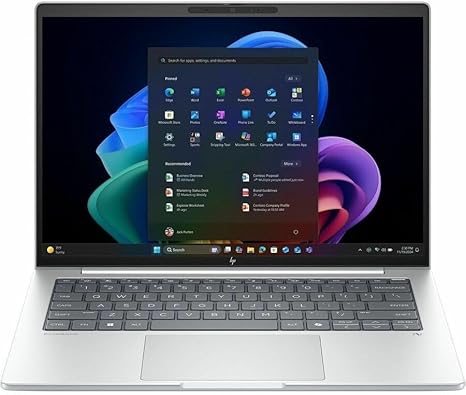
Welcome to “Reviews inside tv,” where we take a closer look at the latest tech. Today, we’re diving into the HP EliteBook 8 G1i 14″ Touchscreen Notebook, a business-focused powerhouse designed with premium materials and cutting-edge performance features. Whether you’re a professional, student, or someone in need of a solid portable workhorse, this laptop promises to deliver top-tier performance with Intel’s latest Core Ultra 7 processor. But does it live up to the hype? Let’s find out.
This model comes equipped with an Intel Core Ultra 7 268V processor, offering an impressive octa-core setup that’s built to handle multitasking and demanding workloads with ease. Alongside this, you’ll get 32 GB of RAM, which is a significant step up for those who frequently work with large files or use memory-hungry applications. In terms of storage, it features a 512 GB SSD, which means you can expect fast boot times, quick file access, and improved overall system responsiveness compared to older SATA drives. The 14-inch WUXGA touchscreen display, with a resolution of 1920 x 1200, is sharp and clear, offering a good balance between screen size and portability. It’s especially handy for those who need to interact with their device directly, whether for presentations or digital note-taking.
So, what does this all mean for real-world use? For office productivity tasks like web browsing, document editing, and video calls, the HP EliteBook performs seamlessly. Thanks to the powerful Core Ultra 7 processor and 32 GB of RAM, you can easily juggle multiple apps at once without noticeable lag. Whether you’re switching between spreadsheets, PowerPoint slides, or running Zoom meetings with several participants, this laptop feels smooth. If you’re a content creator or someone who needs more intensive computing power, like photo or video editing, the additional RAM helps ensure that everything runs efficiently. However, keep in mind that this laptop doesn’t feature a discrete GPU, so heavy-duty gaming or 3D rendering tasks might not be as ideal. For light gaming or media consumption, though, it’s more than capable, offering a good viewing experience on that high-resolution touchscreen.
Speaking of media consumption, the 14-inch touchscreen with its WUXGA resolution provides crisp visuals, and while it may not be as vibrant as higher-end OLED panels, it’s more than enough for everyday use. Movies and shows look sharp and clear, and the touchscreen functionality is a nice bonus, adding extra convenience when you need to interact with your content. For audio, you’re looking at a solid experience. While it’s unlikely to replace a dedicated sound system, the built-in speakers do a decent job for video calls or casual viewing.
When it comes to thermals and fan noise, the HP EliteBook 8 G1i remains relatively quiet, even under load. The fan does kick in when you’re doing more demanding tasks, but it’s far from disruptive. This is a machine designed for work, not for gaming marathons, so while it’s built to handle long hours, it stays cool under typical office use. During video editing or when handling large file exports, the temperature does rise, but there’s minimal thermal throttling, which means consistent performance during extended sessions.
Battery life is a key consideration for any business laptop, and the EliteBook delivers well here. With its efficient Intel Core Ultra processor and a 51 Wh battery, you can expect anywhere from 8 to 10 hours of use under normal conditions—think browsing, writing, or light media consumption. For heavier workloads, you might see closer to 6 to 7 hours, but either way, it’s solid for a full day of work. The charging speed is quick as well, allowing you to get back to work without too much downtime.
The keyboard is another highlight of this laptop. It features a full-size layout with responsive keys that have a nice amount of travel, making long typing sessions comfortable. The trackpad is large and responsive with accurate palm rejection, so you won’t have to worry about accidental movements while typing. Plus, the touchscreen adds another layer of interaction, which is handy for those who need quick, direct input.
As for ports and connectivity, the EliteBook 8 G1i has all the essentials for a productive day. You’ve got USB-A and USB-C ports for connecting peripherals, an HDMI port for external monitors, and a microSD card reader for transferring files. On top of that, it supports Wi-Fi 6 and Bluetooth 5.0, ensuring you have reliable wireless connectivity for all your devices. The laptop is equipped with a webcam and microphone that handle video calls well, making it ideal for remote work and virtual meetings.
One thing worth noting is the build quality. The chassis is crafted from premium aluminum, which feels solid and sturdy. It’s lightweight for a business laptop at around 1.3 kg, making it easy to carry around in a bag all day. The design is sleek and professional, and while it’s not particularly flashy, the Glacier Silver finish gives it a high-end, refined look that fits well in both corporate and casual settings.
Now, let’s talk about the price. At this point, the HP EliteBook 8 G1i is priced in the mid-range business laptop category. When you compare it to similarly priced competitors, like the Dell Latitude 7420 or Lenovo ThinkPad X1 Carbon, you’re getting excellent value for the performance and build quality. While those alternatives might offer slightly better displays or more options for discrete GPUs, the EliteBook stands strong with its balance of features, especially for business professionals who prioritize performance, reliability, and portability.
If you’re in the market for a laptop that combines powerful performance with great portability, the HP EliteBook 8 G1i is definitely worth considering. It’s ideal for professionals, students, and anyone who needs a reliable work laptop. If you’re a gamer or need more graphically-intensive capabilities, though, you might want to explore options with discrete graphics cards.
Thanks for watching! Don’t forget to hit like, subscribe, and ring the bell so you never miss a review. You’ll find the link to the HP EliteBook in the comments box below—feel free to leave your thoughts or share your experience if you’ve used this laptop. Until next time, stay tuned for more in-depth reviews from “Reviews inside tv.”
Available to buy here:


