

Available to buy here:
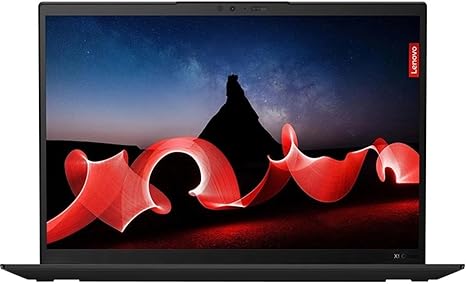
Welcome back to “Reviews inside tv,” where today we’re looking at the Lenovo ThinkPad X1 Carbon Gen 11. This ultrabook is designed for professionals who need high performance, portability, and reliability. Let’s see if it’s worth your investment for both work and play.
The ThinkPad X1 Carbon Gen 11 is powered by an Intel Core i7-1355U, a deca-core processor built on Intel’s 13th generation architecture. With 10 cores, this CPU handles multitasking effortlessly. Whether you’re juggling multiple office applications or working on more demanding tasks, this processor ensures smooth performance without lag. Coupled with 16GB of RAM, it can manage even more intensive workloads like data-heavy spreadsheets or light video editing, with no noticeable slowdowns. The RAM is LPDDR5, so it’s not only ample but also fast, keeping your system responsive even during busy days.
For storage, the X1 Carbon Gen 11 boasts a 1TB SSD, which offers quick boot times, fast file transfers, and overall snappy system performance. The difference between a traditional hard drive and an SSD is substantial – this ultrabook’s SSD ensures that everything from launching apps to transferring large files is seamless. Whether you’re storing presentations, movies, or high-res images, the 1TB capacity should be more than enough for most users.
The 14-inch WUXGA (1920×1200) display is a standout feature for those who want clarity and vivid colors. It’s bright enough to use indoors without any trouble, and the resolution, while not 4K, still provides excellent sharpness and detail for everyday tasks like browsing, video streaming, or reading documents. The touchscreen adds a layer of convenience if you’re someone who likes to interact directly with the screen. Whether you’re flipping through files or using creative apps, it makes navigation a breeze.
In terms of performance, the ThinkPad X1 Carbon Gen 11 isn’t geared for high-end gaming or heavy content creation like 4K video editing, but it handles productivity and media consumption with ease. Web browsing, document work, and media streaming are all responsive and enjoyable. Watching movies or shows on its 14-inch screen is a pleasant experience, with solid color accuracy and contrast. The speakers are good for a laptop of this size, delivering clear sound for video calls or casual media consumption.
The laptop’s portability is another key selling point. Weighing just around 2.5 pounds, the X1 Carbon is light enough to carry around all day in your bag. Its slim profile makes it easy to slide in and out of tight spaces, perfect for those always on the go. As far as battery life goes, you can expect a full day of work on a single charge with light to moderate use. Of course, running demanding tasks will drain it faster, but for the average office work or media streaming, it holds up well, offering around 10 to 12 hours in normal use. Charging is relatively quick too, making it a great option for professionals who need to get back up to speed fast.
The keyboard and trackpad are just as impressive. Lenovo has long been known for its excellent keyboard design, and the X1 Carbon is no exception. The key travel and feedback are perfect for long typing sessions, which is a big plus if you’re typing out reports, emails, or anything else. The trackpad is responsive, with smooth gestures and no palm rejection issues. If you prefer to use a stylus or touch input, the touchscreen is reliable for those moments when you need direct interaction.
When it comes to connectivity, the X1 Carbon offers a robust selection of ports. You’ve got two Thunderbolt 4 ports, two USB-A ports, HDMI 2.0, and a microSD card reader. Wi-Fi 6 ensures fast, reliable internet access, while Bluetooth 5.1 supports a wide range of wireless peripherals. There’s even an optional Nano-SIM card slot if you’re looking for a cellular connection. As for expandability, the RAM is soldered, so you can’t upgrade it later, but the 1TB SSD is upgradable if you need more storage down the line.
Thermal performance is something that often comes into play with ultrabooks, especially when they’re pushed to their limits. During everyday use, the X1 Carbon stays cool, with only mild warmth in the keyboard area. Even under heavier workloads like video calls or media streaming, the heat is manageable. The fan is typically quiet unless you’re running demanding applications, but it doesn’t get too loud to be distracting. It’s the type of machine that works well whether you’re on a conference call in a quiet office or editing documents in a cafe.
Now, let’s talk about value for money. The Lenovo ThinkPad X1 Carbon Gen 11 is a premium ultrabook with an eye-catching price tag. At this price point, it competes with other high-end laptops, such as the Dell XPS 13 and the HP Spectre x360. Both of these alternatives offer similar performance and features, but Lenovo’s ThinkPad series has long been a favorite among business professionals due to its durability, reliable keyboard, and sleek design. For those who value solid performance in a lightweight, reliable package, this is a great option, though it may be overkill for casual users who only need basic productivity features.
For those who need something a little less expensive, the HP Envy 14 or the ASUS ZenBook 14 could be more affordable alternatives with similar specs but without some of the premium features and build quality of the ThinkPad X1 Carbon.
In terms of build quality, this ultrabook feels solid, with a magnesium-alloy body that’s both lightweight and durable. The hinge feels secure, and the overall build is designed to handle the rigors of daily use. It’s not the most rugged ultrabook out there, but it’s certainly durable enough for everyday tasks.
Overall, the Lenovo ThinkPad X1 Carbon Gen 11 is an excellent choice for professionals who need a lightweight, powerful laptop that can handle demanding work tasks, media consumption, and day-to-day productivity. It’s not aimed at gamers or heavy content creators, but for those who prioritize productivity, portability, and a premium experience, it’s hard to beat.
Thank you for watching! Don’t forget to like, subscribe, and hit the bell icon for more in-depth reviews. The link to get this laptop is in the comments box. If you have any questions or already own this model, feel free to leave a comment below. Take care, and see you in the next one!
Available to buy here:


