

Available to buy here:
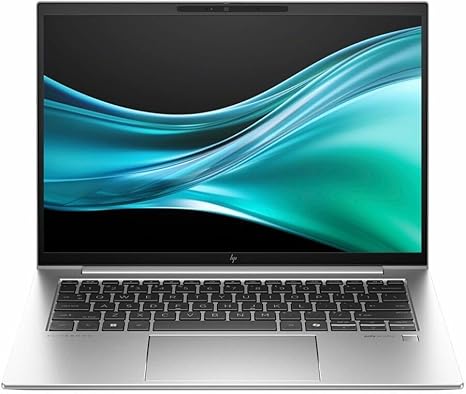
Welcome to “Reviews inside tv,” where we break down the latest in tech to help you make the best purchase decisions. Today, we’re looking at the HP EliteBook 840 G11—a sleek, 14-inch touchscreen notebook designed with professionals in mind. This model comes packed with Intel’s Core Ultra 7 155U processor, featuring a dodeca-core (12-core) setup, turbo speeds up to 4.80 GHz, and it’s equipped with 16GB of RAM and a 512GB SSD. But how does it perform in real-world use? Let’s find out.
Starting with the basics, this EliteBook packs an impressive punch in its 14-inch frame. The WUXGA touchscreen display provides a resolution of 1920 x 1200 pixels, which offers more vertical screen real estate compared to the standard 1080p. It’s ideal for productivity tasks, offering sharp, clear text and vibrant images. The display quality is decent, with good color accuracy, though you won’t get the ultra-wide color gamuts you’d find in premium creator machines. However, for office work and media consumption, it’s certainly adequate.
Under the hood, the Core Ultra 7 155U processor is built for efficiency, thanks to Intel’s latest architecture. With 12 cores, it’s well-suited for multitasking, so juggling between multiple spreadsheets, video calls, and word documents should feel smooth. The processor’s maximum turbo speed of 4.80 GHz allows for quick bursts of power when you need it most, which is great for applications that demand higher clock speeds, like video editing or even light gaming. The 16GB of RAM is a solid configuration, and it’s more than enough for typical office tasks, media streaming, and even some heavier workloads like Photoshop or Lightroom.
In terms of storage, the 512GB SSD ensures snappy boot times, quick file transfers, and near-instant access to your applications. SSDs really make a noticeable difference compared to older SATA drives, ensuring your day-to-day experience is fast and responsive. The laptop’s fast storage means you won’t experience that dreaded lag when opening large files or booting up apps.
When it comes to real-world performance, this laptop excels at office productivity. Web browsing with a dozen tabs open, handling spreadsheets, and taking video calls all work flawlessly. For media consumption, the display quality is more than good enough for watching movies or streaming shows. While it’s not a 4K display, it holds its own for day-to-day media use. If you’re into content creation, the Core Ultra 7 processor and 16GB of RAM can handle photo editing and light video rendering, though you may need a more powerful GPU for intense video work or 3D rendering.
For gamers, however, this laptop isn’t a powerhouse. It doesn’t come with a discrete GPU, so while it can handle casual gaming at lower settings, don’t expect it to play the latest AAA titles at high frame rates. For more demanding games, you’ll likely need to lower the graphics settings and resolution. That said, for light gaming or esports titles, it should be okay at reduced settings.
The keyboard and trackpad deserve a mention, especially for those who spend hours typing. The keys have a nice amount of travel and feedback, making long typing sessions comfortable. The trackpad, though not the largest, is responsive, with accurate palm rejection, ensuring a smooth experience when navigating the interface. The layout is clean, with all the essential keys, and it’s comfortable for people who type a lot during the day.
Thermals are well-managed on this device. During typical office work, the laptop remains cool, but under load—like when editing photos or multitasking—there’s a noticeable increase in fan noise. It’s not overpowering, but it’s definitely audible. The bottom of the chassis gets warm, though it doesn’t get uncomfortably hot, making it still manageable for lap use. Long gaming sessions might lead to thermal throttling, but again, this isn’t a gaming laptop, so that’s not a huge concern for most users.
Battery life is a mixed bag. With a 3-cell, 51 Whr battery, you’ll get about 7 to 9 hours of moderate usage, which includes web browsing, watching videos, and some light office work. Under heavy workloads or with the screen brightness turned up, it’ll last closer to 5 or 6 hours. It’s not the longest-lasting laptop out there, but it should be enough to get you through a workday without needing a charger.
On the connectivity side, the HP EliteBook 840 G11 comes with a good selection of ports, including USB-A, USB-C, and Thunderbolt, along with an HDMI port for external displays and a headphone jack. It also has a microSD card reader, which could come in handy if you work with digital cameras or need to expand storage. Wi-Fi 6 ensures a fast and reliable connection, even in crowded environments, and Bluetooth 5.2 offers solid connectivity with external devices like headphones, mice, or keyboards.
In terms of build quality, this EliteBook is solid. It feels premium thanks to its aluminum chassis, which gives it durability and a professional look. At 1.35 kg (2.97 lbs), it’s fairly lightweight, making it easy to carry around all day in a bag without feeling burdened. The hinge is sturdy and smooth, providing a solid feel when opening the screen.
Now, let’s talk about value for money. The HP EliteBook 840 G11 is priced in the mid-range for business laptops, and given its solid performance, decent display, and reliable battery life, it offers good value for professional users who prioritize productivity and portability. It’s not the cheapest in its class, but the build quality, the performance of the Core Ultra 7, and the overall usability make it worth the investment.
For those comparing it to similar models, the Lenovo ThinkPad X1 Carbon or the Dell Latitude 7430 may come up, both of which have similar specs and target audiences. The HP stands out for its slightly lower weight and the inclusion of Thunderbolt, making it a bit more versatile for users who need to dock with external displays or peripherals.
To wrap things up, the HP EliteBook 840 G11 is a solid choice for students, office workers, and business professionals who need a reliable, portable laptop for everyday tasks, media consumption, and light content creation. If you need a machine that can handle heavy gaming or intense creative work, though, you might want to look elsewhere. Overall, it does what it’s supposed to do well, without any major flaws.
Thanks for watching! If you want to learn more, the link to grab this laptop can be found in the comments box below. Let us know what you think if you already own one or have any questions. Until next time, stay tuned for more reviews here on “Reviews inside tv.”
Available to buy here:


