

Available to buy here:
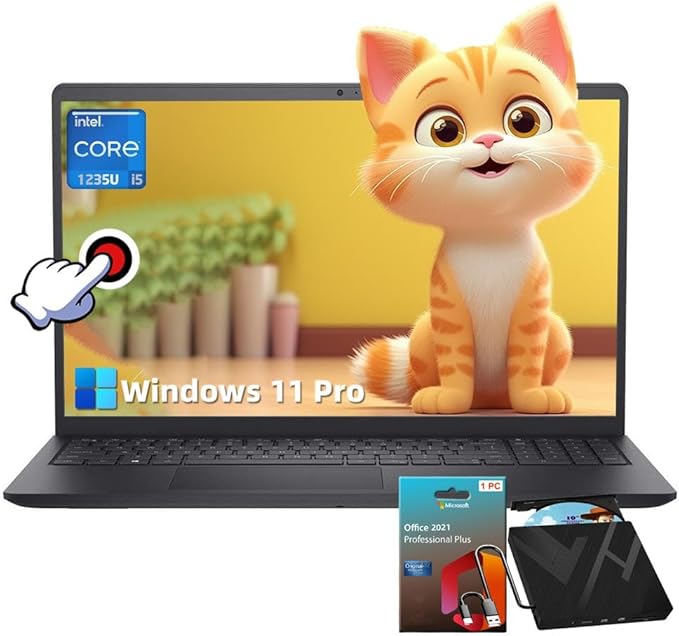
Hello and welcome to Reviews inside tv — today we’re taking a clear, honest look at the Dell Inspiron 15 3520 Business Laptop, a 15.6-inch machine pitched at professionals, students, and everyday users who want a dependable workhorse without overspending. On paper it promises a lot: a 12th Gen Intel Core i5 chip, roomy storage, and a Full HD touchscreen. So let’s unpack what that really means — what works, what doesn’t, and whether it delivers value for money.
From the spec sheet: this Inspiron packs an Intel Core i5-1235U — a 12th-generation CPU with 10 cores (two “Performance” cores and eight “Efficient” cores), supporting 12 threads, and able to boost up to 4.40 GHz. That gives it plenty of headroom for everyday multitasking: juggling browser tabs, Word/Excel, video calls, light photo editing, and even some heavier applications. In the model you’re considering there’s 16 GB of DDR4 RAM and a 1 TB SSD. The display is a 15.6-inch Full HD touchscreen (1920×1080), which adds convenience for presentation, document editing, or casual browsing. Graphics rely on integrated Intel UHD (or depending on RAM configuration, possibly Iris Xe) — enough for video playback, basic photo work, and light creative tasks, but not a substitute for a dedicated GPU. On the connectivity front you get standard USB-A ports, HDMI 1.4, Wi-Fi and Bluetooth, making it practical for external displays, peripherals, and everyday connectivity. The design is straightforward and built for business/office usage.
In daily use this Inspiron feels responsive. Boot times and application launches are fast thanks to the SSD, switching between Office apps, browser tabs, or editing tools feels smooth. For a student writing essays, a professional drafting documents, or someone handling spreadsheets and email, it’s quietly capable. The touchscreen brings some extra flexibility — handy for marking up documents or navigating with a tap rather than a click, though for heavy creation work the FHD panel and integrated graphics limit how far you can push it. Media consumption — streaming movies, watching lectures, browsing — is pleasant. Basic photo editing works fine; heavier tasks like video rendering or intensive multi-layered graphics work will quickly show limitations. Gaming? Only very light or older titles at low settings; modern, graphics-heavy games will struggle.
Thermals are generally well managed: the U-series i5 doesn’t generate excessive heat and Dell seems to keep cooling in check under typical workloads. On light to moderate use, the laptop stays cool-ish and fan noise stays low. Under heavier load (e.g. long editing sessions or pushing many processes at once), you may notice the fan ramping up — nothing horrendous, but enough to be audible and slightly warm the chassis. Given the integrated GPU and the mobile processor, thermal throttling under normal workloads is unlikely though the machine isn’t suited for sustained heavy lifting like long video exports or 3D rendering. Performance remains stable for office-class workloads, but don’t expect desktop-class stamina.
Battery life is decent for its class: in mixed use — browsing, document work, video playback — you can expect roughly five to six hours per charge. That’s not “all day” for heavy users, but fine for a workday if you’re near a charger. The 65 W adapter isn’t overly bulky and charging is reasonably quick, which helps if you move between workspaces or carry the laptop around.
Typing and navigation are satisfactory. The keyboard is functional for everyday typing — responsive enough for long writing or email sessions — though it lacks fancy extras like backlighting (which can be a downside in low-light environments). The trackpad is adequate — precise and palm-reliable, suitable for office tasks and daily navigation. Inputs are plenty for peripherals or external monitors, but if you need high-speed or high-bandwidth ports (like Thunderbolt or 4K output) for serious docking or external GPU/monitor setups, you might find the port selection limiting. RAM and storage are reportedly upgradeable (within reasonable limits), giving some future flexibility.
Where this Inspiron gets tricky is in “power user” or “creator-heavy” use cases. The integrated graphics simply aren’t built for serious GPU workloads. Even creative tasks like video editing or heavy Photoshop work can quickly hit performance ceilings. Gaming beyond light titles or older games is unrealistic in any meaningful way. The display — while Full HD and touchscreen — is adequate but not remarkable: brightness and color gamut are modest, so if you care about color accuracy for photo or video work or want a high-contrast, bright panel, you’ll likely feel constrained. Build materials are conventional, not premium — enough for daily carry and office use but nothing luxurious.
Compared with alternatives at a similar price point, this Inspiron delivers solid everyday performance and responsiveness, especially for students, writers, office workers, or anyone needing a dependable laptop for web, documents, streaming, and light creative tasks. But power users — video editors, gamers, heavy multitaskers, creators — might get more value from machines with dedicated graphics, higher quality displays (e.g. IPS or OLED), and stronger cooling/build quality.
Real strengths: smooth multitasking, SSD-backed speed, responsive CPU, sensible connectivity, adequate build for office/business use, workable battery life, touchscreen convenience. Real weaknesses: integrated graphics limits creative or gaming use; display is basic; keyboard lacks backlight; not ideal for heavy workloads; no premium chassis feel.
If you’re a student, office professional, casual user or someone who needs reliable everyday performance and decent storage — this Dell Inspiron 15 3520 will serve you well. If you’re a creator, gamer or heavy multitasker — you’d likely outgrow it sooner than later. Thanks for watching Reviews inside tv — if you own this laptop drop a comment below with your thoughts, or ask any questions you have. Catch you later, and until next time, keep those workflows smooth and your screens bright.
Available to buy here:


