

Available to buy here:
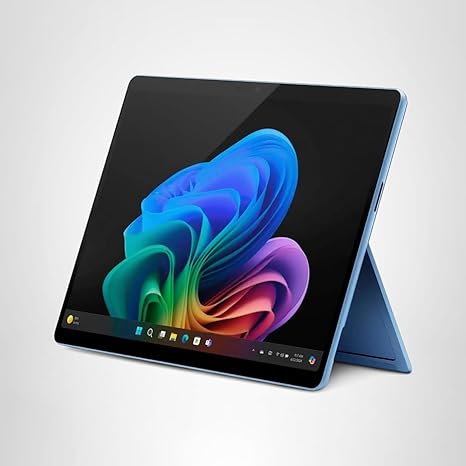
Welcome to Reviews inside tv! Today, we’re looking at the Microsoft Surface Pro 2-in-1 Laptop/Tablet, a device that blends cutting-edge technology, impressive AI features, and an incredibly flexible design. It comes with the 13-inch OLED touchscreen, Snapdragon X Elite processor, and 16GB of RAM, positioning itself as a standout in the 2-in-1 market. But does it live up to the hype? Let’s break down everything you need to know about this versatile machine.
The Surface Pro comes with a 13-inch OLED display that boasts vivid colors, deep blacks, and exceptional contrast, making it ideal for creators and media consumers alike. Whether you’re editing photos or streaming videos, this screen delivers stunning clarity. Plus, the 120Hz refresh rate makes for a smooth, responsive experience, perfect for creative work and even casual gaming. The display covers a wide color gamut, and its high brightness ensures it’s usable in bright environments—something that can be a dealbreaker for many users in everyday situations.
Under the hood, the Surface Pro is powered by the Snapdragon X Elite with a 12-core CPU. This chip offers impressive performance, easily outpacing the MacBook Air M3 in terms of raw processing power. Whether you’re multitasking across a dozen tabs or editing 4K video, this chip can handle it. Paired with the Adreno GPU, you’ll experience solid graphics performance, although it’s not designed for hardcore gaming or high-end 3D rendering. For most users, though, it’s more than enough for productivity and creative tasks.
The 16GB of RAM ensures smooth multitasking. Whether you’re working on spreadsheets, browsing with multiple tabs open, or hopping between apps, this laptop handles it without any noticeable slowdowns. Combined with the 512GB SSD, which is far faster than SATA-based storage, the system boots up quickly and apps load in an instant. You won’t have to worry about bottlenecks when it comes to storage, and the system’s responsiveness will make a difference, especially in productivity workflows.
Battery life is another area where the Surface Pro excels, with up to 14 hours of usage, which Microsoft claims should get you through a full day of work, whether you’re in meetings, on video calls, or watching movies. The fast charging feature is a nice touch too—using the 65W PSU, you can top up quickly, which is great for those moments when you’re on the go. The USB-C charging option adds extra versatility, giving you more flexibility when carrying accessories or traveling.
Now, let’s talk about the keyboard and trackpad. The Surface Pro features a detachable Surface Pro Flex Keyboard, which offers a great typing experience. It’s spacious, and the key travel is comfortable, though it’s not quite as luxurious as some full-size keyboards on premium laptops. The trackpad is smooth and responsive, making navigation easy during long work sessions. However, for heavy typers, it might feel a little too compact, but it does the job for the majority of users. The layout is standard, with good spacing between keys, though the lack of a dedicated number pad might be a drawback for some.
When it comes to ports and connectivity, the Surface Pro provides a solid selection for most tasks. You get USB-A and USB-C ports, which is ideal for connecting to a range of accessories. The presence of Thunderbolt would have been appreciated for future-proofing, especially for external displays or docks, but the setup is perfectly functional for casual use. There’s also an HDMI port, SD card reader, and the usual audio jack. Wi-Fi and Bluetooth are top-tier, so connectivity should never be an issue.
In terms of performance, while the Surface Pro is powerful, it’s important to note that it isn’t built for gaming or handling extremely demanding tasks like 3D rendering. For office work, content creation, and media consumption, it performs effortlessly. However, its graphics capabilities are more geared toward general use rather than high-performance gaming. If you plan to play titles like Cyberpunk 2077 or Call of Duty: Warzone, you may need to drop the settings to medium or low for smoother gameplay.
Thermals and fan noise are handled well with the Surface Pro. It stays relatively cool under most workloads, but like most ultrabooks, it will warm up a little under heavy load, especially during longer video exports or gaming sessions. The fans are not overwhelmingly loud, though you will notice them kicking in during intensive use. This shouldn’t be a concern unless you’re looking for a completely silent machine during heavy multitasking or gaming.
Portability is one of the standout features here. Weighing in at around 1.9 pounds, the Surface Pro is incredibly light, making it easy to slip into a bag or carry around all day without it weighing you down. Whether you’re a student or a professional on the move, this is a laptop that won’t add unnecessary bulk to your daily carry.
The build quality is excellent, with a premium feel that includes a sturdy magnesium alloy frame and a solid hinge that holds the display in place at any angle. The Surface Pro has always been known for its flexibility, and the 2024 edition is no different—whether you’re working at a desk, on your lap, or sketching in tablet mode, it adapts to your needs.
Now, onto the AI features that set the Surface Pro apart. Copilot+ is at the core of this model, enhancing productivity through its AI-powered experiences. From improving video calls with noise cancellation and background blurring to real-time translation during video calls, this is a unique selling point. The ability to co-create art and easily retrieve past documents or web pages with an explorable timeline is groundbreaking. While these features are impressive, they are also in their early stages, with some features like the timeline still coming soon.
To wrap up, the Surface Pro 2-in-1 Laptop/Tablet (2024) is a powerhouse for its intended audience—students, office professionals, and creators who need portability, versatility, and solid performance. It delivers exceptional display quality, strong performance, and unique AI features that enhance the overall experience. Its price is on the higher end, but it competes well with alternatives like the MacBook Air M3 and other premium ultrabooks. If you need something that can seamlessly transition between tablet and laptop modes, this is an excellent choice.
That’s all for today’s review. Don’t forget to hit like and subscribe for more in-depth reviews and tech breakdowns! If you have any questions about the Surface Pro or your own experiences with it, leave a comment below—we’d love to hear from you. Thanks for watching, and we’ll see you next time!
Available to buy here:


