

Available to buy here:
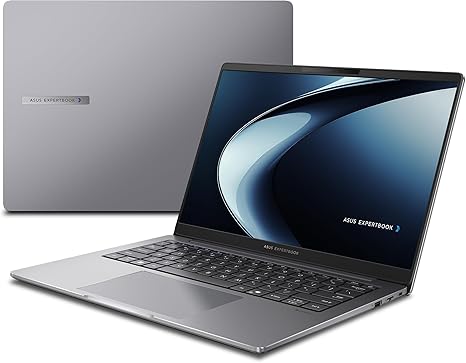
Welcome to “Reviews inside tv.” Today, we’re looking at the ASUS ExpertBook PM3, a business-focused 14-inch laptop designed for professionals who need powerful performance and reliability on the go. Let’s see if this device delivers everything you’d expect from a business laptop.
The ASUS ExpertBook PM3 features an AMD Ryzen AI7 350 Processor, clocked at 2.0 GHz. Paired with 32GB of RAM and a 512GB NVMe PCIe 4.0 SSD, this laptop promises smooth multitasking, rapid file transfers, and snappy performance for both office work and more demanding tasks. With its WUXGA display (1920 x 1200), you get a sharp, anti-glare screen designed to reduce reflection and improve visibility, which is particularly helpful in brightly lit environments or when working outdoors. The 14-inch size strikes a good balance between portability and usability, providing enough screen real estate for productivity without being bulky.
On the performance side, the Ryzen AI7 350 Processor is no slouch. While it’s not a high-end gaming chip, it’s more than capable of handling demanding office work, spreadsheets, video calls, and even some light creative tasks. The 32GB of RAM means you won’t be bogged down by multiple applications running simultaneously, whether you’re juggling email, documents, or other productivity tools. The 512GB SSD ensures that boot times and file transfers are quick, which translates to a smooth, interruption-free experience for business users. As for the battery, with its sizeable capacity, you should expect to get through a full day of work without needing to recharge, especially for lighter tasks. Charging is also fast, allowing you to quickly power up between meetings or work sessions.
When it comes to connectivity, the ExpertBook PM3 excels. It offers two USB 3.2 Gen 1 Type-A ports, two USB 3.2 Gen 2 Type-C ports that support display and power delivery, an HDMI 2.1 port, an RJ45 Gigabit Ethernet jack, and a 3.5mm audio combo jack. With Wi-Fi 7 support, the laptop offers cutting-edge wireless connectivity for fast internet access, while Bluetooth ensures you can easily connect to peripherals like wireless mice and headphones. The presence of a Kensington Nano Security Slot and a TPM 2.0 chip provides a layer of security, essential for business users concerned about data protection.
Now, let’s talk about the durability and build. The ExpertBook PM3 meets US military-grade standards (MIL-STD 810H), which means it’s built to withstand rough handling, making it a great option for professionals who travel frequently. Whether it’s a drop, a spill, or even extreme temperatures, this laptop is built to last and keep going. The Misty Grey finish adds a professional touch, while the compact size makes it portable enough for daily commuting.
In terms of the keyboard and trackpad, this model doesn’t disappoint. The keyboard has good key travel and tactile feedback, making it comfortable for long typing sessions, a must-have for any business laptop. The trackpad is accurate and responsive, though not as large as you might find on some premium models, it’s more than sufficient for most productivity tasks.
When it comes to performance during actual use, the ExpertBook PM3 handles business tasks without breaking a sweat. You can easily manage dozens of browser tabs, take video calls, and work on spreadsheets or presentations without experiencing lag or slowdown. Streaming content is smooth on the 14-inch display, with good clarity and vibrant colors, even if it’s not OLED or mini-LED. For content creators, the screen will work fine for light photo editing or graphic design but it’s not going to replace a dedicated creator laptop if that’s your primary focus.
One key feature of the ExpertBook PM3 is its enterprise-grade security, including a fingerprint login and a webcam privacy shutter—great for those concerned about privacy and cybersecurity. It’s clear that ASUS understands the needs of business users with these added features. Additionally, the dedicated Copilot Key is a standout feature. It provides AI-assisted productivity tools that will appeal to anyone who uses their laptop for complex work processes, making everyday tasks feel smoother and faster.
Now, let’s talk about the performance under load. While this isn’t a gaming laptop, the Ryzen AI7 processor holds up well with everyday tasks and light multitasking. Under load, you might hear the fans spin up, but it’s nothing too bothersome. The laptop’s thermals stay stable even when working for extended hours, and there’s no noticeable throttling or excessive heat on the chassis. The underside can warm up a little under load, but it’s nothing uncomfortable for lap use.
In terms of battery life, you’re looking at around 7-10 hours on a full charge with typical office work. Streaming video or heavier multitasking may bring that number down closer to 6 hours, but for most professionals, that’s more than enough to get through a day. Charging is also efficient, and the charger is compact enough to carry with you without it becoming a hassle.
If you’re someone who uses a lot of ports and external devices, the connectivity options here are solid. The USB-C ports, HDMI, and Ethernet jack are all welcome inclusions, especially for business users who rely on a range of peripherals. The fact that it has a gigabit Ethernet port is a great advantage for those who need the most stable connection possible for work, particularly for presentations or video calls.
Now, to address the pros and cons. On the plus side, the ExpertBook PM3 offers excellent performance for business tasks, a durable build, and a great selection of ports. The display is clear and sharp, and the security features are top-notch for any business user. However, it’s not the most ideal option for those who need powerful gaming or high-end creative performance. The screen, while good, might not satisfy professional photographers or videographers who require color accuracy and top-tier brightness.
When it comes to value for money, this laptop sits in the mid-range for business machines. Considering its performance, build quality, and extra features, it’s definitely a solid choice for business professionals looking for something reliable that won’t break the bank. However, if you’re looking for something with more creative or gaming chops, you might want to look elsewhere.
For a quick comparison, the ExpertBook PM3 stacks up well against other business laptops in the same price range, such as the Lenovo ThinkPad and HP EliteBook. While these models may offer slightly better displays or additional features, the ASUS ExpertBook PM3’s durability and security features make it a compelling option, especially for frequent travelers or anyone needing a business laptop built to last.
To wrap things up, the ASUS ExpertBook PM3 is a solid business laptop for professionals who need a reliable, durable machine for everyday work tasks. Its fast performance, strong security features, and rugged build make it an excellent choice for anyone who spends a lot of time working on the go. It’s not designed for gaming or high-end creative work, but for those who need a business laptop that does it all—without being a burden to carry—this is a fantastic option.
Thanks for watching! You can find the link to get the laptop in the comments box. If you’ve used the ExpertBook PM3 or have any questions, leave a comment below. Don’t forget to like, subscribe, and hit the bell icon for more reviews like this. See you in the next one!
Available to buy here:


