

Available to buy here:
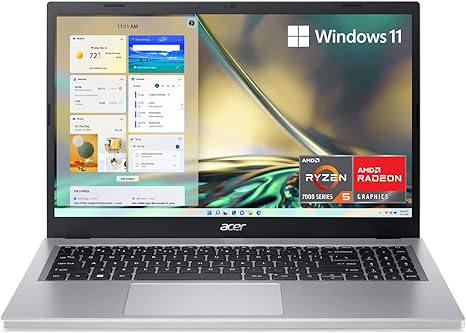
Welcome to “Reviews inside tv”! Today, we’re taking a close look at the Acer Aspire 3 A315-24PT-R8CY, a slim and portable laptop packed with features designed for everyday productivity and entertainment. With its sleek design and budget-friendly price, is this the ideal choice for students, families, or casual users? Let’s find out!
The Acer Aspire 3 is powered by the AMD Ryzen 5 7520U quad-core processor, paired with AMD Radeon Graphics, providing a solid foundation for multitasking, media consumption, and light gaming. This processor offers a balance of performance and power efficiency, which should easily handle office tasks, web browsing, and even photo editing, though it may struggle a bit with more demanding video editing or high-end gaming. It’s complemented by 8GB of LPDDR5 RAM, which should be sufficient for most general tasks, but if you’re into heavier multitasking or creative work, you might want to look for something with more RAM. The 512GB NVMe SSD provides fast read and write speeds, significantly improving boot times and application launches, compared to traditional hard drives or even SATA SSDs. You get faster data access, which translates into a smoother experience when you’re running multiple apps.
Let’s talk display. The 15.6-inch Full HD IPS touchscreen is a standout feature for this price range. The color reproduction is decent, with sharp details and good viewing angles, making it a solid choice for media consumption or light photo editing. While it may not reach the color accuracy of higher-end laptops with OLED or mini-LED displays, it certainly offers good quality for everyday tasks and entertainment. The touchscreen functionality, though not essential for everyone, is a nice addition for those who prefer hands-on navigation.
When it comes to battery life, the Acer Aspire 3 is equipped with improved thermals, thanks to a 78% increase in fan surface area and a 17% increase in thermal capacity. This helps maintain performance during extended work sessions, whether you’re tackling office tasks or streaming content. In terms of real-world use, you can expect around 6 to 8 hours of light office work, and up to 5 hours of media streaming or browsing, which is reasonable for a laptop in this category. Charging is also quick, and the design is compact enough to carry with you all day without feeling weighed down.
The keyboard and trackpad are comfortable for most users. The key travel is reasonable, making long typing sessions relatively comfortable, though the layout might feel a bit cramped if you’re used to larger laptops. The trackpad is responsive, with good palm rejection, which is a relief for those who tend to rest their palms while typing. For those who need additional security, the HD camera with Acer’s TNR technology offers clear images even in low light, which is great for video calls. The Acer PurifiedVoice technology with AI noise reduction is another nice touch, ensuring your voice comes through clearly during online meetings.
As for ports, the Aspire 3 has all the essentials: USB Type-C with 10Gbps transfer speeds, USB 3.2 ports, an HDMI 2.1 port for external displays, and an audio jack. While it’s nice to see the inclusion of USB-C, the lack of Thunderbolt 3 might limit future-proofing if you want to connect multiple high-speed external devices or monitors. But for everyday users, these ports should cover most needs. The laptop also comes with Wi-Fi 5, providing a reliable internet experience, though if you’re looking for faster speeds or better performance in congested networks, Wi-Fi 6 would be a better choice.
Now, performance and thermals. Under typical workloads, the Aspire 3 is efficient, but heavy tasks like gaming or video editing will push it a bit too far. In terms of gaming, don’t expect to run graphically demanding titles like Cyberpunk 2077 at high settings. But for lighter titles like Fortnite or Minecraft, it can handle mid-range settings without breaking a sweat. When it comes to thermals, the laptop stays relatively cool under light loads, though you may notice some heat on the underside during extended gaming or video rendering sessions. The fan can get audible under load, but it’s not a dealbreaker.
When it comes to portability, the Aspire 3 weighs in at just 1.78 kg, making it easy to carry around, and its slim profile won’t take up too much space in a bag. While it’s not the lightest laptop out there, it strikes a good balance between performance and portability.
So, who is the Acer Aspire 3 best suited for? If you’re someone looking for a reliable laptop for daily tasks like browsing, office work, and streaming, this is a solid option. It’s also a good fit for students or casual users who need something portable without breaking the bank. However, if you need a laptop for more demanding creative tasks or gaming, you might want to consider a more powerful option.
To sum it up, the Acer Aspire 3 offers good value for its price. It delivers on everyday performance, decent display quality, and solid battery life, all in a lightweight design. However, its gaming and creative capabilities are limited, and the absence of Thunderbolt might be a drawback for some. If you’re looking for a no-frills laptop for basic tasks, it’s hard to go wrong with this one.
Thanks for watching! If you’re interested in the Acer Aspire 3, you can find the link in the comments box below. Don’t forget to like, subscribe, and hit the bell icon so you never miss a review! Feel free to drop any questions or share your experiences with this laptop in the comments. Until next time, stay productive, and happy computing!
Available to buy here:


