

Available to buy here:
Welcome to Reviews inside tv, your go-to spot for tech insights that matter. Today, we’re taking a close look at the Lenovo 500e Yoga Chromebook Gen 4 – a 12.2-inch convertible 2-in-1 Chromebook designed with versatility and simplicity in mind. Let’s see how it stacks up for students, educators, and everyday users who need a reliable, portable, and efficient laptop.
The Lenovo 500e Yoga Chromebook Gen 4 comes with an Intel N100 quad-core processor, offering basic computing power. While it may not set the world on fire with raw performance, it’s more than adequate for standard productivity tasks like web browsing, word processing, and video calls. Paired with 4GB of onboard RAM, this Chromebook can handle light multitasking fairly well. However, if you’re someone who often has multiple apps or browser tabs open at once, the limited memory might become a bottleneck. You’ll find it works well for everyday tasks but might struggle with more demanding workloads like heavy multitasking or media editing.
In terms of storage, the Lenovo 500e Yoga offers a modest 32GB of eMMC storage. While this might seem a bit cramped, especially if you’re used to larger SSDs, keep in mind that Chrome OS is relatively lightweight, and the Chromebook is primarily designed for cloud-based work. If you’re mostly using web apps or streaming content, you might not need much more. However, those looking to store large media libraries or install multiple heavy apps will likely need to rely on cloud storage or external drives.
The 12.2-inch touchscreen display with a WUXGA resolution of 1920 x 1200 is solid for its size, offering crisp visuals and decent color accuracy. It’s not the most vibrant or bright screen out there, but it gets the job done for watching videos, browsing the web, or doing schoolwork. If you’re looking for an ultra-high-definition experience, this display won’t impress, but for its target market, it’s perfectly adequate.
With 12 hours of battery life, this Chromebook is a solid contender for all-day use. Whether you’re working on a project at a coffee shop or catching up on your favorite shows, you’ll get plenty of juice to last through your tasks without worrying about finding an outlet. For casual users and students who need a laptop for long days of productivity or schoolwork, this Chromebook excels in battery performance.
When it comes to keyboard and trackpad, Lenovo keeps things comfortable and functional. The keyboard is good for typing, though it’s not the most responsive or tactile out there. For short writing sessions or quick emails, it performs adequately, but extended typing sessions might feel a bit flat. The trackpad is decently sized and responds well, but don’t expect any premium-level precision. Both feel perfectly fine for the casual user, but if you’re a heavy typist, you may wish for a bit more travel and feedback.
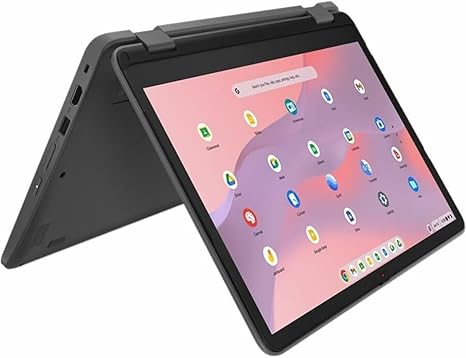
The design of this convertible 2-in-1 device is a major highlight. The Lenovo 500e Yoga Chromebook features a sturdy build that’s flexible enough to be used in tablet mode or as a traditional laptop. The hinge mechanism works smoothly, allowing you to rotate the screen all the way around, making it a great option for watching videos, sketching, or using touch-friendly apps. It’s designed with students in mind, offering an educational, hands-on experience that’s durable enough for everyday use.
Let’s talk about connectivity. The 500e Yoga comes with a limited port selection, typical for Chromebooks of this size. You get a USB-C port, a USB-A port, a microSD card slot, and a headphone jack. There’s no HDMI or full-size USB ports here, so if you need to hook up a projector or external devices, you’ll need to get adapters or rely on wireless solutions like Bluetooth or casting. For Wi-Fi, you’re looking at Wi-Fi 5, which is perfectly fine for browsing or streaming but may lag behind newer Wi-Fi 6 devices when it comes to more demanding online tasks. Bluetooth connectivity is stable for pairing devices like headphones, but keep your expectations grounded if you’re hoping to connect multiple accessories.
Now, performance. The Intel N100 processor offers reasonable speed for general use but can struggle with more demanding applications. It’s great for web browsing, light productivity, and media consumption but falls short for gaming, video editing, or software development. If you’re using this for schoolwork, online learning, or light entertainment, it’ll meet your needs. For more intensive tasks, however, you’ll want to look elsewhere.
Thermal performance on the 500e Yoga is generally good. The laptop stays cool under light loads, but the small form factor means it can heat up slightly when working harder for extended periods. That said, the thermal management is efficient enough not to cause discomfort during regular use, and you won’t find the chassis heating up excessively. The fan noise is minimal, with the occasional quiet hum under load, which is typical for a device like this.
As far as portability goes, the Lenovo 500e Yoga Chromebook is lightweight, weighing in at just around 2.8 pounds. It’s easy to carry in a backpack and won’t weigh you down during long days of class or work. The compact form factor makes it ideal for students or professionals who need something small but capable.
Looking at the overall build quality, it feels robust yet lightweight. The chassis is made of plastic, which is standard for this price range, but it feels solid and durable. The hinges are sturdy enough to withstand constant use, and the keyboard area doesn’t flex easily under pressure. While it’s not a premium build like you might find in more expensive devices, the Lenovo 500e Yoga is a tough little Chromebook that should last through the rigors of everyday school or office life.
In terms of value, the Lenovo 500e Yoga Chromebook stands out as a solid choice for budget-conscious users who need a functional, all-day laptop for everyday use. While it’s not going to win any awards for performance or design, it delivers on its promises for students and educators looking for a reliable, inexpensive device for basic tasks. It competes well with other low-cost Chromebooks like the Acer Chromebook Spin 11, but it offers better battery life and a more flexible design.
In conclusion, the Lenovo 500e Yoga Chromebook Gen 4 is an excellent option for light, everyday use, especially if you’re a student or casual user. With solid performance for the basics, good battery life, and a versatile design, it does what it promises without any major flaws. However, if you’re someone who needs more power, a better display, or greater performance for tasks like media creation or gaming, you might want to look elsewhere. Still, for its price, this is a solid and reliable device.
Thanks for watching! The link to grab this Chromebook is in the comments box. If you have any questions or already own one, feel free to drop your thoughts below. Don’t forget to like, subscribe, and hit that bell icon so you don’t miss our next review. Until next time, happy tech hunting!
Available to buy here:


