

Available to buy here:
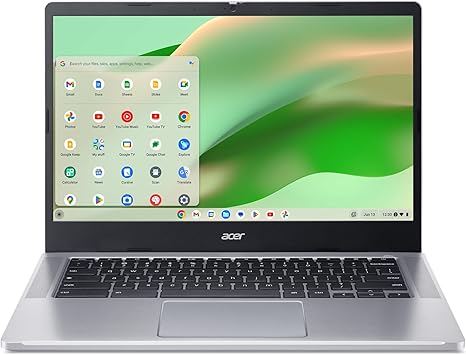
Welcome to “Reviews inside tv,” where we explore the tech you care about with in-depth insights. Today, we’re taking a look at the Acer Chromebook 314 CB314-4H-C2UW, a lightweight, budget-friendly Chromebook designed to tackle everyday tasks with ease. Whether you’re a student, professional, or casual user, this device promises quick performance, all while being secure, portable, and surprisingly affordable. But does it live up to the hype? Let’s find out.
The Acer Chromebook 314 features an Intel Processor N100 that can reach speeds up to 3.4 GHz. This is an entry-level chip in Intel’s range, but it’s more than enough for your basic productivity tasks like web browsing, working on documents, or watching videos. The integrated Intel UHD graphics will handle light media consumption and casual gaming without breaking a sweat. Combined with 4GB of LPDDR5 RAM, this setup gives you a responsive experience in day-to-day tasks. While the RAM might feel limiting for power users or heavy multitaskers, it’s suitable for general Chromebook duties.
When it comes to storage, the Chromebook uses 64GB of eMMC flash storage, which is fast but limited compared to more modern SSD options. If you tend to store large files or want more room for apps, the microSD card reader provides an easy way to expand your storage without breaking the bank. The 14-inch Full HD IPS display offers vibrant colors and sharp details, making it perfect for working on documents or watching a movie. The ComfyView LED-backlit panel does a great job of reducing glare, ensuring comfortable use even in brighter environments.
Battery life on this Chromebook is impressive for its size, with up to 10 hours of usage on a single charge under light workloads. So, if you’re working in class or on the go, you can trust it to last through a full day of tasks without needing to plug in. And when it’s time to recharge, it charges quickly thanks to USB-C charging, which makes it even more convenient for busy users.
In terms of connectivity, the Acer Chromebook 314 offers two USB Type-C ports, both capable of fast data transfer speeds up to 5 Gbps, alongside a USB Type-A port for older peripherals. There’s also an HDMI port for easy connection to external monitors and two built-in stereo speakers that provide decent sound for a laptop of this size. The Intel Wi-Fi 6E AX211 card is a standout, offering faster and more stable Wi-Fi performance on newer networks, and Bluetooth 5.1 is included for connecting wireless peripherals.
When it comes to comfort, the keyboard is decently spaced with adequate key travel, but it’s not quite as plush as higher-end models. The trackpad is smooth and responsive, though some may find it a bit small for more precise tasks. That said, it’s more than enough for general browsing and document work.
Now, let’s get into the real-world usage of this Chromebook. For everyday office work, like browsing the web with multiple tabs open, checking emails, and doing some word processing or spreadsheet work, it holds up pretty well. The processor and 4GB of RAM are sufficient for these tasks, but if you plan on juggling a lot of heavy apps or working with multiple tabs open, you might run into some slowdowns. Media consumption, such as streaming YouTube or Netflix, is a breeze with the Full HD IPS display delivering clear, crisp visuals. The speakers are decent enough for light video calls or watching a show, but they’re not going to wow you in terms of sound quality.
If you’re considering this Chromebook for content creation, keep in mind it’s not built for demanding tasks like photo or video editing. While you can get basic work done with apps like Google Docs and Canva, don’t expect to edit 4K footage or render complex images without some serious lag. For casual gaming, it’s similarly limited—Minecraft runs fine at medium settings, but graphically demanding titles will likely not be playable at all.
One thing to note is the thermal performance. Under light workloads, this Chromebook remains fairly cool, but you’ll start noticing some heat buildup on the bottom of the device if you push it with tasks like streaming for extended periods. The fan noise is relatively quiet, but it may kick up under heavier loads like gaming or media editing. That’s pretty common for a laptop at this price point, and while it doesn’t get overly hot, you’ll want to avoid using it on your lap during intensive sessions.
As for portability, this Chromebook is lightweight and easy to carry, making it a good option for students or frequent travelers. It’s not the thinnest Chromebook on the market, but it’s still compact and fits easily into most bags. The battery life is solid, so you can work or stream content for a good chunk of the day before needing to plug in again.
Now, let’s talk about the value for money. At its current price, the Acer Chromebook 314 offers great performance for the price. For basic tasks like web browsing, office work, and media consumption, it’s a steal. However, if you’re looking for more power for gaming or content creation, this isn’t the laptop for you. You’ll want to look at higher-end Chromebooks or laptops with more powerful processors and better GPUs. But for light, everyday use, it delivers exactly what it promises.
In terms of direct competitors, you’ll find other budget Chromebooks in this price range with similar specs, but few come with Wi-Fi 6E and the same battery life, which are real highlights for this model. It doesn’t quite have the processing power or high-end features of pricier models, but it’s a solid choice for anyone who needs a reliable, secure, and easy-to-use device for basic tasks.
The build quality feels solid for the price, with a sturdy plastic chassis that’s not too heavy but still durable enough for everyday use. The hinge is robust, and the screen opens easily with one hand. The overall design is functional, and the silver color gives it a clean, modern look without being flashy.
Customer support from Acer is generally reliable, though you may not get the same level of personal service as higher-end brands. Still, the warranty and support options should be adequate for most users, and given the price point, this Chromebook represents good value for money.
In conclusion, the Acer Chromebook 314 is a fantastic choice for students, light office workers, and casual users who need a dependable laptop for everyday tasks. It’s secure, portable, and offers solid performance for its price, but if you need more power for demanding workloads, you might want to look elsewhere.
If you’re considering picking this up, check the comments box for the link to purchase. As always, feel free to drop your questions or thoughts if you’re already using this Chromebook—I’d love to hear your experience. Thanks for watching, and remember: when it comes to finding the right tech, always make sure to look inside first.
Available to buy here:


