

Available to buy here:
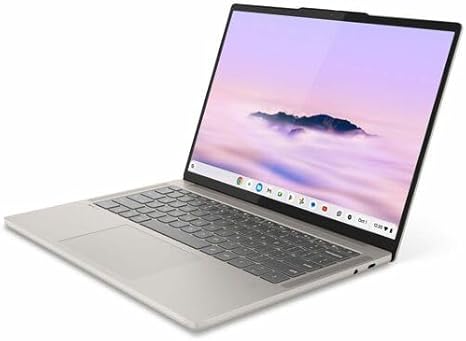
Welcome to Reviews inside tv! Today, we’ve got the Lenovo Chrome 14M9610, a 14-inch Chromebook that’s aimed squarely at those looking for a fast, efficient, and portable device for everyday tasks. Whether you’re a student, a busy professional, or just someone who needs a reliable laptop for browsing, media, and light work, the Chrome 14M9610 offers some intriguing features. Let’s take a closer look at what it brings to the table.
First, let’s break down the key specs. This Chromebook features an ARM Cortex X925 octa-core processor paired with an ARM Cortex X4, designed to handle multitasking with ease. It’s got 16GB of RAM, which is generous for a Chromebook and should keep things smooth even when juggling multiple browser tabs or running light applications. For storage, you’re looking at 256GB of flash memory, which, while not as fast as NVMe drives, should still provide decent performance for everyday needs like document editing, streaming, and light media work. The 14-inch touchscreen display sports a WUXGA resolution—higher than typical HD, which should help give sharper images for media and productivity tasks.
But what does all of this mean for real-world use? Well, the processor, being ARM-based, focuses on power efficiency, so you won’t be seeing the raw power of an Intel Core i5 or i7, but the Cortex X925 should deliver excellent performance for most tasks you’ll throw at it—web browsing, streaming video, and light productivity work like word processing and spreadsheets. If you’re looking to do any heavy lifting, though, you’ll want something with a more powerful CPU. That said, for daily tasks, this Chromebook should feel snappy and responsive.
When it comes to media consumption, the 14-inch display performs admirably, offering bright, crisp visuals thanks to its WUXGA resolution. It’s not the brightest display around—there are definitely more vibrant options out there—but it’s more than enough for casual streaming and web browsing. Plus, the touchscreen adds an extra layer of interactivity for those who like to tap and swipe their way through apps.
As for gaming, don’t expect to play graphically demanding titles. The integrated GPU, which works alongside the ARM Cortex X925 processor, is built for efficiency, not raw power. So, games that are more casual or browser-based will run just fine, but for anything heavier like AAA titles, this Chromebook will fall short. It’s not what this device was built for, after all.
One of the real highlights here is the build quality. The Lenovo Chrome 14M9610 feels sturdy and well-constructed. It’s lightweight, making it highly portable for people who are always on the go. Its slim design is easy to slip into a bag without weighing you down, making it a great choice for students or professionals who need a reliable companion for meetings or study sessions.
Battery life is another strength. With a battery that can last anywhere from 8 to 10 hours on a single charge under typical usage—browsing the web, watching videos, and working on documents—you’re looking at a Chromebook that can easily get through a full day of work or study without hunting for an outlet. Of course, this depends on what you’re doing, but for lighter use, you should have no trouble keeping it running all day.
Now, let’s talk about the keyboard and trackpad. The keyboard on the Lenovo Chrome 14M9610 is surprisingly comfortable for extended typing sessions. It offers decent key travel and tactile feedback, so whether you’re typing up essays or responding to emails, you won’t feel fatigued. The trackpad, while not the largest out there, is accurate and responsive, and I didn’t notice any issues with palm rejection. Overall, both input methods work well for everyday tasks.
When it comes to ports, this Chromebook covers the basics. You’ll get a couple of USB-A ports for your peripherals, USB-C ports for modern devices, and an HDMI port for connecting to external monitors. There’s no Ethernet port here, so you’re relying on Wi-Fi for connectivity, but that’s par for the course with most modern laptops. Wi-Fi performance is stable, and the Bluetooth 5.0 support is a nice touch for wireless accessories.
One area where this Chromebook could use some improvement is its thermals. Under light use, you won’t notice much heat, but when working harder—especially in media-heavy tasks or long browsing sessions—things can get a bit warm. The fan is quiet under normal conditions but can become audible when the laptop is pushed harder. It’s not overwhelming, but if you’re used to a totally silent laptop, it’s worth noting.
As for value, the Lenovo Chrome 14M9610 positions itself well for its target audience. It’s not going to blow you away with ultra-fast performance or a stellar display, but for the price, you get a very solid Chromebook that handles day-to-day tasks without issues. If you’re looking for something for light work, media consumption, and casual use, this Chromebook is more than up to the task.
Now, who is this laptop for? If you’re a student or someone who needs a no-fuss laptop for everyday tasks, this could be a great choice. It’s light, portable, and offers enough power for all the basics. If you’re a creator who needs a powerful machine for things like video editing or 3D rendering, you’ll want to look elsewhere, as the performance here isn’t quite up to those heavy workloads.
In comparison to some competitors like the HP Chromebook 14 or the Acer Chromebook Spin, the Lenovo Chrome 14M9610 offers a similar experience in terms of performance but stands out with its build quality and better RAM configuration. It’s a solid pick in the mid-range Chromebook market, but if you need more power or a higher-end display, you might want to stretch your budget for something like the Google Pixelbook Go or a similar premium option.
To wrap up, the Lenovo Chrome 14M9610 is a capable, budget-friendly Chromebook that strikes a nice balance between performance, portability, and battery life. It’s perfect for students, light office users, and anyone who wants a reliable, on-the-go laptop. If you’re after something for heavy multitasking or high-end creative work, though, this one isn’t going to cut it. For most users looking for a dependable Chromebook, however, it’s a great choice at a competitive price.
Thanks for watching, and be sure to check out the link to the Lenovo Chrome 14M9610 in the comments below. If you’ve used this Chromebook, feel free to share your thoughts or ask any questions you might have. Don’t forget to like, subscribe, and hit the bell icon so you never miss a review from Reviews inside tv. Catch you in the next one!
Available to buy here:


