

Available to buy here:
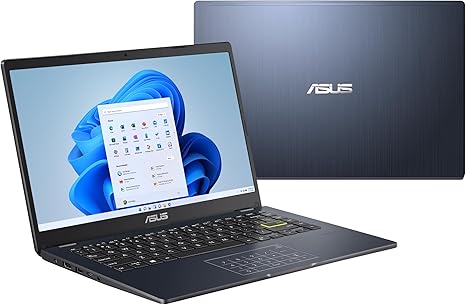
Welcome to Reviews inside tv, where we bring you the most detailed and insightful reviews. Today, we’re taking a look at the ASUS Vivobook Go 14 L410, a compact, budget-friendly laptop designed for everyday use. It’s built for people who need a simple machine to handle basic tasks, but how well does it deliver? Let’s find out.
The ASUS Vivobook Go 14 comes with an Intel Celeron N4020 processor, which is a dual-core chip that can boost up to 2.8 GHz. For day-to-day tasks like browsing the web, checking emails, or working with documents, this CPU should get the job done. It’s not a powerhouse by any means, but for light work, it won’t hold you back. If you’re coming from an older laptop or a budget model, the N4020 should feel like a decent step up for everyday productivity.
In terms of RAM, this model comes with 4GB of DDR4 memory. This is definitely on the lower end, so multitasking might start to show some limitations. With 4GB, you can expect to run a few browser tabs and basic apps without too much hassle, but as soon as you start loading up heavy applications or multiple programs, things could slow down. You’ll likely want to keep an eye on your task manager if you tend to keep a lot of things open. If you’re planning to use this laptop for heavier tasks, consider upgrading to a model with more RAM.
Storage is handled by a 64GB eMMC drive, which is a step down from SSD storage in terms of speed. This drive will get you through basic file storage, but don’t expect lightning-fast boot times or rapid file transfers. For most casual users, the 64GB eMMC should suffice, especially since Windows 11 in S Mode and Microsoft 365 Personal are included. However, if you plan to store large files or a lot of media, you might quickly run into space limitations, as eMMC storage tends to be more restrictive than traditional SSDs. You can expand your storage with an external drive, but that’s something to keep in mind for longer-term use.
The 14-inch Full HD display offers a resolution of 1920×1080, which is great for basic media consumption. It’s a standard LCD panel, so don’t expect OLED-level vibrancy, but for streaming videos, checking social media, or getting work done, it does the job well. The colors aren’t as rich as more premium displays, but you’ll get decent clarity and sharpness for everyday use. This display size and resolution make it a good option for students or light office work, but if you’re a creator or someone who requires true color accuracy, this might not be your ideal choice.
Battery life is something to note here as well. With a 38 Wh battery, the Vivobook Go 14 is rated for about 7 to 9 hours of use, depending on your activities. For light web browsing, streaming, and document editing, you should be able to get through a full day of work or school without needing to plug in. However, if you’re doing something more intensive, like streaming HD content for several hours or heavy multitasking, expect it to drain quicker. It’s not a laptop for all-day gaming or extensive video editing, but it’s solid for casual use. Charging is straightforward with the included charger, though it’s not the fastest on the market.
In terms of ports and connectivity, the Vivobook Go 14 offers a respectable selection for a budget device. It includes a USB 3.2 Gen 1 Type-C port, a USB 3.2 Gen 1 Type-A port, a USB 2.0 Type-A port, HDMI 1.4 for external displays, and a headphone jack. You get Wi-Fi 5, which is decent for most situations, but if you’re looking for the latest and greatest in wireless speeds, you’ll want to look elsewhere. Still, for regular web browsing, email, and light video calls, Wi-Fi 5 will be more than enough. It’s also worth noting that there’s no SD card slot or Ethernet port, so you’ll need adapters for those if you need them.
Now, let’s talk about how it feels to use. The keyboard is surprisingly comfortable for typing sessions, especially considering the laptop’s thin profile. The key travel is decent, and the keys are spaced well for accuracy. The trackpad is responsive with decent palm rejection, though it’s a bit smaller than what you might find on higher-end laptops. Given the price point, these are definitely acceptable compromises for a budget-friendly device. If you need precise input and extra functionality, there’s always the option of connecting an external mouse or keyboard.
The laptop itself is incredibly lightweight and slim, weighing just 2.87 lbs and measuring 0.72 inches thick. This makes it a great option for anyone who needs to carry it around all day, whether it’s for school, work, or just everyday tasks. The build quality is decent—while it’s not the most premium-feeling laptop around, it’s sturdy enough for casual users. The plastic build doesn’t give you that solid premium feel, but considering its price, it’s quite serviceable.
When it comes to performance, the Vivobook Go 14 isn’t built for heavy multitasking or gaming, but it can handle most light tasks with ease. Running a few browser tabs, office apps like Word or Excel, and streaming video should be a smooth experience. The Intel Celeron N4020 is capable of tackling all of that, but don’t expect miracles. It’s not built for heavy content creation or gaming, and pushing it beyond these limits will lead to noticeable slowdowns.
In terms of thermals, the Vivobook Go 14 stays relatively cool under normal use. For light tasks, the laptop barely heats up, and you don’t have to worry about fan noise much. Under load, it might get a bit warm, but nothing uncomfortable. The fan noise is relatively quiet, but you’ll hear it when doing something more intensive, like streaming high-definition content or running multiple apps.
Now, let’s talk about the value. At its price point, the Vivobook Go 14 is a solid offering for students, casual office users, or anyone who just needs a simple machine for everyday tasks. It’s not going to be a powerhouse for content creators or gamers, but it gets the basics right. The screen is good for media consumption, the keyboard is comfortable for typing, and the laptop is lightweight and portable.
If you’re considering alternatives, models like the Lenovo IdeaPad 1 or the HP Stream 14 come to mind. Both are similarly priced and offer similar performance, but the ASUS Vivobook Go 14 stands out with its slim profile, decent screen quality, and lightweight design.
In conclusion, the ASUS Vivobook Go 14 is a great budget option for people who need a portable laptop for light everyday tasks. It’s a solid choice for students or professionals on the go who don’t need heavy performance but value a slim, lightweight design with decent display quality. If you’re after a laptop for more demanding tasks, though, you’ll want to look at something with a bit more power.
Thanks for watching! Don’t forget to check out the link to the laptop in the comments box. If you’ve used the Vivobook Go 14 or have any questions, drop a comment below—I’d love to hear your thoughts. Until next time, happy computing!
Available to buy here:


