

Available to buy here:
Welcome to Reviews inside tv! Today, we’re taking a close look at the Lenovo Chromebook Flex 5, a versatile 2-in-1 laptop designed for work, school, and everything in between. With its compact size and sleek design, this Chromebook aims to deliver a balance of performance, portability, and user-friendly features. But, does it truly live up to its promises? Let’s explore what this device offers and how it performs in real-world use.
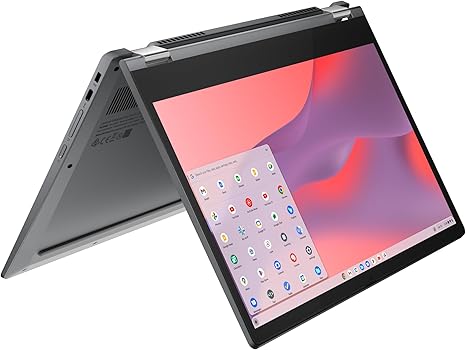
The Lenovo Chromebook Flex 5 features an Intel Celeron N5205U processor, paired with 4GB of RAM and 64GB of storage. Now, this isn’t a powerhouse for gaming or intensive content creation, but for typical tasks like web browsing, document editing, and media consumption, it offers solid performance. The 13.3-inch Full HD touchscreen display is where this laptop really shines for casual use. The narrow bezels around the screen give it a modern look, and the touch interface makes it intuitive to interact with everything from web pages to apps. Plus, if you’re into digital art or note-taking, you can add the Lenovo digital pen (sold separately), which offers responsive writing and drawing directly on the screen.
Battery life is another standout feature, with the Flex 5 offering up to 10 hours on a single charge. That’s enough to get you through a day of school, work, or streaming without scrambling for a power outlet. However, keep in mind that heavy tasks may drain the battery faster. For connectivity, the laptop comes equipped with two USB Type-C ports, a USB Type-A port, an SD card reader, and an audio jack, covering most of your basic connectivity needs. Wi-Fi and Bluetooth support ensure that you can easily connect to networks, peripherals, and devices.
When it comes to everyday performance, the Intel Celeron N5205U processor delivers adequate speeds for light tasks like browsing, working on Google Docs, and watching videos. The 4GB of RAM, while not a massive amount, is enough for handling multiple tabs and apps in Chrome OS. However, if you tend to juggle a lot of tabs or heavy web-based tasks, you might feel the limits of the memory, especially with Chrome OS’s memory management. For storage, the 64GB eMMC drive is fine for basic needs but can fill up quickly if you store a lot of media or files locally. Cloud storage integration helps mitigate this limitation, but it’s something to keep in mind for users who rely on local files.
Now, let’s talk about the display. The 13.3-inch Full HD touchscreen delivers crisp visuals, and the color accuracy is decent for everyday tasks. If you’re watching videos or browsing photos, you’ll be pleased with the sharpness and clarity. However, don’t expect deep color saturation or the high brightness levels of premium models. While the display works fine in most environments, it may struggle a bit in direct sunlight, where higher brightness would be ideal. The dual stereo speakers provide decent audio for casual use, but they’re not the loudest or most immersive. For video calls or streaming, they’ll do the job, but audiophiles or those needing high-quality sound may want to invest in external speakers or headphones.
The Flex 5’s keyboard and trackpad provide a comfortable typing experience, especially for longer sessions. The keys have good travel and feedback, which helps prevent fatigue during extended typing tasks. The trackpad is responsive, and palm rejection works well, so you won’t have to worry about accidental touches while typing. The layout is standard, with well-placed function keys, arrow keys, and a power button that doubles as a fingerprint reader, adding a layer of security.
In terms of thermals, the Chromebook Flex 5 remains relatively cool even with moderate use. Under heavier loads, you may notice the fan kicking in, but it’s not overly loud, which is great for a device like this. The laptop does a good job of keeping its temperature in check, so it’s comfortable for lap use during long sessions.
Now, let’s talk about the battery. The Flex 5 offers up to 10 hours of use, depending on what you’re doing. For light office work, streaming videos, or web browsing, you can expect around 8 to 10 hours of battery life. This is solid for a Chromebook in this price range, and it should easily last you through a full day of work or classes. The charging experience is relatively fast, but keep in mind that the charger is compact and travel-friendly, so you won’t need to lug around a bulky adapter.
In terms of build quality, the Lenovo Chromebook Flex 5 has a solid and durable construction, with a plastic body that feels sturdy without being too heavy. Weighing around 2.97 pounds, it’s portable enough to throw in a bag and carry around throughout the day, but it’s not as light as some ultraportables in the market. If you’re someone who’s constantly on the move, this laptop strikes a good balance between performance and portability.
The laptop’s port selection covers the essentials: two USB Type-C ports, one USB Type-A port, an SD card reader, and an audio jack. This gives you flexibility for connecting external devices like headphones, monitors, or flash drives. However, if you’re someone who needs more ports for connectivity, you may find the limited options a bit restrictive. The lack of Ethernet support might also be a drawback for those who prefer wired connections for stability, but the Wi-Fi performance is solid for most users.
When it comes to real-world usage, this laptop excels in tasks like web browsing, video conferencing, document editing, and media consumption. The 4GB of RAM and 64GB of storage are enough for light tasks, but if you plan on running multiple apps at once, you might run into some performance hiccups. This is not the laptop for heavy multitasking or demanding creative workloads, but for students or casual users who need a reliable Chromebook for everyday use, it performs well.
On the flip side, the Lenovo Chromebook Flex 5 is not without its drawbacks. The 4GB of RAM and 64GB of storage might limit you if you plan on using your device for heavy multitasking or running resource-intensive applications. While the display is decent for everyday use, it could be brighter and more color-accurate for those who do any type of photo or video editing. The speakers are also underwhelming, offering a basic sound experience for media consumption, but not much else.
Now, let’s take a quick look at some alternatives. The Acer Chromebook Spin 13 offers similar specs, but it comes with a better display and more premium materials. The HP Chromebook x360 is another competitor with a similar 2-in-1 design, but it features a higher-end processor and more storage options. However, these alternatives come at a higher price point, so the Lenovo Chromebook Flex 5 presents good value for users who don’t need top-tier performance or a super high-end display.
For the price, the Lenovo Chromebook Flex 5 delivers solid performance, an intuitive touchscreen, long battery life, and a portable design. It’s best suited for students, casual users, and office workers who need a device for basic tasks like browsing, writing, and streaming. If you need more power, higher storage, or better display quality, you might want to consider a more premium option. But for those on a budget or looking for a simple, reliable Chromebook, the Lenovo Chromebook Flex 5 is a great choice.
Thanks for watching! The link to get this laptop is in the comments box below. If you already own the Flex 5, feel free to share your thoughts in the comments – we’d love to hear your experience. Don’t forget to like, subscribe, and hit that bell icon for more tech reviews. See you in the next one!
Available to buy here:


