

Available to buy here:
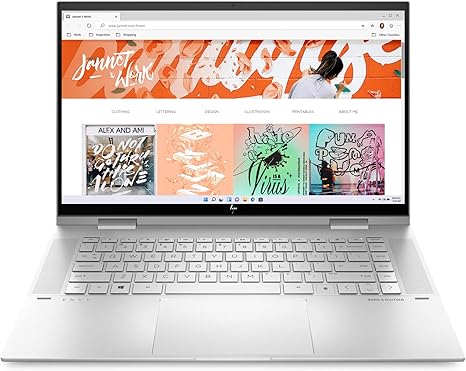
Welcome back to “Reviews inside tv”! Today, we’re taking a deep dive into the HP Envy x360 Convertible 15-inch laptop. With its sleek, natural silver aluminum design, it promises to deliver impressive performance, all wrapped up in a slim, portable form. But does it live up to the hype? Let’s break it down and see if this 2-in-1 convertible can handle your everyday tasks, creative projects, and more.
First, let’s go over the specs that matter. At the heart of this device is the 12th Gen Intel Core i7-1260P processor, which offers four performance cores and eight efficiency cores. This unique design allows the laptop to balance power and efficiency based on what you’re doing—whether you’re multitasking with several browser tabs open or editing high-resolution photos. It’s a solid choice for anyone looking for a device that won’t slow down when the pressure’s on. Paired with 16GB of RAM, you can expect smooth multitasking without the dreaded lag, even when switching between resource-heavy applications. And for storage, you’re looking at a 1TB SSD, which ensures fast boot-up times and quick access to files and programs. It’s plenty of space for most users, whether you’re storing large video files or thousands of documents.
Now, let’s talk about the display. The HP Envy x360 comes with a 15.6-inch Full HD touchscreen. It’s an edge-to-edge panel, which means you get vibrant, expansive visuals without the usual bezels. Whether you’re watching movies, editing photos, or browsing the web, colors pop, and the screen looks great from almost any angle. The touch functionality makes it super convenient for quick interactions, and it also supports tablet mode, adding flexibility to your workflow. But do keep in mind, while it’s crisp and clear, this isn’t an OLED or mini-LED display, so you’re not going to get those ultra-deep blacks or exceptional contrast ratios. Still, it’s a solid option for a mid-range laptop.
In terms of graphics, the HP Envy x360 is equipped with Intel Iris Xe integrated graphics. These aren’t going to push AAA games at high settings, but for light gaming, casual entertainment, and even some basic content creation, they do the job. You’ll be able to play less demanding games or run creative applications like Photoshop or video editing software with ease, though for more intensive tasks, you might run into limitations. It’s not a gaming laptop, but for day-to-day tasks, it holds up pretty well.
Battery life is another strong suit. The 51Wh battery is paired with HP’s Fast Charge technology, meaning you can get 50% charge in about 30 minutes. In typical usage—browsing, working on documents, and watching videos—you’re looking at around 7-9 hours of use. If you’re pushing the laptop harder with content creation or streaming, that number might drop, but for most office and productivity tasks, this battery is more than adequate to last through the day. And with the laptop being lightweight and easy to carry, it’s a solid choice for students, business professionals, and anyone who needs to be mobile.
Let’s talk about the keyboard and trackpad. The keyboard here is comfortable for typing long documents or emails. Key travel and feedback are solid, so whether you’re typing up assignments or working on a project, the Envy x360 should keep up. The trackpad is large and responsive with great palm rejection, so you don’t have to worry about accidental taps while typing. It’s not a MacBook-level trackpad, but it’s certainly one of the better ones you’ll find in this category.
When it comes to ports, the HP Envy x360 offers a good mix, including USB-A, USB-C, and HDMI, which is perfect for connecting external monitors or projectors. There’s also an SD card reader, which is a nice touch if you’re working with photos or video. Wi-Fi 6 is on board, ensuring fast and stable internet connections, and Bluetooth 5.0 adds the convenience of connecting various peripherals. Unfortunately, there’s no Thunderbolt 4, but considering the price and target audience, that’s not a huge issue unless you’re working with high-end peripherals.
Now, let’s discuss performance and thermals. In real-world use, the i7 processor, paired with the Iris Xe graphics, provides reliable performance for a variety of tasks. Office work, browsing, and light creative workloads feel responsive and quick. If you’re into gaming, you’ll want to stick to titles like Fortnite or League of Legends at medium settings, but pushing it beyond that, especially with demanding games like Cyberpunk 2077, will cause the system to throttle performance. Thermals stay reasonable, but like most thin laptops, heavy workloads or long gaming sessions will heat things up a bit. The fan noise is noticeable under load but far from obnoxious.
In terms of value, the HP Envy x360 is a well-rounded device. It’s not the most powerful machine in the world, but it strikes a great balance between performance, portability, and design. It’s a fantastic option for office workers, students, and casual content creators who don’t need a high-end GPU but still want something versatile. However, if you’re a gamer or need serious power for tasks like video editing, you may want to look elsewhere.
So who is this laptop for? The HP Envy x360 15 is best suited for those who need a versatile, portable laptop with solid performance for everyday tasks. It’s great for people who want to work on the go or enjoy media consumption, but if you need a powerhouse for gaming or intensive creative work, this might not be the best fit. If you’re looking for something well-rounded with a premium feel without breaking the bank, though, this is definitely worth considering.
Thanks for watching! If you’ve got questions or want to share your own experience with the HP Envy x360, drop a comment below. The link to grab yours is in the comments box. Don’t forget to like, subscribe, and hit that bell icon for more reviews. Until next time, this has been “Reviews inside tv”—keep your tech game strong!
Available to buy here:


