

Available to buy here:
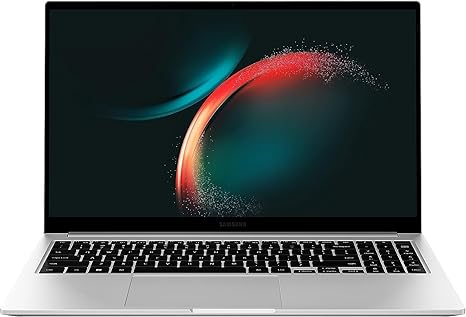
Welcome to Reviews inside tv! Today, we’re looking at the Samsung Galaxy Book3 Business Laptop, a device that brings together premium performance and sleek portability, designed with hybrid work in mind. Whether you’re managing a remote team, working in a government office, or just need something to keep up with a busy professional lifestyle, this laptop is built for efficiency, security, and comfort. Let’s break down what this device offers, and see if it’s the right fit for your needs.
The Galaxy Book3 is powered by the Intel Core i5-1335U processor, part of the 13th Gen Intel family, paired with Intel Iris Xe Graphics. This combination offers solid performance for office tasks, web browsing, document editing, and light media creation. With four performance cores and eight threads, multitasking feels smooth, and applications like spreadsheets, emails, and video calls are handled easily. The graphics are capable of running basic creative software and even some light gaming at lower settings. However, don’t expect it to tackle high-end gaming or video editing workflows like a dedicated gaming laptop would.
When it comes to RAM, the Galaxy Book3 comes with 16GB, which is a generous amount for most professional and personal uses. This ensures you can run multiple tabs and apps simultaneously without the system slowing down. For storage, you get 512GB of SSD space, which is fast enough for booting up Windows 11 Pro quickly and loading files in no time. It’s also upgradable, so if you need more space in the future, you can expand it up to 2TB, although the microSD card is sold separately.
The laptop’s display is a 15.6-inch full-HD screen with bright, vivid colors, offering good viewing angles and decent clarity. It’s perfect for video calls, working on documents, or watching content during breaks. The brightness level is adequate for most indoor settings, but don’t expect to use it comfortably outside in direct sunlight. It’s not the OLED or mini-LED screen that high-end models offer, but for its price and target audience, it’s more than sufficient. The 60Hz refresh rate, while basic, works fine for everyday tasks and media consumption.
Battery life on the Galaxy Book3 is solid, thanks to a 54Wh battery. In typical office use, you can expect around 7-9 hours of work, depending on the tasks you’re doing. For lighter tasks like browsing the web or working on documents, you could even stretch that a bit longer. The laptop’s low power consumption, paired with its thin, light design, makes it perfect for carrying between meetings or working remotely without worrying too much about charging.
Speaking of portability, the Galaxy Book3 is designed to be ultra-light, making it ideal for anyone who needs a laptop that’s easy to carry around. Weighing just under 3.5 pounds, it won’t weigh you down in a backpack or briefcase. Its slim profile makes it easy to pull out and use in any setting, whether you’re at the coffee shop or in a meeting room.
Now, let’s talk about comfort. The keyboard is a pleasure to type on, offering a good amount of key travel and satisfying feedback. Long typing sessions are comfortable, though some might miss a dedicated number pad due to the 15.6-inch size, but that’s a minor issue for most users. The trackpad is responsive, and palm rejection works well for those long work sessions when your hands are resting on the desk.
As for ports, this laptop has a solid selection for its size and class. You get USB-A ports, USB-C, HDMI, and even a microSD slot for expanded storage. It also supports Thunderbolt, which is great for fast data transfer and connecting to external monitors or docks. Wi-Fi 6 ensures fast internet speeds and solid connection stability, and Bluetooth connectivity makes it easy to pair with accessories. This device is ready for virtually any situation, whether it’s connecting to a projector for a presentation or syncing with Bluetooth peripherals.
In terms of thermals, the Galaxy Book3 handles light and moderate workloads well. During typical use, the device remains cool and quiet, with no noticeable fan noise. Under more intensive tasks, like running multiple apps or larger files, the fan does kick in, but it’s not overly loud. You may notice some warmth on the underside, but it doesn’t reach uncomfortable levels. It’s not designed for extended high-performance tasks, so long gaming sessions or heavy video editing might cause some thermal throttling, but for business or everyday work, it’s solid.
When it comes to the webcam, this laptop shines. The 720p camera, with Dolby Atmos support, ensures that you look good on video calls. The picture quality is clear, and the sound is rich, making virtual meetings feel more personal. It’s a nice touch for anyone who spends a lot of time on Zoom or Teams calls.
The build quality is excellent for a business laptop. It has a premium look and feel, with a solid chassis that doesn’t creak or flex under pressure. The silver finish adds a sleek, professional touch, and while it’s made of plastic, the build doesn’t feel cheap. It’s durable enough for daily office or remote work use, but if you’re looking for something ultra-rugged, this isn’t it.
Now, let’s address some key pros and cons. On the plus side, the Galaxy Book3 is lightweight, powerful for its class, and offers a great selection of ports. The 16GB RAM and the upgradable storage add extra flexibility for future use. The bright, crisp display is great for everyday work and media consumption, and the long battery life ensures you can work on the go without charging constantly. On the downside, while it’s good for office tasks, media consumption, and light creative work, it’s not suited for more demanding activities like high-end gaming or professional-level content creation. Additionally, the 60Hz refresh rate and the non-OLED screen might leave some users craving a more premium display.
So, is the Galaxy Book3 worth your money? At its price, it’s a solid offering for business professionals, remote workers, or anyone looking for a sleek, capable laptop for productivity and media consumption. It won’t replace a high-end gaming machine or a creator’s powerhouse, but for the majority of people who need reliability, portability, and performance for day-to-day tasks, it’s an excellent choice.
Now, if you’re considering other options, this device is in direct competition with laptops like the Lenovo ThinkPad X1 Carbon and the HP Elite Dragonfly, both of which offer similar performance but with different trade-offs in terms of design and build quality. The Galaxy Book3 stands out for its price-to-performance ratio and excellent portability.
Thanks for watching! The link to get your hands on the Galaxy Book3 can be found in the comments box below. If you have any questions or already own one, drop a comment to share your experience. And don’t forget to like, subscribe, and hit the bell icon to stay updated with all our reviews. See you in the next one, and remember—work hard, play hard!
Available to buy here:


