

Available to buy here:
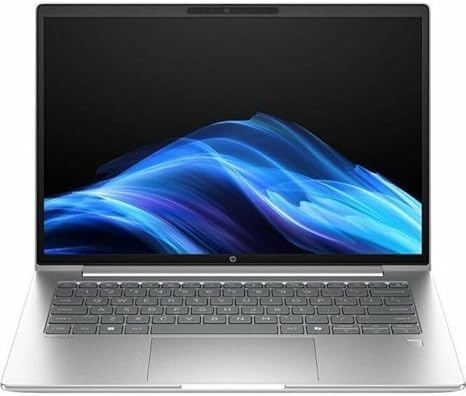
Welcome to Reviews inside tv! Today, we’re taking a closer look at the HP ProBook 4 G1i 14-inch Notebook, a machine designed to handle professional tasks while providing solid performance for productivity and everyday computing needs. Packed with a 12-core Intel Core Ultra 7 255U processor, a 32GB RAM setup, and a fast 512GB SSD, this laptop promises a balance of power and efficiency. But does it deliver? Let’s find out.
The HP ProBook 4 G1i isn’t your average office laptop. With a 12-core Intel Core Ultra 7 processor, it’s built to handle multitasking, complex spreadsheets, and even light content creation. The 32GB of RAM is a big plus, providing the kind of headroom that makes a difference in productivity. Whether you’re working with large files, running multiple programs at once, or switching between demanding apps, the ProBook handles it smoothly. Pair that with the 512GB SSD, which offers fast read and write speeds, and you’ll notice a noticeable boost in boot times, file transfers, and app launches.
When it comes to the display, the ProBook sports a 14-inch WUXGA screen with a resolution of 1920 x 1200, giving you a slightly higher pixel density than standard Full HD. The IPS panel promises great viewing angles and vibrant colors, which makes it a solid choice for watching videos or browsing photo galleries. For day-to-day work, the clarity and brightness should be more than enough. That said, if you’re expecting OLED-level vibrancy or gaming-level refresh rates, you might be a bit disappointed. Still, for its intended use case—office tasks, media consumption, and casual browsing—the display does a great job.
In terms of battery life, the ProBook is equipped with a robust battery, but the exact numbers depend on usage. You’re looking at around 8 to 10 hours of productivity work, which should comfortably get you through a day of meetings, writing, and web browsing. For media streaming, it can push closer to 7-8 hours. With its fast charging capabilities, you won’t be left waiting long for a full charge, and it’s definitely more portable than many other business laptops out there. It’s light enough to carry around all day without feeling like you’re lugging a brick, weighing in at just around 3.2 pounds.
Now, onto the keyboard and trackpad. The ProBook’s keyboard is comfortable with good key travel, which makes typing for long periods much easier than on shallower keyboards. The layout is also solid, with full-sized keys, a dedicated number pad, and easy-to-find function keys. The trackpad is spacious, responsive, and accurate, with good palm rejection and click response. If you’re used to working on a laptop with less-than-perfect input devices, this will feel like a breath of fresh air.
On the connectivity front, the ProBook covers all the bases. You get multiple USB-A and USB-C ports, including one that supports Thunderbolt, which opens up options for fast data transfer or connecting external monitors. There’s also HDMI for an additional display, an SD card reader for easy photo transfers, and a headphone jack. Wi-Fi and Bluetooth connectivity are rock solid, ensuring stable connections for online work or streaming.
When it comes to performance under load, the ProBook holds up surprisingly well. During regular office tasks, it runs quietly, and you won’t hear the fan kicking in unless you’re running something more demanding. However, heavy workloads—like video editing or running multiple virtual machines—will definitely push the system harder. The fan can get a bit loud, but it’s a typical response for laptops with high-performance processors.
Now, for those of you who might be concerned about cooling, the ProBook doesn’t run overly hot under normal use, though the keyboard deck can warm up slightly when multitasking or handling intensive applications. However, it doesn’t get uncomfortably hot, and the system does a decent job of managing its thermal load.
In terms of gaming, this is definitely not a gaming laptop. While the ProBook can handle some light gaming and older titles, don’t expect it to run graphically intensive games like Cyberpunk 2077 or Call of Duty at high settings. However, for casual gaming, streaming, or some basic titles, it’ll work fine. The built-in Iris Xe integrated graphics are better than what you’d find in entry-level business laptops, but they’re not meant for gaming at full resolution or high frame rates.
If you’re wondering about long-term value, the HP ProBook 4 G1i offers solid reliability, especially for users who need a professional laptop for office work, media consumption, or light creative tasks. The build quality feels premium, thanks to its sturdy chassis and solid hinge. While the plastic exterior might not give off an ultra-premium feel, it’s durable enough to survive the rigors of travel and daily use.
For those of you considering alternatives, the ProBook competes in a similar space to other ultraportable business laptops, such as the Dell Latitude 5420 or the Lenovo ThinkPad L14. While those might offer similar specs, the ProBook stands out in terms of its performance for multitasking, solid battery life, and versatile ports. It’s also priced competitively, making it a great option for business users who need power and portability without paying top-dollar for premium features like OLED displays or dedicated gaming GPUs.
At the end of the day, the HP ProBook 4 G1i is a well-rounded laptop that balances performance and portability for users who need a reliable workhorse. If you’re after a device for day-to-day office tasks, media consumption, or light content creation, this machine has you covered. However, if you’re looking to game or do heavy-duty video editing, there are other options better suited to those needs.
Thanks for watching! If you have any questions or already own this laptop, feel free to drop a comment below. Don’t forget to check out the link to get this laptop in the comments box. Be sure to like, subscribe, and hit the bell icon for more tech reviews. Catch you next time on Reviews inside tv!
Available to buy here:


