

Available to buy here:
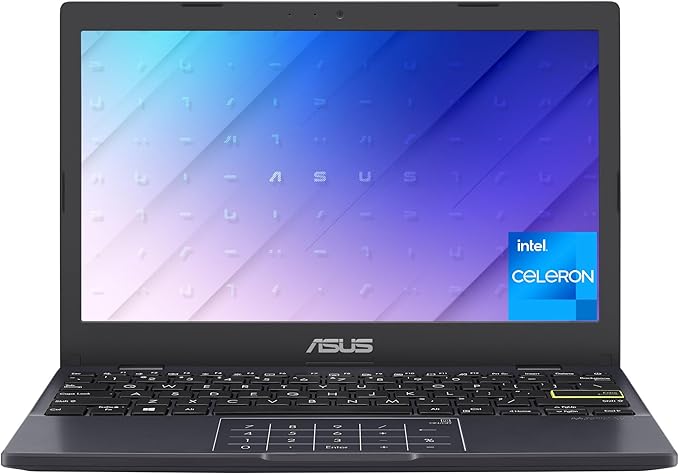
Welcome to “Reviews inside tv”! Today, we’re checking out the ASUS Vivobook L210, an ultra-portable, budget-friendly laptop designed for those who need a reliable everyday machine without breaking the bank. With its slim profile and affordable price point, this laptop seems ideal for students, light office work, or anyone in need of a simple, no-fuss device. But does it live up to its promises? Let’s take a closer look at what the Vivobook L210 brings to the table.
Let’s start with the specs. The ASUS Vivobook L210 is powered by an Intel Celeron N4020 processor, which clocks in at 1.1 GHz, with the ability to turbo boost up to 2.8 GHz. For light tasks like web browsing, word processing, and streaming, this chip holds up well enough, but don’t expect it to handle anything demanding. Paired with 4GB of DDR4 RAM and 128GB of eMMC storage, the Vivobook is built for simplicity. That eMMC storage is fine for basic tasks and storing documents, but it’s much slower compared to SSDs, so booting up or loading large files might take a bit longer than you’re used to.
The 11.6-inch display, with a resolution of 1366 x 768, isn’t going to blow you away in terms of sharpness, but for a device at this price, it does the job. Colors are decent, and it has a 73% screen-to-body ratio, which is quite good for a budget laptop. The HD screen can handle casual media consumption, but don’t expect rich details or super vibrant colors. If you’re looking for a laptop to watch movies or edit photos professionally, you’ll want to look elsewhere.
In terms of performance, the Vivobook L210 is suitable for basic productivity tasks like writing documents, browsing the web, or handling spreadsheets. It’s ideal for students or casual users who don’t require heavy multitasking or high-end computing. But, if you’re thinking about photo or video editing, or anything that demands serious processing power, the Intel Celeron N4020 might leave you frustrated. Gaming is also out of the question for this one—at best, it can handle light, older titles at low settings, but that’s about it.
When it comes to media consumption, streaming content on this laptop is perfectly fine. The small screen size might be a bit cramped for watching movies, but the display gets the job done for casual watching. The speakers, though nothing special, are passable for daily use. Just don’t expect deep, rich sound—they’ll work for a quick YouTube video or a Zoom call, but not much beyond that.
Setting up the Vivobook is a breeze. It comes with Windows 11 Home in S Mode, which is designed to keep you safe by only allowing apps from the Microsoft Store, and while this adds an extra layer of security, it might be a little limiting for some. You also get a year of Office 365 Personal, which is a nice bonus if you need productivity software. It’s worth mentioning that some users might find the limitations of S Mode a bit frustrating, especially if you want to install software from outside the Microsoft Store.
In terms of comfort, the keyboard is small but functional. Key travel is a bit shallow, but for short typing sessions or quick emails, it should be fine. Long typing sessions, however, might cause some fatigue due to the smaller key size and less tactile feedback. The trackpad is decently responsive, though not as smooth or large as higher-end laptops. Again, it gets the job done for basic navigation and gestures, but you won’t find a premium feel here.
Now, let’s talk about thermals and noise. The Vivobook L210 stays fairly cool during everyday use, but push it too hard, and you’ll feel some warmth on the underside. The fan noise is minimal, but it does kick up a bit when under load. For light work, this shouldn’t be an issue, but if you start running multiple programs at once, you may notice the fan ramping up. The cooling system isn’t great, but at this price point, it’s about what you’d expect.
When it comes to portability, the L210 excels. At just 0.7 inches thick and weighing only 2.31 pounds, it’s incredibly lightweight and easy to carry around all day. Whether you’re tossing it in your backpack for class or taking it to a coffee shop for some casual work, it won’t weigh you down. Battery life is decent, offering around 6–7 hours under typical light usage, though you’ll likely need to plug in for more intensive tasks.
For connectivity, the Vivobook offers a range of options: a USB 3.2 Gen 1 Type-C port, a USB 3.2 Gen 1 Type-A port, HDMI, and the standard headphone jack. While it has the basics covered, there’s no Thunderbolt or Ethernet port, which could be limiting for those who need to connect to high-speed devices or wired networks. There’s also no SD card reader, which may be a downside for photographers or videographers who need quick access to files.
In terms of upgradability, you’re stuck with the 4GB of RAM and 128GB eMMC storage, as neither are easily replaceable or upgradable. This is another reason why the Vivobook L210 is better suited for light, day-to-day use rather than intensive work or long-term power users.
The build quality, as you might expect, is mostly plastic, but it’s sturdy enough for everyday use. The lid feels a little flimsy, but it won’t break easily unless you put it under serious stress. The keyboard deck has minimal flex, and the hinges hold the screen firmly in place. It’s not a luxury build, but it gets the job done.
When it comes to value for money, the ASUS Vivobook L210 is definitely one of the more affordable options in its category. For students, casual users, or anyone who needs a reliable machine for light tasks, it’s an excellent choice. However, if you plan to do any serious content creation, gaming, or multitasking, you’ll want to look elsewhere. In terms of performance for its price, it’s hard to beat, but there are clear trade-offs in terms of display quality, processing power, and expandability.
If we compare this to other budget-friendly laptops, it stands up well against the competition, especially in terms of portability and battery life. However, there are other models out there with better displays or more power, such as the Lenovo IdeaPad 1 series, which may offer a slightly better balance of performance and features for a similar price.
In conclusion, the ASUS Vivobook L210 is best suited for those who need a basic laptop for light productivity, web browsing, and media consumption. It’s ideal for students or anyone who values portability and affordability above all else. However, if you need a more powerful machine for demanding tasks, you’ll need to look at higher-end models. It’s a simple, no-frills laptop that delivers where it counts—just don’t expect anything groundbreaking.
Thanks for watching! If you’ve got any questions about the ASUS Vivobook L210 or want to share your own experience with it, drop a comment below. Don’t forget to hit that like button, subscribe to the channel, and ring the bell to stay updated on all our latest reviews. Catch you next time!
Available to buy here:


