

Available to buy here:
Welcome to Reviews Inside TV! Today, we’re taking a close look at the ASUS Chromebook Flip C302, a lightweight, versatile 2-in-1 laptop that promises solid performance and excellent portability. With its 12.5-inch Full HD touchscreen and 360-degree hinge, it’s designed to be both a laptop and a tablet, making it an intriguing option for those who need flexibility on the go. Whether you’re a student, professional, or casual user, let’s find out if this Chromebook truly delivers.
The ASUS Chromebook Flip C302 is powered by an Intel Core M5 processor, paired with 4GB of RAM and 64GB of flash storage. While these specs are solid for light productivity tasks, the 4GB of RAM might feel a bit limiting for more demanding tasks. It’s more than enough for web browsing, document editing, and watching videos, but heavy multitaskers may find the experience a little sluggish. The Intel Core M5, though not a powerhouse, offers smooth enough performance for daily computing needs, especially in the Chrome OS environment, which is optimized for efficiency. The 64GB of flash storage is a bit on the smaller side, but with Google’s cloud ecosystem, it should be manageable if you’re relying on web apps and cloud storage.
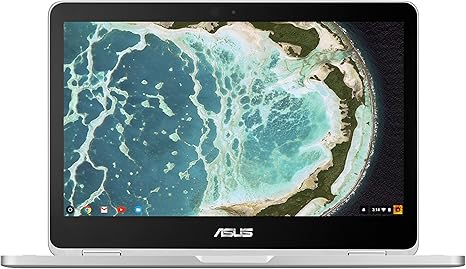
One of the standout features of this laptop is its 12.5-inch Full HD touchscreen with ASUS’s NanoEdge display technology. The bezel is narrow, giving you more screen real estate in a compact form. The screen’s brightness and color reproduction are decent, making it suitable for media consumption and general browsing. However, if you’re a content creator or someone who works with color-sensitive projects, the display won’t offer the level of accuracy that an IPS or OLED panel would provide. Still, for a Chromebook, the display does the job for most casual users and those who prefer portability over top-tier visuals.
As for battery life, the ASUS Chromebook Flip C302 is rated for up to 10 hours of usage. In real-world conditions, this means you can comfortably get through a full workday of web browsing, document editing, and media streaming without needing to plug in. Charging is quick, and the laptop is light enough at just 2.65 pounds to easily slip into a backpack or carry around for extended periods. This makes it a great option for students or frequent travelers who want something lightweight but still capable of handling their everyday tasks.
The keyboard on the Flip C302 is backlit, which is a nice touch for working in dimly lit environments. The key travel is on the shallow side, so it may not be the most comfortable for long typing sessions, but it should be fine for shorter tasks like emails or note-taking. The trackpad is responsive and smooth, offering a solid experience for navigation and gestures. You won’t find a lot of extra features like a number pad, but that’s to be expected in this compact design.
When it comes to connectivity, the Flip C302 has a decent selection for its size. You’ll find two USB Type-C ports, one USB 3.0 port, a microSD card reader, and an audio jack. However, there’s no HDMI or Ethernet port, so if you’re someone who regularly needs to hook up external monitors or use wired connections, you may need to invest in additional adapters. The inclusion of USB-C is a step forward, offering faster data transfer speeds and the convenience of reversible charging.
Thermal performance is generally solid, with the laptop staying cool under typical use. During web browsing or media consumption, you’ll hardly notice any heat buildup. However, it’s worth noting that the Core M5 processor, being a lower-power chip, isn’t designed for intense workloads, so heavy multitasking or extended periods of gaming could lead to some noticeable heat. As far as fan noise goes, it’s mostly silent during light tasks but can become slightly audible during more demanding activities like video calls or longer sessions of media playback.
Now, let’s take a moment to look at the real-world performance. For office work, this Chromebook handles web browsing with multiple tabs, word processing, and light spreadsheet tasks with ease. Video streaming is smooth, and the display is bright enough for casual watching. In terms of content creation, this Chromebook is more limited. Photo editing or video editing will be slower due to the limited RAM and storage, though you can manage light photo touch-ups or basic tasks through cloud apps. Gaming, as expected, is not its strong suit. This device is not designed for graphically demanding titles, but casual games available through the Google Play Store run smoothly.
In terms of build quality, the ASUS Chromebook Flip C302 feels solid thanks to its all-metal body. It’s sturdy, but not overly heavy, and the sleek design makes it look more premium than other Chromebooks in this price range. The 360-degree hinge is smooth and easy to use, allowing you to quickly flip between laptop and tablet modes. Whether you’re working at a desk or using it as a tablet on the couch, the design lends itself to flexibility.
Now, let’s talk about the elephant in the room—value for money. The ASUS Chromebook Flip C302 offers a solid, reliable experience at a reasonable price. It’s perfect for students, casual users, or those who need a lightweight laptop for basic tasks. However, it might not be the best choice for someone who needs power for professional work, gaming, or heavy multitasking. Given the relatively low specs, it feels more like a mid-range Chromebook that prioritizes portability and ease of use over raw performance. Still, it’s one of the better options available in the sub-$500 Chromebook market.
When comparing it to other models in the same category, the Flip C302 holds its own, especially considering its premium build and touchscreen capabilities. But if you’re looking for more power, a larger display, or better multitasking ability, you may want to look at higher-end models or consider a Windows laptop. However, if you value a lightweight, flexible design and use Google services extensively, the Flip C302 is an excellent choice.
In terms of build quality, the laptop feels durable, but as with most ultraportables, it’s essential to handle it with care. The Chromebook Flip C302 should stand up to daily wear and tear, but extended use could show signs of stress, especially around the hinge area.
Looking at long-term reliability, ASUS generally has a solid reputation for producing durable, well-built devices. While we don’t have a ton of long-term reliability data on this specific model yet, ASUS’s track record in the Chromebook space suggests it should last a reasonable amount of time with proper care.
So, who is the ASUS Chromebook Flip C302 for? If you’re looking for a lightweight, portable laptop for everyday tasks like browsing, word processing, and streaming, this Chromebook is a great option. It’s also perfect for students who need a flexible device for class and homework. However, if you need more power for creative work, gaming, or heavy multitasking, you may want to consider a more powerful machine.
Thanks for tuning in to this review! If you have any questions or want to share your experience with the ASUS Chromebook Flip C302, drop a comment below. Don’t forget to like, subscribe, and hit the bell icon for more reviews. Until next time, keep flipping those screens and stay tech-savvy!
Available to buy here:


