
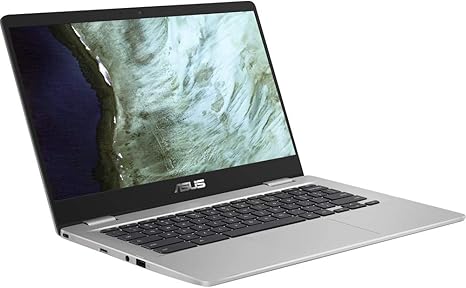

Available to buy here:
Welcome to Reviews inside tv, where we bring you detailed, unbiased insights on the latest tech. Today, we’re looking at the ASUS Chromebook C423. It’s a 14-inch Chromebook designed with simplicity and reliability in mind, aiming to offer a practical solution for students, casual users, and anyone who needs a lightweight, fast system for basic tasks. But does it hold up to the hype? Let’s find out.
The ASUS Chromebook C423 is equipped with an Intel Dual-Core Celeron N3350 processor. This CPU is built for basic tasks, offering speeds of up to 2.4 GHz, which should be sufficient for light productivity like web browsing, document editing, and video streaming. It’s not built for heavy workloads or gaming, but it’s perfectly capable for everyday use, such as checking emails or using Google Docs.
When it comes to memory, the C423 includes 4GB of LPDDR4 RAM. This is a good amount for a budget Chromebook, as it ensures smooth multitasking for simple activities like running a few browser tabs and apps at once. The 4GB may feel limiting if you’re used to more powerful machines, but it works well for the device’s target audience—those who need a reliable, budget-friendly laptop for everyday computing tasks.
Storage-wise, it offers 32GB of eMMC memory. While it’s relatively small, keep in mind that Chromebooks are designed to work with cloud storage, so the local storage isn’t as crucial. You might need to rely on Google Drive or external drives for storing larger files, but for general web browsing and app usage, it should suffice. eMMC storage is slower than SSDs, but for a budget laptop like this, it gets the job done without much noticeable lag in daily tasks.
Now, let’s talk about the display. The 14-inch HD NanoEdge screen features a resolution of 1366×768, which is standard for this price range. It’s not the sharpest display out there, but it’s serviceable for everyday tasks like reading, browsing, and watching videos. The anti-glare coating helps reduce reflections, which is a bonus when using the laptop in bright environments. While it doesn’t have the vibrancy or sharpness of higher-end displays like full HD or OLED screens, it’s perfectly fine for basic usage. The 180-degree hinge is another nice touch, making it easy to share content or collaborate in a more flexible way, whether you’re presenting to a group or just watching a movie with friends.
In terms of connectivity, the Chromebook C423 offers a USB Type-C (Gen 1) port, a USB Type-A port, and a standard HDMI output. While it might not offer the broad range of ports found in more premium laptops, it’s enough for most casual users. You can easily connect external devices, like a mouse, keyboard, or even a monitor. It also supports Wi-Fi and Bluetooth, which means you’ll have reliable internet and peripheral connectivity. The 4GB RAM and 32GB storage are not upgradable, so you’re locked into those specs for the lifetime of the device, which is worth considering if you think you might need more power in the future.
Battery life is where this Chromebook really shines. ASUS claims the C423 can last up to 10 hours, and in real-world use, you can expect something close to that. For light office work, web browsing, or streaming videos, you’ll have plenty of time to get through a full day without needing to charge. This makes it an excellent choice for students or professionals who need to use it throughout the day without being tethered to an outlet. It’s also relatively lightweight, coming in at just under 3 pounds, so it’s easy to carry around in a backpack.
Now, let’s talk about performance. For office tasks like word processing, email, and video calls, this Chromebook performs well. You won’t experience lag or slowdowns unless you push it to its limits with too many apps or browser tabs open at once. When it comes to media consumption, streaming HD content works well, but don’t expect this laptop to handle anything beyond casual viewing. The speakers are decent for a laptop in this range, providing clear sound for videos or music but lacking deep bass or volume for louder environments.
As for gaming, the C423 isn’t built for high-end games. It lacks the GPU power for modern, graphically intense titles, but if you’re into casual web-based games or older titles, it should suffice. It’s a Chromebook after all, and it’s more suited to tasks like web browsing and office work. It won’t be able to run games like Fortnite or Cyberpunk 2077 smoothly, so if gaming is a priority for you, you’ll want to look elsewhere.
Thermals and noise are typically non-issues with this machine. During light use, the keyboard deck stays cool, and the fan noise is almost nonexistent. Under heavier loads, it remains relatively quiet, but you might notice a bit of warmth on the underside if you’re using it for extended periods. This isn’t a machine meant for gaming marathons or long video editing sessions, but for general daily use, it’s more than adequate.
Now, the keyboard and trackpad. The keyboard is fairly comfortable for typing, with decent key travel and spacing. It might not feel as premium as those on higher-end laptops, but it’s certainly good enough for casual use or typing up documents. The trackpad is responsive, and the palm rejection works well. It’s not the largest trackpad out there, but it’s perfectly usable for web browsing and navigating through apps.
As far as portability goes, the C423 is compact and easy to carry around. Its slim profile makes it a great option for anyone who needs to take it on the go. Whether you’re a student with a packed backpack or someone who needs a lightweight device for travel, the C423’s size and weight make it an ideal choice.
Let’s quickly look at some of the strengths and weaknesses. On the plus side, you get a lightweight, affordable device with great battery life, solid everyday performance, and a decent display for basic use. The flexible 180-degree hinge and solid connectivity options are also highlights. On the downside, the display resolution could be sharper, the storage is limited, and the performance might feel underwhelming if you need more power for demanding tasks.
In terms of value, the ASUS Chromebook C423 provides solid performance for the price. It competes well with other budget Chromebooks, offering good battery life, decent specs for everyday tasks, and a simple, functional design. It might not compete with higher-end laptops in terms of performance, but for those looking for an affordable and reliable device for basic computing, it’s a strong contender.
Compared to similar models like the Lenovo Chromebook 14 or Acer Chromebook 15, the ASUS C423 holds its own. It offers a comparable display and similar specs, but the hinge design and lightweight build make it stand out. If you need more storage or power, you might want to consider a higher-end option, but for most users, the C423 provides all the essentials at a competitive price.
When it comes to build quality, the C423 is made from plastic, which is standard in this price range. It feels sturdy enough, but not as premium as metal builds. The hinge feels solid, and the overall design is functional without being flashy. Given the price point, it’s not likely to suffer from long-term reliability issues, but it’s always worth checking for any potential design flaws in user reviews, especially around the hinges or keyboard.
If you’re wondering about customer support, ASUS is generally known for good customer service and reasonable warranty terms. While specific support experiences vary by region, their reputation for reliable service is worth noting.
In conclusion, the ASUS Chromebook C423 is a solid, budget-friendly laptop that excels in offering the essentials: portability, battery life, and smooth performance for basic tasks. It’s perfect for students, casual users, or anyone who needs a secondary device for web browsing and light productivity. If you’re looking for a powerful machine for gaming or creative work, you’ll need to look elsewhere, but for its price, it’s a great choice for those who just need something that works reliably for everyday tasks.
Thanks for watching! You can find the link to grab the ASUS Chromebook C423 in the comments below. Feel free to ask any questions or share your experience if you already own this laptop. Catch you in the next one!
Available to buy here:


