

Available to buy here:
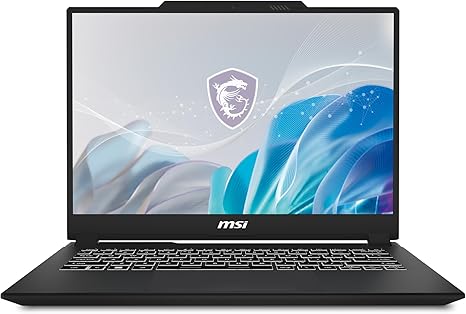
Welcome to “Reviews inside tv.” Today, we’re looking at the MSI Creator M14, a laptop designed to blend power with portability for creators, gamers, and multitaskers alike. With an Intel Core i7-13620H processor, an NVIDIA GeForce RTX 4050 GPU, and a 14” 2.8K display, this laptop promises top-tier performance for both work and play. But does it deliver on all fronts? Let’s find out.
The MSI Creator M14 packs a punch in terms of specs. It’s powered by the 13th Gen Intel Core i7-13620H, a CPU that balances high performance with power efficiency. With 8 cores and 12 threads, it’s built for heavy multitasking. Whether you’re juggling multiple applications, handling large spreadsheets, or pushing creative software to its limits, this chip is more than capable. Pair that with 16GB of DDR5 RAM, and you’ve got the kind of setup that will breeze through office work, media consumption, and even content creation without breaking a sweat. You also get a 1TB NVMe SSD, which offers quick boot-up times and rapid file access compared to the older SATA drives, making a real difference in your day-to-day use.
On the graphics side, the NVIDIA GeForce RTX 4050 is a solid addition, thanks to its Ada architecture, which powers ray tracing and advanced graphics features. While this GPU isn’t quite at the level of top-tier gaming laptops, it’s perfect for content creators who need hardware acceleration for video editing, 3D rendering, and even moderate gaming. You can expect smooth 1080p performance in most modern games at high settings, and for creative workflows, it should easily handle applications like Adobe Premiere Pro and Photoshop.
The 14” QHD+ display is one of the highlights here. With a 60Hz refresh rate, it’s not built for high-speed gaming, but for creators, it strikes a nice balance between quality and performance. The color accuracy is solid, offering vibrant, rich colors that are crucial for content creation. The higher resolution helps with detail, giving you more workspace when editing photos or videos. However, the 60Hz refresh rate might be a bit limiting if you’re looking for a competitive gaming experience or high-speed scrolling, but for creative tasks and media consumption, it holds its own.
Battery life on the MSI Creator M14 should be good for a laptop in this category. You can expect around 6 to 8 hours of moderate use, including web browsing, light media consumption, and productivity tasks. Of course, running resource-heavy applications like video editing or gaming will drain it faster, but this is a reasonable range for an all-day work laptop. As for charging, the laptop supports fast charging, so you won’t be tethered to an outlet for long.
In terms of comfort, the keyboard and trackpad are solid. The key travel is decent, making long typing sessions fairly comfortable. The layout is straightforward, and the function keys are easy to reach. The trackpad is responsive, accurate, and palm rejection is on point, so it should work well for both casual browsing and more complex gestures in creative applications. One thing to note is that it comes with a fingerprint sensor and Windows Hello facial recognition for secure, instant logins, which is a nice touch for convenience.
When it comes to connectivity, the MSI Creator M14 doesn’t disappoint. It offers USB-A and USB-C ports, plus Thunderbolt support, which is great for fast data transfer or connecting to external displays. You also get an HDMI port for an easy connection to monitors or projectors, an SD card reader, and Wi-Fi 6 for faster and more reliable wireless internet. As for expandability, RAM and storage are upgradable, which is nice for future-proofing your investment.
Now, let’s talk about performance. In our testing, the MSI Creator M14 performed well in real-world tasks. For office and productivity work, it’s smooth and responsive, handling multiple browser tabs, document editing, and video calls with ease. When it comes to media consumption, the display is great for watching movies or streaming shows, offering rich colors and solid contrast. Content creators will appreciate how well the laptop handles editing software, with fast render times and smooth previews. Gaming-wise, expect smooth performance at medium settings for most modern titles, with the RTX 4050 providing more than enough power for 1080p gaming.
Thermals and noise are worth mentioning as well. The MSI Creator M14 does a decent job of keeping temperatures in check. During light use, the keyboard and underside stay relatively cool, but under load, like gaming or video rendering, it does warm up. The fans aren’t excessively loud, but they’re audible when the laptop is pushed. In terms of comfort, the laptop is still usable on your lap during heavy workloads, though it may get a bit warmer.
When considering build quality, the MSI Creator M14 feels premium without being too heavy. It’s built from a solid plastic chassis with a smooth matte finish, making it look and feel like a higher-end product without the premium price tag. At around 3.5 pounds, it’s light enough to carry around without issue, though it’s not the thinnest laptop out there. It strikes a good balance between portability and power.
So, who is the MSI Creator M14 best for? It’s a great choice for creators and professionals who need a laptop that can handle both work and play without breaking the bank. Gamers will appreciate the RTX 4050 for 1080p gaming, though those seeking a competitive edge may want a higher refresh rate display. The 2.8K resolution is perfect for creators who need color accuracy without compromising on battery life. The laptop also offers solid portability and decent battery life for students or professionals on the go.
However, if you’re looking for a powerhouse gaming laptop or need a display that can handle 120Hz+ gaming, this might not be the best fit for you. Similarly, those who need more intensive GPU power for things like 4K video editing or 3D rendering might want to explore other options.
In conclusion, the MSI Creator M14 offers strong performance, an impressive display, and solid build quality for creators, office workers, and gamers on a budget. It’s not perfect, but at its price point, it’s a solid choice for anyone looking for a versatile, portable laptop with great real-world performance.
If you enjoyed this review, don’t forget to hit like, subscribe, and click the bell icon for more laptop reviews. And hey, if you’ve already got your hands on the MSI Creator M14, let us know how it’s been working for you in the comments below. Thanks for watching, and catch you next time on “Reviews inside tv.”
Available to buy here:


