

Available to buy here:
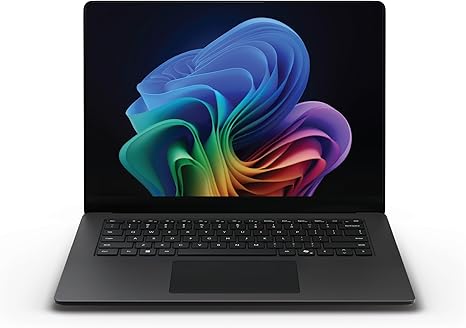
Welcome to “Reviews inside tv”! Today, we’re taking a look at the Microsoft Surface Laptop for Business (2025) with Windows 11 Pro Copilot+. Aimed at professionals and business users, this laptop is designed to deliver impressive performance, all-day productivity, and AI-powered enhancements to streamline your work. But how well does it really stack up in real-world use? Let’s dive in and find out.
This laptop is powered by Intel’s latest Core Ultra 5 processor from the Series 2 lineup, a chip that’s built for multitasking, heavy workloads, and AI capabilities. The 16GB of RAM offers smooth multitasking, whether you’re running multiple browser tabs, editing documents, or handling more demanding tasks like video calls. When it comes to storage, you’ve got a 256GB SSD that not only provides fast access to your files but also contributes to quick boot times and seamless app loading. And the display? The 13.8-inch Surface PixelSense Flow touchscreen offers razor-thin bezels and a 3:2 aspect ratio, giving you a more expansive workspace compared to the usual 16:9 screens.
Now, let’s talk about performance. With the Intel Core Ultra 5 processor and the AI Boost NPU, this laptop packs a serious punch. The AI capabilities are particularly noteworthy, as they can enhance productivity tasks, improve app efficiency, and provide a more responsive experience overall. Whether you’re juggling office apps, creating presentations, or working on spreadsheets, this processor ensures everything runs smoothly. In terms of real-world usage, the 16GB RAM helps you manage multiple tasks at once, while the SSD keeps things snappy. So if you’re used to frustrating delays with old storage types, that’s no longer an issue here.
When it comes to media consumption, the 13.8-inch PixelSense Flow display stands out. This touchscreen offers brilliant visuals with vibrant colors and great contrast, perfect for watching videos or reviewing documents with lots of detail. The display’s 3:2 aspect ratio gives you more vertical space, making it easier to read long documents or browse the web without constantly scrolling. And the touchscreen responsiveness is fantastic for those of you who like to directly interact with your screen, making tasks like note-taking or editing images feel intuitive.
For business and office productivity, this laptop is a dream. The battery life is exceptional, offering up to 22 hours of use on a single charge. That means you can work all day without worrying about finding an outlet, whether you’re in meetings, working from a cafe, or traveling. The charging speed is also impressive, allowing you to quickly top up when needed. However, while the battery life is a major plus, the weight and portability are equally important. Weighing in at around 2.5 pounds, it’s lightweight enough to slip into your bag without causing strain, and its slim profile makes it easy to carry around all day.
The keyboard on this Surface Laptop is optimized for comfort. The key travel is well-balanced, providing a satisfying tactile response without feeling too stiff or shallow. Whether you’re typing up a report or sending emails, the keyboard allows for fast, accurate input. And with the addition of the Copilot key, you can quickly engage AI features to boost productivity, which adds a nice touch for those who rely on smart assistants to speed up workflows.
One of the biggest advantages of this laptop is its robust connectivity options. You’ve got USB-C ports for fast data transfer and charging, along with a USB-A port for older peripherals. The laptop also includes a headphone jack and supports Wi-Fi 6, ensuring that you’ll stay connected in any environment. There’s no Ethernet port, but with the rise of Wi-Fi networks, that’s becoming less of an issue for most users. Bluetooth 5.1 is also included, which ensures fast and reliable wireless connections to peripherals like headphones, mice, and keyboards.
Now, for thermals and fan noise: the Surface Laptop for Business performs well here. Even under heavier loads like video conferencing or multitasking with multiple apps, the laptop remains relatively cool. There’s no significant throttling or performance drops, and the fan noise is kept to a minimum. During lighter tasks like web browsing or document work, the laptop operates nearly silently, providing a quiet and comfortable working environment.
However, when it comes to gaming or high-performance creative tasks like video editing, you won’t see the same level of performance as with dedicated gaming laptops or workstations. This is not a machine for running graphically demanding games or pushing 4K video edits for long periods. But for business, office, and productivity use, it more than gets the job done.
As far as build quality goes, the Surface Laptop has the same premium feel you expect from Microsoft. The chassis is solid, with a clean, professional look. The materials are high-quality, and it’s clear that this laptop is built to last. It’s not the cheapest option on the market, but it’s sturdy, well-designed, and lightweight, making it a strong choice for those who need a reliable laptop that will stand the test of time.
The key selling points of this laptop are its outstanding battery life, high-quality display, and impressive performance for everyday business tasks. But there are a few things to keep in mind. While the Core Ultra 5 processor is great for productivity and AI tasks, it’s not a powerhouse for gaming or high-end creative workloads. The 256GB SSD, while fast, may feel limiting for those who store a lot of large files on their device. And the price, while justified by the overall performance and design, may be a bit high for users who just need basic office functionality.
In terms of value, the Microsoft Surface Laptop for Business is a strong contender for business professionals who need reliability, portability, and long battery life. If you’re someone who works on the go and values a great display and all-day productivity, this laptop is an excellent choice. However, if you’re a power user who needs more raw computing power for tasks like gaming, video editing, or CAD work, you might want to explore other options.
For a quick comparison, let’s look at some alternatives in this price range. The Lenovo ThinkPad X1 Carbon Gen 11 and the Dell XPS 13 both offer similar performance but with slight differences in build quality, keyboard feel, and battery life. The Surface Laptop might win out on portability and battery life, but the ThinkPad X1 Carbon has a more rugged build, and the XPS 13 delivers a slightly better display for creatives.
Ultimately, the Microsoft Surface Laptop for Business (2025) is an excellent choice for professionals looking for a solid, reliable laptop for everyday use. If you’re focused on productivity, battery life, and a premium build, this laptop checks all the boxes.
Thanks for watching! If you have any questions or want to share your thoughts on this laptop, feel free to drop a comment below. Don’t forget to like, subscribe, and hit that bell icon to stay updated with all our latest reviews. See you next time on “Reviews inside tv!”
Available to buy here:


