

Available to buy here:
Welcome back to “Reviews inside tv”! Today, we’re checking out the Lenovo 500e Yoga Chromebook Gen 4, a convertible 2-in-1 that’s made to serve a variety of needs. With its 12.2-inch touchscreen and Intel N-Series processor, this Chromebook is geared towards students and professionals who need a portable, reliable machine. But does it live up to the hype? Let’s break it down and find out.
The Lenovo 500e Yoga packs a 12.2-inch WUXGA display that offers a resolution of 1920 x 1200. This means sharp, clear visuals and vibrant colors, which is fantastic for streaming, reading, or even some light media editing. While the display isn’t the brightest on the market, it still performs well for daily tasks with solid color accuracy and wide viewing angles, so you’ll get a decent experience no matter where you’re sitting.
Under the hood, this Chromebook is powered by an Intel N-Series N100 processor. This is an entry-level chip that excels in light tasks like web browsing, document editing, and media consumption. It’s a great choice for users who don’t need the heavy-hitting power of an i5 or i7 chip. It’s fast enough for basic productivity, but don’t expect to run demanding software like video editing suites or high-end games on this machine. Paired with 8GB of RAM, multitasking is smooth, with minimal lag when juggling a few browser tabs or light applications.
Storage-wise, the Lenovo 500e Yoga comes with 64GB of flash memory, which is fairly standard for a Chromebook in this price range. While you won’t be able to store massive amounts of files locally, the Chromebook’s reliance on cloud storage means you can rely on Google Drive or similar services for your storage needs. For light use like email, web browsing, or Google Docs, this should be more than sufficient. However, you might find it limiting if you want to store a lot of large files locally.
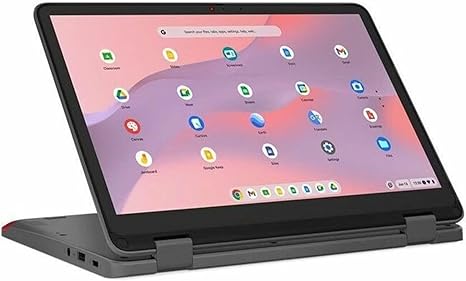
In terms of portability, this is where the Lenovo Yoga shines. Weighing in at just 2.5 pounds, it’s lightweight enough to toss into your bag without much thought. It’s thin too, making it easy to carry around for a day of meetings, classes, or casual work sessions. The 360-degree hinge gives you a lot of flexibility, allowing you to use it in laptop, tent, stand, or tablet mode depending on your needs. This versatility is one of the biggest selling points for anyone who needs a machine that can adapt to different work styles.
Now, let’s talk about battery life. With its 42Wh battery, you can expect around 8-10 hours of usage depending on how you’re using it. This is perfect for light office work, web browsing, and streaming videos during the day, but it might fall short if you’re pushing the machine harder with multiple apps or media-heavy tasks. It’s certainly a solid performer for a Chromebook, but don’t expect all-day gaming or video editing.
When it comes to input, the keyboard is comfortable for typing out long emails or papers, with decent key travel and a soft, responsive feel. The layout is standard, so you’ll get a dedicated number pad and function keys, and there’s no awkward placement for the power button. The trackpad is spacious and accurate, with good palm rejection, making it comfortable for day-to-day navigation.
Connectivity is another area where the Lenovo 500e Yoga offers what you need without being overly complicated. You get a couple of USB-A ports, USB-C for faster data transfer, and an HDMI port for external displays. There’s also a microSD card reader, which is a nice touch if you need to expand your storage on the go. However, the lack of Ethernet or Thunderbolt support might be limiting for users who need those features for specific workflows.
As for thermals, you won’t find the Lenovo 500e Yoga overheating under light use. It stays relatively cool even when multitasking, thanks to the lower-power Intel N100 chip. The fan noise is minimal, which is a relief if you’re in a quiet setting like a library or classroom. That said, if you’re pushing it too hard, you may notice some heat build-up, especially around the keyboard area, but that’s typical for this kind of device.
So, how does this Chromebook perform when put to the test? Well, it handles basic office work and media consumption just fine. Streaming video on Netflix or YouTube is a breeze, and the screen’s color and resolution hold up well. For productivity tasks like Google Docs or Spreadsheets, it runs without issues. The Intel N100 processor won’t win any awards for speed, but it’s capable enough for casual users. For creators or gamers, though, you’ll want to look elsewhere. This Chromebook is not built for heavy creative workloads or demanding games like Fortnite or Call of Duty.
Battery life, as mentioned earlier, is great for typical use, but you might need to charge it midday if you’re pushing it harder. The portability is top-notch, especially for anyone who needs a machine they can take anywhere. As for build quality, the Lenovo 500e Yoga feels solid in hand, with a durable construction that can handle day-to-day bumps without issue. The overall look is professional yet practical, and the Graphite Gray finish gives it a nice modern touch.
In terms of value for money, this Chromebook is a good choice for students or casual users who need an affordable, reliable laptop for everyday tasks. The price is competitive, and while it’s not a powerhouse, it gets the job done for most typical laptop users. Competitors like the Acer Chromebook Spin or HP’s Chromebook x360 come close in terms of price and features, but the Yoga’s 360-degree hinge and compact design give it an edge for portability and versatility.
When comparing this to other similar models, you’ll find the Lenovo Yoga excels in flexibility, offering both tablet and laptop modes in a single device. The battery life and display quality are also standout features. However, the 64GB of storage might feel limiting for those who need more room for files, and the Intel N100 processor may not be enough for power users.
For anyone in need of an affordable, portable Chromebook for basic tasks, the Lenovo 500e Yoga Chromebook Gen 4 is definitely worth considering. It’s not going to blow you away with raw power, but it delivers where it counts: solid performance, good battery life, and a design that adapts to your needs. It’s an excellent choice for students, casual users, or anyone looking for a budget-friendly device for everyday use.
Thanks for watching, and don’t forget to hit that like button and subscribe for more reviews. If you’ve tried the Lenovo 500e Yoga, let us know your thoughts in the comments below. As always, you can find a link to this device in the description, and I’ll catch you next time on “Reviews inside tv.”
Available to buy here:


