

Available to buy here:
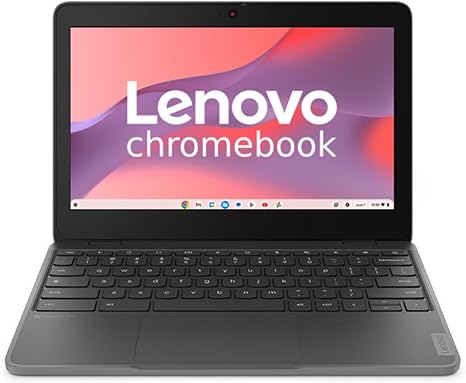
Welcome to “Reviews inside tv”! Today, we’re looking at the Lenovo 100e Chromebook Gen 4, a lightweight, budget-friendly option that promises to offer efficient performance for students and casual users. With an 11.6-inch display, ARM-based octa-core processor, and a sleek graphite gray design, this Chromebook seems like a practical solution for everyday tasks, but is it the right choice for you? Let’s take a deeper look.
The Lenovo 100e Chromebook Gen 4 is powered by an octa-core ARM processor, combining the performance of Cortex A76 and Cortex A55 cores. In everyday use, this means solid multitasking and a smooth experience when handling web browsing, word processing, or even streaming videos. You’ll find this setup adequate for light tasks like checking emails, making video calls, or hopping between Google Docs and spreadsheets. The octa-core design helps the Chromebook handle multiple processes efficiently, so you won’t be slowed down when juggling several apps at once.
As for RAM, you get 8 GB, which is a great starting point for a Chromebook in this price range. With 8 GB, you’ll notice smooth performance even when you have multiple tabs open and switch between applications. However, if you’re looking for more demanding workloads like photo editing or more intensive multitasking, this amount of memory might show some limitations in speed, but for most users, 8 GB will offer a good balance of performance and efficiency.
The 64 GB of flash storage may seem limited, but that’s typical for Chromebooks, which rely heavily on cloud storage. For students or users who need quick access to online apps and documents, the storage won’t be much of a hindrance. However, if you plan on storing a lot of offline files like videos or games, you’ll likely run into space limitations sooner rather than later. The storage is also based on flash memory, so it offers quick boot times and fast file access, but keep in mind it’s not as fast or spacious as the more expensive SSDs found in higher-end models.
The 11.6-inch HD display offers a resolution of 1366 x 768, which is decent for a Chromebook in this category. While the resolution isn’t as sharp as a 1080p screen, it’s sufficient for day-to-day tasks like browsing the web, watching movies, or reading articles. The colors are vibrant, and the wide viewing angles mean you won’t have to squint when showing something to a friend. However, if you’re hoping for a high-end display, especially for creative work or media consumption, you might want to look elsewhere. That said, for an entry-level device, the display holds its own.
Now, let’s talk about battery life. The Lenovo 100e is equipped with a battery that offers up to 10 hours of usage on a single charge, which is pretty solid for a Chromebook in this range. Light office work, streaming, and browsing should get you through an entire school or work day without needing to plug in. The 11.6-inch display and efficient ARM processor help keep the battery consumption low. Charging is fairly quick too, making this an easy laptop to power up between classes or during short breaks.
In terms of thermals, the Lenovo 100e remains cool under most everyday tasks. The fan isn’t particularly loud, but don’t expect it to stay silent when running multiple apps or during video calls. You might hear it hum occasionally, but it’s not overly disruptive. The laptop remains comfortable on your lap or desk during extended use, and there’s no significant heat buildup that would affect performance. While it won’t be the most powerful device for heavy workloads, it certainly handles light tasks with ease.
The keyboard on the Lenovo 100e Chromebook is solid for its class. The keys have a decent amount of travel, making typing comfortable for general work and school tasks. While you won’t get the tactile feel of a premium laptop, the keys are responsive, and the layout is easy to get used to, especially with the compact design. The trackpad is also responsive, with no issues in terms of tracking or click accuracy, which is great for day-to-day use.
Connectivity options are relatively basic but sufficient for a Chromebook. You’ll find two USB-C ports, a USB-A port, a headphone jack, and a microSD card slot. This setup should be enough for connecting external devices like a mouse, headphones, or external storage, though you won’t find HDMI or Ethernet ports here. For most users, especially those using cloud-based applications, this won’t be an issue, but it’s worth noting that you might need adapters for some peripherals.
Let’s take a brief detour for a moment—if you’re finding this review useful, don’t forget to hit that like button and subscribe for more in-depth reviews. It really helps us keep these reviews coming, so be sure to tap the bell for notifications on future uploads!
Back to the review. One of the standout features of this Chromebook is its portability. Weighing in at just around 2.5 pounds, it’s incredibly light and easy to carry around in a backpack. Whether you’re heading to class or taking it to a coffee shop, the 100e won’t weigh you down. Its slim profile means it won’t take up much space in a bag, making it a great option for students or anyone who needs a compact device for on-the-go productivity.
As for value for money, the Lenovo 100e Chromebook Gen 4 is a strong contender for anyone on a tight budget. Its performance, especially for light tasks, is more than adequate, and the portability is a big plus. However, if you’re a heavy multitasker or need higher-end performance for gaming or video editing, you might find this laptop lacking. It’s definitely not built for intensive workloads, but for students, office workers, or casual users who primarily work with web apps, it offers great value.
In comparison to similar devices like the HP Chromebook 11a or the Acer Chromebook 311, the Lenovo 100e stands out with its solid build quality and dependable performance. However, if you’re willing to stretch your budget just a little, you might find models with higher-resolution displays or additional storage options. The decision really comes down to your specific needs—if you just need a Chromebook to handle everyday tasks with ease, this one fits the bill perfectly.
In terms of build quality, the Lenovo 100e is made with a sturdy plastic body that feels durable but not necessarily premium. It’s lightweight and resistant to everyday wear, but it doesn’t have the high-end materials that some more expensive Chromebooks feature. For the price, though, it’s a solid, reliable build that should withstand the rigors of a student’s daily routine.
As for customer support, Lenovo generally has a good reputation for providing warranty and support options, but you might need to check specific terms for your region. The brand offers a standard 1-year warranty, which covers most repairs and issues that might arise during regular use.
To wrap up, the Lenovo 100e Chromebook Gen 4 is a solid choice for students, casual users, and anyone in need of a basic, budget-friendly laptop for everyday tasks. While it’s not built for heavy workloads or high-end creative tasks, it delivers what it promises: a lightweight, affordable laptop with decent performance, battery life, and portability. If you’re in the market for something simple and functional without breaking the bank, this could be a perfect fit.
Thanks for watching! If you’re considering the Lenovo 100e, let us know your thoughts in the comments below. Feel free to ask any questions you may have or share your own experience if you already own one. And as always, don’t forget to like, subscribe, and hit the bell icon for more reviews. Until next time, stay tech-savvy!
Available to buy here:


