

Available to buy here:
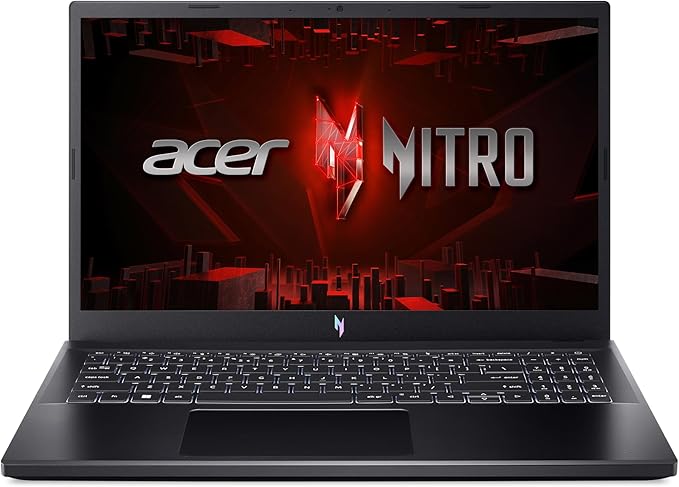
Welcome back to “Reviews inside tv”! Today, we’re going to be taking a closer look at the Acer Nitro V Gaming Laptop, a machine designed to cater to high-performance gaming and content creation alike. With powerful specs that promise smooth, immersive experiences, the Nitro V is packing some serious hardware under the hood. Let’s break it down and see if it’s worth your attention.
Starting with the core specs, this laptop is powered by the Intel Core i9-13900H processor, one of Intel’s latest chips from the 13th generation. With 14 cores and a maximum clock speed of up to 5.4 GHz, the i9-13900H ensures this laptop can handle not only intensive gaming but also demanding creative tasks like video editing and 3D rendering. Whether you’re gaming, working on complex projects, or running multiple applications at once, this CPU is ready to push the limits.
Paired with the Intel processor is the NVIDIA GeForce RTX 4060 Laptop GPU, a fantastic choice for gamers who want to experience lifelike graphics. With support for DLSS 3.5, this GPU enhances ray tracing and upscales graphics for smoother, more immersive gameplay. The RTX 4060 is capable of running demanding titles like Cyberpunk 2077 and Call of Duty: Warzone at solid frame rates, even with some of the more visually intense settings cranked up.
Memory-wise, the Acer Nitro V comes with 16GB of DDR5 RAM. This is a significant upgrade over the older DDR4, offering faster speeds and better multitasking. Whether you’re juggling multiple browser tabs, running productivity apps, or jumping between games and creative software, this amount of RAM should keep everything running smoothly. If you find yourself needing more, this laptop can be upgraded to a maximum of 32GB, giving you room to grow as your needs change.
For storage, the Nitro V includes a 1TB PCIe Gen 4 SSD, which offers lightning-fast read and write speeds. This is perfect for gaming and creative work, as it dramatically reduces load times for large games, applications, and projects. Plus, with two PCIe M.2 slots available, you can easily expand your storage down the line if you need more space.
Now, let’s talk about the display. The 15.6-inch FHD IPS screen boasts a 180Hz refresh rate, making it a fantastic option for competitive gamers who need fast, responsive visuals. With a high refresh rate like this, you’ll experience ultra-smooth gameplay, especially in fast-paced games where every frame counts. The color accuracy and viewing angles are also solid, making it a decent choice for creators who want a vibrant display for photo and video work. And with an 82.64% screen-to-body ratio, the slim bezels ensure that your gaming experience is immersive without distraction.
Battery life on gaming laptops is often a point of concern, but Acer has designed the Nitro V to balance performance and longevity. While gaming laptops aren’t known for long battery life, you can expect around 5 to 6 hours of light usage like web browsing or video streaming. Heavy gaming sessions will naturally drain the battery faster, but with Wi-Fi 6 support, you’ll have a fast and stable internet connection for online gaming, and charging the device is quick thanks to the Thunderbolt 4 port.
Speaking of ports, the Nitro V doesn’t disappoint. It’s packed with connectivity options: a USB-C 3.2 Gen 2 port, USB 3.2 Gen 1 ports, an HDMI 2.1 port, a headphone jack, an Ethernet port, and a Thunderbolt 4 port that supports power, data transfer, and video output. Whether you’re connecting external storage, a high-res monitor, or gaming accessories, the Nitro V has you covered.
In terms of thermals, the dual-fan cooling system in this laptop does a good job of keeping things cool during intense gaming sessions. The fans are relatively quiet under normal use, though they can get a bit louder when the laptop is under heavy load. During gaming, the keyboard deck and underside may get warm, but they don’t get uncomfortably hot. Acer’s cooling system prevents significant thermal throttling, ensuring that the laptop maintains good performance without excessive heat buildup.
When it comes to keyboard and trackpad, the Nitro V offers a backlit keyboard that’s comfortable for long gaming sessions. The key travel is decent, and the layout includes a number pad, which can be handy for productivity tasks. The trackpad is accurate and responsive, though if you’re serious about gaming, you’ll probably prefer using a mouse. Acer also includes AI-powered noise reduction technology through PurifiedVoice and PurifiedView, making communication crystal clear during your gaming sessions.
The build quality feels solid, with a chassis made of a mix of plastic and metal. It’s not as premium-feeling as some high-end gaming laptops, but at 4.66 pounds, it’s still portable enough to carry around, especially if you need a laptop that’s both powerful and relatively easy to transport. The design is futuristic, with gradient colors that look cool but may not be to everyone’s taste.
When it comes to gaming performance, the RTX 4060 GPU paired with the i9-13900H is a solid combination. Based on benchmarks from reliable sources, you can expect around 90 FPS in titles like Cyberpunk 2077 at medium to high settings with ray tracing enabled, with a slight drop in FPS in more demanding scenes. The 180Hz display is more than enough to handle the FPS output, ensuring smooth visuals. In less graphically intense games, you’ll see higher frame rates, especially if you lower settings or disable ray tracing.
Battery life during gaming is typical for a high-performance laptop, lasting about 2 to 3 hours depending on the game. If you’re planning on gaming for long periods, you’ll definitely want to stay near an outlet.
Now, is this laptop worth its price? It’s certainly a powerful machine with a lot of features aimed at gamers and content creators, but the price point reflects that power. For those who need top-tier performance for gaming or creative work, the Acer Nitro V offers great value. However, if you’re just looking for an everyday laptop for lighter work or media consumption, you might find more affordable options that fit your needs better.
In comparison to other gaming laptops in this price range, like the ASUS ROG Strix or the Lenovo Legion series, the Nitro V holds its own in terms of performance, though it might lag behind in build quality and premium feel. The display is fantastic for competitive gaming, but if you’re into heavy content creation, you might want to look at laptops with 4K OLED screens for better color accuracy.
So, who should buy the Acer Nitro V? If you’re a gamer or a content creator who needs a machine that can handle demanding tasks without breaking a sweat, this is a great choice. The performance is top-notch, and the cooling system helps ensure that the laptop can keep up over long sessions. However, if you’re looking for a machine purely for productivity or casual use, this might be overkill.
Thank you for watching, and if you’ve found this review helpful, don’t forget to like, subscribe, and hit the bell icon for more reviews like this. If you already own the Acer Nitro V, let us know your experience in the comments, and as always, the link to get it is in the comments box below. Until next time, keep gaming and creating!
Available to buy here:


