

Available to buy here:
Welcome to “Reviews inside tv.” Today, we’re taking a close look at the ASUS Chromebook Flip C434, a 2-in-1 laptop that combines sleek design with practicality, offering a 14-inch touchscreen and impressive portability. Whether you’re a student, professional, or just need a reliable device for everyday tasks, the C434 promises versatility with its flexible 360-degree hinge and a performance-packed setup. But does it live up to the hype? Let’s explore.
The C434 comes with an Intel Core m3-8100Y processor that clocks up to 3.4 GHz. This is an ultra-low-power chip, designed for lightweight laptops, and while it won’t crush heavy creative tasks or gaming workloads, it’s perfect for standard office work, web browsing, and media consumption. Pairing this with 8GB of DDR3 RAM ensures decent multitasking capability, allowing you to keep multiple tabs open and run productivity apps without too much slowdown. For storage, you’re looking at 64GB of eMMC, which is fine for cloud-based users but might feel limiting for those who need to store a lot of files locally.
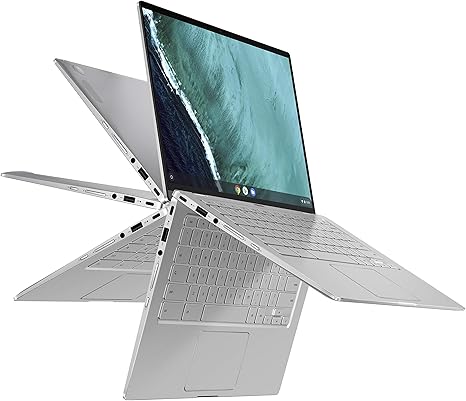
The 14-inch Full HD touchscreen is one of the standout features of this laptop. It’s a 4-way NanoEdge display, meaning the bezels around the screen are ultra-narrow, providing a larger screen area within a compact body. With a resolution of 1920×1080, everything from web pages to movies looks sharp and vibrant. And the 360-degree hinge is a great addition, allowing you to flip the screen into tent, stand, or tablet mode, offering flexibility for different tasks and workspaces. It’s not the brightest screen in the market, but it’s more than adequate for indoor use.
On the connectivity front, the C434 includes 2 USB Type-C Gen 1 ports, which are versatile for charging and connecting peripherals. It also has a USB Type-A port for older accessories, and the addition of a backlit keyboard is a nice touch, especially in low-light environments. However, it’s worth noting that the C434 doesn’t have an HDMI port or an SD card reader, which might be a dealbreaker for those who need more extensive connectivity options.
When it comes to real-world use, the C434 shines for productivity tasks. Browsing the web with many tabs, running Google Docs, or even a few simple apps runs smoothly. However, for anything more demanding—like video editing, large spreadsheet calculations, or gaming—it can feel sluggish. The Intel Core m3-8100Y is capable of handling everyday work, but it lacks the power to push through heavy-duty tasks.
Battery life on the C434 is solid. With a 48Wh battery, it can comfortably get you through a day of web browsing, office work, and media consumption. Expect around 8 to 10 hours of use depending on what you’re doing. This is a definite plus for students or professionals who need to carry the laptop around without worrying about charging.
When it comes to thermals, the C434 generally runs cool, even under a decent load. It doesn’t get uncomfortably hot, and the fan noise is minimal. However, it’s not a powerhouse, so long gaming or editing sessions might cause it to heat up, but for most tasks, it remains pretty quiet and stable.
As for the build quality, the all-aluminum metal body is one of the best features of this laptop. It’s lightweight at just 3 pounds, making it easy to carry around, and it feels solid and durable. The sleek silver finish looks professional and has a timeless appeal.
Now, let’s talk about the pros and cons. On the positive side, the C434’s design is one of its biggest selling points. It’s a beautiful, slim device that feels premium, and the 360-degree hinge gives it great flexibility for different use cases. The battery life is solid for everyday use, and the touchscreen is responsive. On the downside, the storage is quite limited, and the performance, while adequate for light tasks, won’t handle more demanding software. The lack of ports like HDMI and the absence of an SD card reader might also be frustrating for some users.
When we look at value for money, the C434 is a solid option for students, office workers, or anyone who needs a light, reliable laptop for day-to-day tasks. It’s not going to handle heavy workloads or creative tasks, but it performs admirably for its target audience. If you’re looking for something more powerful, you might need to look at alternatives like the Lenovo Flex or the HP Spectre x360, which offer better processing power and more storage options. However, for casual use, the C434’s price is pretty justified.
In terms of build quality, this is a laptop that feels premium. The aluminum chassis is sturdy, and the hinge is reliable for long-term use. It’s also backed by ASUS’s reputation for solid customer support, though as with any brand, long-term reliability can vary depending on usage.
So, who should buy the ASUS Chromebook Flip C434? If you’re in the market for a portable, well-built laptop for everyday tasks like browsing, document work, and media consumption, it’s a great option. If you’re a power user who needs more processing muscle for creative work or gaming, you might want to look elsewhere.
Thanks for watching, and don’t forget to check the comments box for the link to get the laptop. If you have any questions or thoughts, drop them below—I’d love to hear your experiences with the C434 or any other laptop you’re considering. Until next time, this is “Reviews inside tv,” and as always, we’ll catch you in the next one!
Available to buy here:


