

Available to buy here:
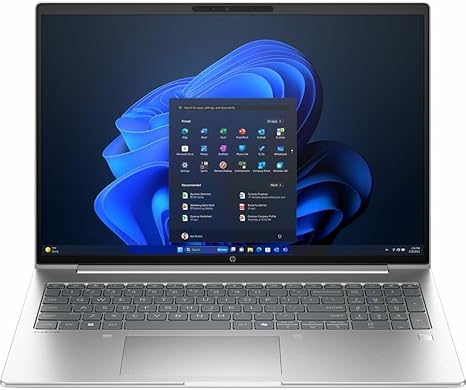
Welcome to “Reviews inside tv,” your go-to place for all things tech. Today, we’re taking a close look at the HP ProBook 4 G1i, a 16-inch touchscreen notebook that promises to balance power and portability for professionals on the go. With its sleek Pike Silver design and a feature set that includes a 12-core Intel Core Ultra 7 processor, 16GB of RAM, and a 512GB SSD, this machine is built for work. But does it deliver on that promise? Let’s find out.
At the heart of the ProBook 4 G1i is the Intel Core Ultra 7 255U processor. With 12 cores, it’s designed to tackle multitasking and demanding workloads with ease. For most office tasks like word processing, spreadsheets, and web browsing, you’ll experience smooth performance without hiccups. This chip is also capable of handling some light creative work, like photo editing and video calls with decent performance, but don’t expect it to run heavy video rendering or 3D modeling tasks like a high-end workstation would. The 16GB of RAM is a great addition to this setup, providing plenty of headroom for running multiple apps or keeping a mountain of browser tabs open without significant slowdowns.
When it comes to storage, the 512GB SSD is a solid choice, offering fast load times and quick access to files. This means you can boot up Windows 11 Pro and access your files in a flash, a big improvement over the older HDDs that many budget laptops still rely on. The SSD also translates to better overall system responsiveness, which you’ll notice the moment you start using this laptop.
The 16-inch touchscreen display boasts a WUXGA resolution of 1920 x 1200, which provides more screen real estate than the usual Full HD displays. This is ideal for those who need to see multiple windows or documents side by side. The display quality is sharp, with decent color reproduction, though it’s not as vibrant as some OLED or high-end IPS panels. The touchscreen functionality works well for everyday tasks like scrolling, pinching to zoom, and even basic creative work. However, if you’re a content creator, you might want something with a wider color gamut or a higher resolution, as this screen leans more towards practicality than artistry.
Moving on to battery life, the ProBook 4 G1i comes with a battery that’s designed to last for a full workday. Expect around 8 to 10 hours of productivity with moderate use—web browsing, document editing, and video calls. If you push it harder with video streaming or more intensive tasks, you might see it dip closer to 6 or 7 hours. Given its power-efficient processor, this battery life is pretty impressive for a laptop of this size, though, if you need more longevity, there are ultrabooks with more efficient power consumption.
As for portability, the ProBook 4 G1i is relatively light for its size, weighing in around 4 pounds. It’s not the lightest option out there, but it’s still manageable for carrying around in a bag throughout the day. The 16-inch size offers a nice middle ground, providing a larger display than typical 15-inch laptops without becoming overly bulky.
Now, let’s talk about performance under load. For most day-to-day tasks like multitasking in Excel, editing Word documents, and keeping a few YouTube videos running in the background, this laptop performs admirably. The 12-core processor allows it to juggle all these tasks without breaking a sweat. However, if you’re looking to do more than just basic office work, such as gaming or content creation, you might hit some limits. The ProBook isn’t built for heavy gaming—titles like “Cyberpunk 2077” or “Call of Duty” won’t run smoothly here. If you’re looking to game, consider something with a dedicated GPU.
Thermals and noise are also something to consider. The HP ProBook 4 G1i does a good job of staying cool during lighter tasks, with the keyboard deck and underside staying at comfortable temperatures. Under load, however, the fan does spin up, and while it’s not the loudest fan out there, it’s something to be aware of if you’re working in quiet environments. The laptop doesn’t suffer from thermal throttling, so performance remains stable during long work sessions, though it’s important to note that heavier workloads, like video editing or gaming, will push the system’s limits.
In terms of connectivity, the ProBook offers a variety of ports for both office and personal use. You’ll find standard USB-A and USB-C ports, plus HDMI for connecting to an external display. It also features an SD card reader and an audio jack, which are useful if you deal with media files or prefer wired audio connections. The laptop also supports Wi-Fi 6 for fast, reliable internet connections and Bluetooth 5.2 for seamless connections to peripherals.
When it comes to input, the keyboard offers a comfortable typing experience with decent key travel and feedback, making it suitable for long work sessions. The trackpad, while functional, could be a bit more precise—occasionally, the cursor may jump if you swipe too quickly, but it’s not a dealbreaker. There’s also the convenience of a fingerprint reader for added security, and the laptop supports Windows Hello face recognition, which makes logging in a breeze.
The HP ProBook 4 G1i’s build quality is solid, though not premium. The chassis is made from plastic, with a matte finish that resists fingerprints. It feels durable, but it’s not as sleek or rigid as some higher-end business laptops. The hinge is sturdy, though it’s not quite as smooth as those on the more premium HP EliteBook series. Over time, we expect this laptop to hold up well in everyday use, but it might not be able to take too much abuse in the long run.
So, is the HP ProBook 4 G1i worth it? It really depends on what you’re looking for. For students or professionals who need a reliable workhorse for productivity tasks, media consumption, and light content creation, this laptop offers great value. It’s got the power, display, and battery life to handle a full workday without a problem. However, for gamers or content creators who need more performance and a more vibrant display, there are other options better suited to those needs.
For the price, it competes well against other mid-range laptops. Alternatives like the Dell Inspiron or Lenovo ThinkPad X1 Carbon might offer more power or a more premium design, but they often come at a higher price. Ultimately, the ProBook shines in areas where most business laptops should: reliability, performance for office tasks, decent portability, and a solid build.
Before we wrap things up, don’t forget to hit that like button, subscribe, and ring the bell icon to stay up to date with all our latest reviews. Now, let’s finish this off.
Thanks for watching! If you’re interested in picking up the HP ProBook 4 G1i, the link is in the comments below. Feel free to drop any questions or share your own experiences with this laptop if you already own it. Catch you in the next one, and remember—there’s always more inside with “Reviews inside tv.”
Available to buy here:


