

Available to buy here:
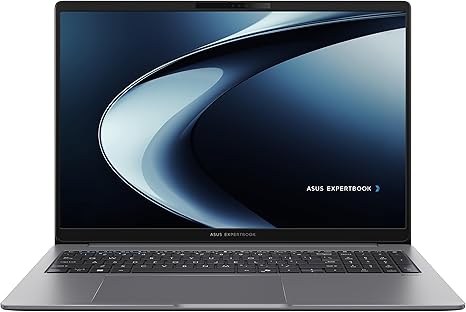
Welcome to “Reviews inside tv”! Today, we’re taking a close look at the ASUS ExpertBook P3, a business laptop that promises solid performance and advanced features tailored for professionals. With its AMD Ryzen AI5 330 Processor, 16GB of RAM, and 512GB SSD, it’s designed to handle everything from office tasks to demanding workflows. Let’s see if this laptop lives up to its promise.
The ASUS ExpertBook P3 is packed with some impressive specs. It’s powered by the AMD Ryzen AI5 330 Processor, which operates at 2.0GHz and is capable of reaching 50 NPU TOPS. Now, what does that mean in practice? Well, the AI capabilities make it a strong contender for tasks that involve automation or AI-enhanced applications. For day-to-day business work—like document editing, spreadsheets, and video calls—the Ryzen 330 has more than enough power. With 16GB of RAM, multitasking is a breeze. You can easily juggle between dozens of browser tabs, office apps, and cloud-based services without worrying about slowdowns.
The storage comes in the form of a 512GB M.2 NVMe PCIe 4.0 SSD, which offers snappy read and write speeds. This results in quicker boot times and near-instant application load times. If you’re the type who frequently accesses large files or needs to handle extensive databases, the SSD will keep things running smoothly without any noticeable lag.
The 16-inch WUXGA display (1920 x 1200) is another highlight, offering more screen real estate compared to your typical 15.6-inch laptop. The anti-glare coating helps reduce reflections, which can be a game-changer during long meetings or when working in brightly lit environments. While it’s not a 4K display, the WUXGA resolution strikes a good balance between clarity and performance, and the color accuracy will serve most professional tasks just fine.
For business users, security is always a top priority, and ASUS has equipped this laptop with enterprise-grade features. The fingerprint scanner allows for quick and secure login, while the 1080P webcam comes with a privacy shutter for those moments when you need to shut the camera off during meetings. There’s also a TPM 2.0 chip for additional data protection, and the Kensington Nano Security Slot is there for physical security—whether you’re in a coffee shop or at the office.
Let’s talk about real-world performance. If your workday consists mostly of office applications, web browsing, and video calls, the ASUS ExpertBook P3 handles everything with ease. Even with multiple tabs open, video conferencing running in the background, and a few office apps up, the performance remains smooth. You won’t experience the kind of lag that drags down productivity in more affordable models. The Ryzen 330 processor, paired with 16GB of RAM, offers smooth multitasking, and the SSD keeps everything responsive.
When it comes to media consumption, the 16-inch display shines. Whether you’re streaming videos for a quick break or watching a presentation, the anti-glare display does a decent job in most lighting conditions. The color accuracy isn’t on par with higher-end content creator laptops, but it’s perfectly fine for watching videos or looking at documents.
For content creators, while the laptop might not be your first choice for heavy video editing or 3D rendering, it still holds its own for basic photo editing and light video work. Thanks to the fast SSD and the robust CPU, light creative workflows will be smooth, but for more intense editing, you might want to consider a higher-end laptop.
Now, let’s get into gaming. The ASUS ExpertBook P3 isn’t designed to be a gaming powerhouse, but it can handle casual gaming at lower settings. Titles like Minecraft, League of Legends, and Fortnite can run decently at lower resolutions. For anything more graphically demanding, like Cyberpunk 2077 or Call of Duty: Warzone, this laptop will struggle to maintain smooth frame rates.
As for the thermals, the ASUS ExpertBook P3 doesn’t have any glaring issues. The fans stay relatively quiet during light tasks, but when you push it harder with more demanding applications, like video editing or gaming, the fans will kick in and produce some noise. During extended use, the chassis gets warm, particularly around the keyboard area, but it’s never uncomfortably hot. There’s no significant thermal throttling reported, but you might notice some performance dips during prolonged gaming or video export sessions.
Battery life is solid, with the laptop lasting around 7-9 hours under light productivity tasks like document editing, web browsing, and video calls. If you’re working on more intensive tasks, like media streaming or creative workloads, expect the battery to last closer to 5-6 hours. The charging speed is decent, but if you’re in a rush, it’s not the fastest compared to some of its competitors.
In terms of portability, the ASUS ExpertBook P3 weighs around 1.8 kg, which is fairly typical for a business laptop with a 16-inch display. It’s not the lightest option out there, but it’s still easy to carry around in a bag all day without feeling weighed down. The thickness is also manageable, and it should fit comfortably in most backpacks.
The keyboard on this laptop is comfortable for long typing sessions, offering good key travel and satisfying feedback. The trackpad is responsive, with accurate palm rejection and smooth gestures. If you’re someone who values a solid typing experience, you’ll appreciate the layout and feel of the keyboard.
When it comes to ports, the ASUS ExpertBook P3 has a good selection for business users. It includes USB-A and USB-C ports, an HDMI port for connecting to external displays, and a microSD card reader, which is great if you work with media files. It also supports Wi-Fi 7, ensuring a fast and stable connection when you need it most. The laptop doesn’t have an Ethernet port, so if you’re someone who needs wired connectivity, you might need a USB-to-Ethernet adapter.
In terms of upgradability, the 16GB of RAM is soldered, so there’s no room for expanding it. However, the 512GB SSD is upgradable, which is great if you anticipate needing more storage down the line.
Now, let’s quickly compare this laptop to some of its competitors. If you’re considering the Lenovo ThinkPad or HP ProBook series, the ASUS ExpertBook P3 stands out with its more powerful Ryzen CPU and larger 16-inch display. However, in terms of build quality, Lenovo’s ThinkPads might feel a bit more premium and offer slightly better thermals. HP’s ProBook line is also known for solid performance, but ASUS’s focus on AI capabilities and business-specific security features gives it an edge in some areas.
As for value for money, the ASUS ExpertBook P3 offers a solid mix of features for business users. At its price point, it delivers excellent performance for office tasks, solid build quality, and business-oriented features. You might find laptops with better screens or faster processors at the same price, but none of them combine all these features so seamlessly.
Overall, the ASUS ExpertBook P3 is an excellent option for business professionals who need a reliable laptop that can handle multitasking, media consumption, and light content creation. It’s not a gaming laptop or a creative powerhouse, but it excels in what it was designed for—office work, meetings, and enterprise tasks.
Thanks for watching! The link to the ASUS ExpertBook P3 is in the comments box if you’re interested. Feel free to ask any questions or share your experience if you already own one. Stay productive, and until next time—happy working!
Available to buy here:


