

Available to buy here:
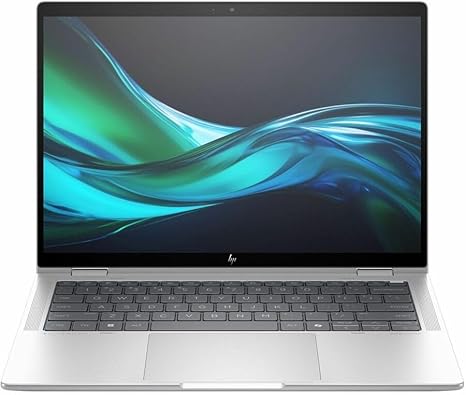
Welcome to Reviews inside tv! Today, we’re looking at the HP Elite x360 1040 G11, a 14-inch touchscreen convertible 2-in-1 notebook that promises impressive performance and versatility. This device is designed for professionals who need power and flexibility, but does it deliver? Let’s take a closer look at its specs and real-world performance to see if it lives up to the hype.
The HP Elite x360 1040 G11 is equipped with Intel’s Core Ultra 7 165H processor, a 14-core, 20-thread powerhouse that reaches up to 5 GHz with Turbo Boost. This makes it more than capable for everything from office tasks like spreadsheets and document editing to more demanding workloads such as video editing and multi-tasking with several applications open at once. If you’re the type who needs to switch between several heavy applications without any hiccups, this CPU will feel like a breeze, offering a seamless experience. Alongside that, the 32 GB of RAM ensures smooth multitasking, whether you’re dealing with a large number of browser tabs or running multiple software simultaneously.
When it comes to storage, the 1 TB SSD is no slouch either. It delivers quick read and write speeds, meaning boot times and file transfers will be lightning fast, and accessing large files will be smooth. Plus, with the SSD technology, you’ll benefit from improved durability and energy efficiency compared to older SATA-based drives. For those of you who work with large video or photo files, the speed and capacity of this storage can really make a difference in your workflow.
The 14-inch display of the Elite x360 is a WUXGA touchscreen, offering a 1920 x 1200 resolution. While it might not have the pixel density of a 4K OLED or mini-LED panel, it strikes a solid balance between clarity and energy efficiency, which is great for extended working hours. The touchscreen feature adds that extra bit of functionality, particularly in tablet mode, whether you’re jotting down notes or navigating through applications. The color accuracy and brightness are decent, but if you’re a content creator looking for industry-leading sRGB or DCI-P3 coverage, you might want to look elsewhere.
When it comes to GPU performance, this model doesn’t include a dedicated graphics card, but the integrated Intel Iris Xe GPU will handle casual gaming and light creative tasks. It’s perfect for web browsing, streaming, and even some light photo editing. However, if you’re into 3D rendering or AAA gaming titles, this laptop might not be your best option. For everyday use, though, it will certainly do the job.
Now let’s talk thermals and performance. With that powerful Core Ultra processor, you might expect some heat buildup, but HP has done a good job keeping things cool under moderate workloads. During light use, the laptop stays relatively cool on the keyboard and underside, making it comfortable for long typing sessions. However, when pushing the machine with more demanding tasks like video editing or gaming, the temperature will rise, and you’ll hear the fans kick in. While it’s not unbearably loud, it’s noticeable under heavy load. It’s definitely not the quietest machine when you’re pushing it to its limits, but for most tasks, it’s fairly tame.
Battery life is always a concern with such powerful specs, but here, the 3-cell 66 Wh battery does a good job. Under light to moderate use, like web browsing or word processing, you can expect anywhere from 8 to 10 hours of battery life. This is great for a full workday, but if you’re streaming or editing video, you’ll probably need to plug it in earlier. Charging is fairly quick, and the power brick is compact enough to be travel-friendly, though not the smallest in its class.
Let’s move on to the keyboard and trackpad. The keyboard feels solid with decent key travel, providing a comfortable typing experience for long hours of work. The layout is pretty standard, with a full set of function keys and a power button in the upper right corner. The trackpad is large, responsive, and smooth, offering good palm rejection for comfortable use. There’s no noticeable lag, and clicking feels natural. One feature worth mentioning is the fingerprint reader embedded in the power button, which is fast and reliable, adding a bit of extra security and convenience.
In terms of connectivity, the HP Elite x360 1040 G11 comes with a healthy array of ports. You get a couple of USB-A ports, two Thunderbolt 4 USB-C ports, an HDMI port, and a full-size SD card reader. This ensures you’ll have plenty of options for connecting external displays, storage devices, and accessories. The inclusion of Wi-Fi 6 ensures that your internet connection will be fast and stable, even on crowded networks. Bluetooth 5.2 also helps with peripheral connectivity. However, it’s worth noting that there’s no Ethernet port, so if you rely on a wired connection, you’ll need to invest in a USB-C to Ethernet adapter.
The build quality of the Elite x360 is excellent, featuring a sleek, lightweight chassis that feels premium. The aluminum finish is solid, and despite being a convertible, the hinge feels sturdy, allowing you to easily flip the screen into tablet mode. At 2.9 lbs, it’s light enough to carry around in a bag all day, making it great for professionals on the go. The laptop is just thick enough to house the necessary cooling components, but it still manages to remain portable.
In terms of value for money, this laptop is priced on the higher end, but you are getting top-tier specs for the price. With the combination of the Intel Core Ultra 7 processor, 32 GB of RAM, 1 TB SSD, and a solid build, it’s a great option for professionals who need both power and flexibility in a portable package. If you’re primarily looking for gaming or intensive creative workloads, this might not be the ideal choice, but for productivity, media consumption, and light creative tasks, it excels.
If you’re looking for alternatives, you might consider devices like the Dell XPS 13 2-in-1 or the Lenovo ThinkPad X1 Yoga, which offer similar features and performance, but at a comparable price point. The HP Elite x360 stands out for its sheer power, versatile design, and solid build, though it could benefit from a more premium display for creators.
So, who is this laptop for? If you’re a professional who values power and flexibility in a slim, portable package, this machine will certainly meet your needs. It’s perfect for office workers, students, and even light content creators who don’t need cutting-edge graphics. However, if you’re after a laptop with better graphics performance for gaming or 3D work, you might want to look at dedicated gaming or creator-focused machines.
Thanks for watching Reviews inside tv! If you’re interested in the HP Elite x360, the link is in the comments box below. Feel free to share your thoughts or ask any questions you might have. Until next time, happy computing!
Available to buy here:


