

Available to buy here:
Welcome to Reviews inside tv! Today, we’re looking at the HP Pavilion x360 14-inch 2-in-1 Laptop, a versatile device designed for everyday use with an emphasis on portability and functionality. Whether you’re a student, professional, or casual user, this flexible laptop promises to handle all your daily tasks. But how does it stack up? Let’s take a closer look.
The HP Pavilion x360 is equipped with an Intel Core i3-1005G1 processor, a solid entry-level chip that offers six cores for dependable multitasking. This processor is ideal for basic computing tasks like web browsing, document editing, and streaming. You won’t be tackling heavy creative workloads or high-end gaming with this CPU, but for most day-to-day tasks, it gets the job done. It’s paired with 8GB of DDR4 RAM, which offers a decent amount of headroom for light multitasking, though you might notice some lag with more demanding apps or large spreadsheets. For storage, the 256GB PCIe NVMe SSD is a standout feature. It’s significantly faster than traditional hard drives, reducing boot times and speeding up file transfers. The responsiveness of this SSD ensures that the laptop feels snappy, even when switching between apps or accessing files.
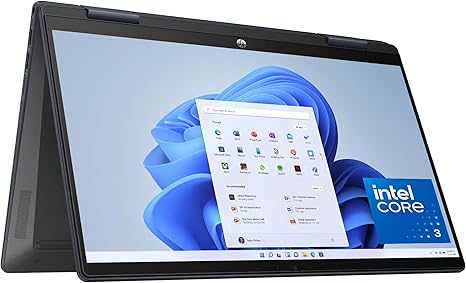
When it comes to visuals, the HP Pavilion x360 shines with its 14-inch Full HD IPS touchscreen display. The narrow bezels maximize the screen area, offering a more immersive viewing experience in a compact form factor. The display provides crisp, clear visuals with wide 178-degree viewing angles, making it easy to share content with friends or coworkers. While it’s not an OLED or mini-LED screen, the IPS panel delivers solid color accuracy and brightness for everyday use, though it’s not quite as vibrant as premium displays found on higher-end devices.
Battery life is always a concern with laptops, especially with a 2-in-1 model. HP claims up to 8 hours of battery life, which is realistic for light office work and media consumption. Of course, this will vary depending on your usage, but under normal conditions like web browsing and video streaming, expect a solid performance throughout the day. The 360-degree hinge is a nice touch, offering flexibility for different use cases like writing, watching movies, or working in tablet mode. However, keep in mind that battery life may decrease under heavy use, such as gaming or video editing, and it may not last as long when running intensive tasks.
Let’s talk about performance. The Intel Core i3 processor is a solid choice for light to moderate workloads, but it’s not built for high-end gaming or resource-heavy tasks. In terms of gaming, this laptop uses integrated Intel UHD Graphics, which means it can handle older or less demanding titles, but don’t expect to run modern games at high settings. For everyday tasks like watching HD videos, light photo editing, and casual gaming, the Intel Graphics can handle it just fine, though you’ll likely experience lower frame rates in graphically intensive games like Cyberpunk 2077 or Call of Duty: Warzone.
On the thermals front, the HP Pavilion x360 remains fairly cool under typical use. The fan does ramp up during more intensive tasks, but it’s not overly noisy. It’s quiet enough to not disrupt your workflow, though the fan can become audible during prolonged gaming or when running heavy applications. The laptop’s cooling system does a decent job, but don’t expect it to maintain peak performance under long sessions of gaming or video editing without some throttling. The keyboard and trackpad offer a comfortable typing experience, especially for students or office workers who spend a lot of time typing. The key travel and feedback are satisfying for general use, though you might notice a bit of flex in the keyboard deck when typing with more force. The trackpad is responsive, and while it’s not as large as some premium laptops, it’s still accurate enough for everyday tasks.
In terms of ports and connectivity, the HP Pavilion x360 is pretty well-equipped for a device in this price range. You get two USB Type-A ports, a USB Type-C port, an HDMI output, and an SD card reader, making it easy to connect external displays or accessories. Wi-Fi 5 and Bluetooth 5.0 are supported, ensuring stable connections for streaming, video calls, and file transfers. The laptop’s limited 8GB of RAM is soldered, so there’s no option for upgrading later. This means it might not have the longevity of some higher-end models, but for everyday users, this isn’t a deal-breaker.
Battery life is another key factor to consider. As mentioned earlier, you can expect about 8 hours of use for everyday tasks like word processing and media consumption. If you’re working on a heavy workload, like editing videos or rendering large files, that time will drop. But if portability and everyday performance are your priorities, the Pavilion x360 does well in terms of battery longevity. When it comes to charging, the device charges relatively quickly, although the included charger is on the bulkier side, which may impact portability.
As for build quality, the HP Pavilion x360 is made from a combination of plastic and recycled materials, which gives it a modern look without feeling overly cheap. It’s lightweight, making it easy to carry around, and its slim profile makes it easy to slip into a bag without much hassle. The 360-degree hinge is robust and smooth, allowing you to transition between laptop and tablet modes with ease. However, the overall build quality doesn’t feel as premium as more expensive laptops, but it’s more than adequate for most users.
So, what’s the bottom line? The HP Pavilion x360 14-inch 2-in-1 Laptop is a solid choice for those who need an affordable, flexible laptop for light tasks like browsing, document editing, and streaming. It’s not built for heavy gaming or professional-grade content creation, but it excels in day-to-day tasks and offers a decent display for media consumption. The design is sleek, and the build quality is good for the price, making it a great option for students, casual users, or anyone looking for a reliable, budget-friendly laptop.
If you’re looking for something with a bit more power for gaming or creative work, you might want to consider stepping up to a more powerful machine with a dedicated GPU, like the Lenovo IdeaPad or an entry-level gaming laptop. But if your needs are straightforward, the HP Pavilion x360 delivers solid value for the price.
Thank you for watching! Don’t forget to check out the link to get the HP Pavilion x360 14-inch 2-in-1 Laptop in the comments box below. If you’ve got any questions or already own this laptop, drop a comment and share your thoughts. See you in the next video, and remember—stay ahead with Reviews inside tv!
Available to buy here:


