

Available to buy here:
Welcome to “Reviews inside tv,” where we bring you the latest, most in-depth reviews to help you make informed decisions about your next tech purchase. Today, we’re taking a close look at the Microsoft Surface Pro 8, a device that promises the performance of a laptop and the versatility of a tablet. With its 13-inch touchscreen, iconic built-in kickstand, and detachable keyboard, is it the perfect 2-in-1 device you’ve been waiting for? Let’s find out.
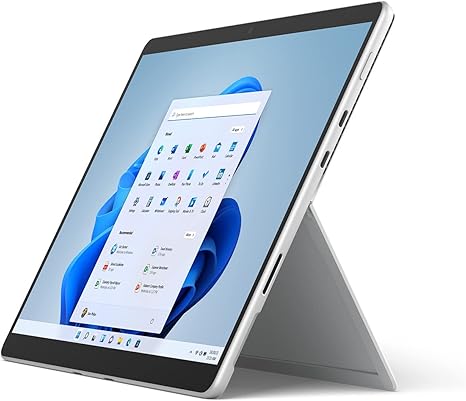
The Surface Pro 8 is built on the Intel Evo platform, a high-performance architecture designed to deliver fast processing, solid graphics performance, and impressive battery life all while maintaining a slim profile. This model comes equipped with the Intel Core i5 processor, 8GB of RAM, and a 512GB solid-state drive, making it ideal for those who need a device that can handle a variety of tasks—whether that’s office work, light creative projects, or media consumption. In terms of design, the Surface Pro 8 continues the sleek, premium build that the Surface series is known for, with a platinum finish that is both stylish and professional.
Starting with the processor, the Intel Core i5 chip, paired with the Intel Evo platform, brings a good balance of performance and efficiency. It’s more than capable for office tasks like web browsing, document editing, spreadsheets, and video calls. The 8GB of RAM is a solid amount for everyday multitasking, though you might feel some limitations if you’re working with heavy, resource-demanding applications, such as video editing software. Fortunately, the SSD storage ensures quick boot times and snappy load speeds for programs, making this device more responsive compared to models with traditional hard drives.
As for the display, the Surface Pro 8’s 13-inch PixelSense touchscreen delivers sharp visuals with a 2880 x 1920 resolution. With vibrant colors and high pixel density, it’s a great screen for media consumption, offering bright, clear images whether you’re watching Netflix or working on detailed design work. The 120Hz refresh rate is an upgrade from previous models and makes navigating the interface buttery smooth—perfect for a more fluid, responsive experience when switching between apps or scrolling through websites. The touchscreen itself is highly responsive, and the included Surface Slim Pen 2 provides a natural drawing and note-taking experience, thanks to its low latency and high accuracy.
Now, let’s talk performance. The Surface Pro 8 does a solid job for everyday tasks, but what about more demanding use cases like content creation or gaming? For video editing, programs like Adobe Premiere Pro run decently, but if you’re handling large files or doing heavy exports, you may notice some slowdowns, especially with the base configuration. For gaming, don’t expect the Surface Pro 8 to be your go-to machine. While it can handle casual games and some older titles, more graphically demanding AAA games won’t run at high settings. It’s not a dedicated gaming machine by any means, but for light gaming or casual play, it should suffice.
Battery life on the Surface Pro 8 is quite impressive. With its slim form factor and efficient Intel Evo platform, you can expect anywhere from 8 to 10 hours of use under typical conditions like web browsing, document editing, and media consumption. This means it’s a solid choice for students, office workers, or travelers who need a reliable device for extended periods without constantly hunting for an outlet. Charging is also quick, and with the compact charger, it’s easy to toss into a bag and take on the go.
When it comes to keyboard and trackpad, the Surface Signature Keyboard doesn’t disappoint. It offers a traditional typing experience with full key travel and a backlit design, making it comfortable for extended typing sessions. The key layout is standard, but if you’re used to a larger keyboard or a number pad, you might find it a bit cramped. The trackpad is spacious, responsive, and supports multi-touch gestures with ease, making navigation simple and intuitive.
As for ports, the Surface Pro 8 has a solid selection for its compact form. You get two USB-C ports, a microSDXC card reader, and a 3.5mm audio jack. The lack of traditional USB-A ports may be a downside for some, especially if you rely on older peripherals, but the inclusion of Thunderbolt 4 support means you can hook up external displays or high-speed storage devices with ease. The Wi-Fi 6 support ensures fast and stable internet connections, and Bluetooth 5.1 allows for smooth pairing with accessories like wireless headphones or a mouse.
One area where the Surface Pro 8 shines is its build quality. Constructed from premium materials, it feels solid and robust while maintaining a lightweight profile of just 1.96 pounds, making it extremely portable. The detachable keyboard adds to its versatility, allowing you to quickly switch between laptop and tablet modes depending on your needs. As for thermals, the Surface Pro 8 runs relatively cool under typical usage, with minimal fan noise. However, when pushing the system with intensive workloads, the fan can become audible, though it’s not overly distracting.
For those of you looking for a 2-in-1 device, the Surface Pro 8 hits the sweet spot. It’s lightweight, highly portable, and offers the flexibility of both a laptop and a tablet. It’s perfect for students, professionals, or creatives who need a versatile device for work, media consumption, and light creative tasks. However, if you’re a heavy gamer or someone who needs to handle more demanding creative tasks like 4K video editing or 3D rendering, you might want to look elsewhere, as the Surface Pro 8 doesn’t quite have the horsepower for those types of workloads.
Now, if you’re still with us, don’t forget to like, subscribe, and hit the bell icon for more in-depth reviews like this one. It helps us bring you even more valuable insights into the best tech products out there.
To sum up, the Surface Pro 8 is a fantastic device for those who need the performance of a laptop and the portability of a tablet. It delivers excellent display quality, solid performance for most tasks, and good battery life, all wrapped up in a sleek, premium design. The downsides are fairly minor, mostly centered around its limited gaming and heavy creative capabilities. At its current price point, it’s a compelling choice for those in need of versatility, especially if you value portability and ease of use. If you’re after an ultra-compact laptop with tablet flexibility, this is definitely one to consider.
Thanks for watching! Feel free to drop a comment below if you have any questions or if you’re already using the Surface Pro 8—let us know what your experience has been. Until next time, keep enjoying the tech that makes life better!
Available to buy here:


