
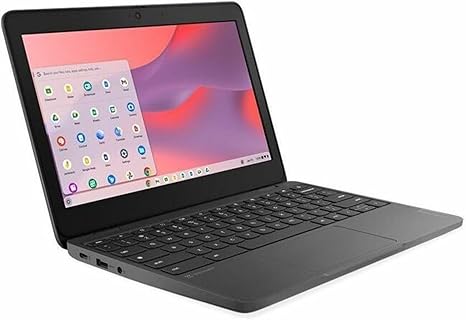

Available to buy here:
Welcome to Reviews inside tv, where we break down the tech you need to know. Today, we’re checking out the Lenovo 100e Chromebook Gen 4, a budget-friendly 11.6-inch Chromebook that’s designed for basic tasks but promises ease and reliability for everyday use. With an Intel N-Series N100 processor, 4 GB of RAM, and 32 GB of flash storage, it’s positioned as a no-frills option for students and casual users alike. But does it live up to the expectations for the price? Let’s find out.
The Lenovo 100e Chromebook Gen 4 comes equipped with an Intel N100 CPU, which is a part of Intel’s N-Series of processors. This is an entry-level chip, so it’s not going to handle high-performance tasks like gaming or video editing, but it’s built to handle web browsing, document work, and streaming without a hitch. For those who do mostly light office tasks or need a secondary device for quick, everyday use, this chip provides more than enough horsepower. The 4 GB of RAM helps keep things running smoothly during multitasking, although, in more demanding environments, you might notice some lag or stuttering, especially with multiple tabs open.
On the storage side, the 32 GB flash memory is fairly limited, especially for those who need to store larger files, but this is typical for a Chromebook in this price range. Fortunately, Chromebooks are designed to work with cloud storage, so if you’re comfortable with relying on Google Drive or other cloud services, the storage here should suffice. This configuration works well for those who don’t need to install a ton of software or keep large files on their device.
When it comes to the display, the Lenovo 100e features an 11.6-inch, 1366 x 768 resolution screen. While this resolution isn’t the sharpest out there, it’s perfectly adequate for watching movies or browsing the web. Colors may not pop as much as on higher-end displays, but it gets the job done for day-to-day tasks. For media consumption, it’s not a 4K experience, but it certainly works for streaming videos and casual watching. Just don’t expect mind-blowing detail or vibrant colors like you’d get on an OLED or high-end IPS display.
Battery life is always an important factor in a Chromebook, and here the Lenovo 100e holds up well. You can expect around 8 to 10 hours of use on a single charge, depending on how intensively you’re using it. This makes it a solid choice for students or anyone needing a device to last throughout the workday or for light travel. Charging speed is decent as well, though it’s not the fastest charger out there—it’ll get you up to full power in about 2.5 hours, which isn’t bad for a budget device.
The keyboard and trackpad are another area where the Lenovo 100e Chromebook Gen 4 keeps things simple. The keyboard is comfortable for typing, though the key travel is a bit shallow, which could cause some discomfort during extended typing sessions. For students, this might not be a dealbreaker, but if you do a lot of typing, you may want to consider whether that suits your needs. The trackpad is responsive and easy to use, but again, don’t expect the smooth precision of higher-end models. It’s functional, though, and gets the job done for the tasks at hand.
In terms of ports and connectivity, the 100e doesn’t offer a lot of options. You get a USB-C port, a USB-A port, and an HDMI output, along with a headphone jack. This is fine for light use but may not be enough if you need to connect multiple devices or peripherals at the same time. Wi-Fi and Bluetooth are included, and both perform adequately for day-to-day tasks like video calls, web browsing, and media streaming.
Now, let’s talk about how this laptop handles the heat and noise. For the most part, under light use, the Lenovo 100e remains cool and quiet. However, if you push it too hard with multiple tabs or heavy web apps, you might hear the fan kicking in. Thankfully, it’s not a loud fan, and it’s unlikely to become a distraction during regular use. The keyboard and chassis do get warm during extended use, but it’s not uncomfortable to hold or use on your lap.
For portability, the Lenovo 100e Chromebook is light and compact, weighing in at just 2.42 pounds. It’s easy to carry around, and its small 11.6-inch form factor makes it an ideal device for students who need to throw it in a backpack or carry it around campus. It’s also a good option for anyone who needs a second device for simple tasks while traveling.
When it comes to value for money, the Lenovo 100e delivers exactly what you’d expect at this price point. For around $200, you’re getting a basic Chromebook that covers all your essential needs without breaking the bank. It’s not the fastest or the most powerful device, but if you’re just looking for a reliable machine for web browsing, office tasks, and media consumption, it gets the job done without any unnecessary frills. The biggest downside is the limited storage, but for anyone comfortable with cloud storage, it’s not a major issue.
In terms of competitors, this model sits in a very budget-friendly category, with similar devices from brands like Acer, HP, and ASUS. These models generally offer similar specs, with comparable CPUs, RAM, and storage options. What sets the Lenovo 100e apart is its solid build quality and its no-nonsense approach to what a budget Chromebook should be. If you’re considering an alternative, take a look at the HP Chromebook 11a or the Acer Chromebook 11, which are similar in price and functionality, though they might offer slightly different designs or port options.
Overall, the Lenovo 100e Chromebook Gen 4 is a no-frills option for those looking for a basic, affordable laptop. It’s perfect for students or anyone who needs a reliable device for light tasks. It doesn’t shine in the performance or display departments, but for the price, it offers solid value. If you’re looking for a higher-end experience with more power or a better display, you might want to look elsewhere, but for casual users and students, it’s a solid choice.
Thanks for watching, and if you’re interested in the Lenovo 100e, you can find the link to purchase it in the comments box below. Don’t forget to like, subscribe, and hit the bell icon for more reviews from Reviews inside tv. Let us know your thoughts if you already own this Chromebook, or if you have any questions. Until next time, keep it simple and keep it smart!
Available to buy here:


