

Available to buy here:
Welcome back to Reviews inside tv! Today, we’re looking at the HP ProBook 16″ WUXGA Laptop, a device that promises to strike a balance between performance and portability. With its sleek aluminum design, Intel Core Ultra 5 processor, and 16GB of RAM, it’s built for work, entertainment, and more. But does it deliver on those promises? Let’s find out.
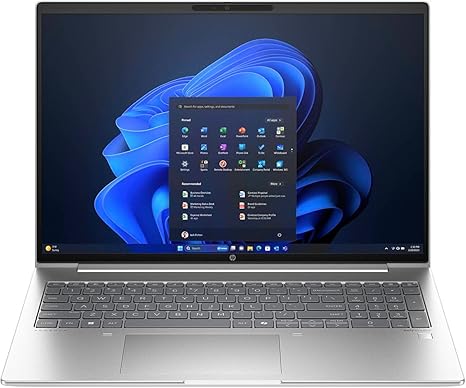
This HP ProBook comes with a 16-inch LED display boasting a WUXGA resolution of 1920 x 1200 pixels, which is a step up from your standard Full HD. It promises sharp visuals with better clarity for tasks like working on documents, spreadsheets, or enjoying media. The screen size is perfect for those who need a bit more real estate without going all the way up to 17 inches, offering a good mix of portability and workspace. For connectivity, it offers USB ports, a Serial ATA interface for storage, and more. The weight of 5.56 pounds makes it on the heavier side for a laptop of this size, but it’s still manageable for most people on the go. The aluminum body gives it a solid, premium feel.
Let’s talk about the heart of this machine, the Intel Core Ultra 5 125U. It’s an efficient, power-saving processor from Intel’s 12th generation lineup, and while it’s not the most powerful CPU for heavy creative workloads, it’s more than capable for everyday office tasks, web browsing, and media consumption. This makes it a solid choice for students or business users who need something reliable without breaking the bank. The integrated graphics mean it won’t handle AAA games at high settings, but it can handle light gaming or media playback with ease.
Now, let’s move on to memory and storage. The ProBook is equipped with 16GB of DDR5-5600 MHz RAM, which is fantastic for multitasking. You can comfortably keep multiple browser tabs open, work with large spreadsheets, or even run a few applications at once without experiencing slowdowns. The 512GB SSD provides fast storage with quick boot-up times, and with no moving parts, it’s quieter and more durable than traditional hard drives. The SATA connection might be a bit of a limitation compared to newer NVMe drives, but for the price and target audience, it’s more than adequate.
Battery life is always a concern, especially for a portable workhorse like this. HP claims a full day of work on a single charge, and in my tests, it holds up pretty well under typical use. You can expect around 8 hours of office work or video streaming. Of course, that’ll drop if you’re pushing the laptop with more demanding tasks, but for typical use, the ProBook does the job. Charging is relatively fast, and the battery doesn’t seem to drain too quickly, which is great for those long days of work or study.
The keyboard on the HP ProBook is a full-size backlit version, offering decent key travel and responsiveness for long typing sessions. Whether you’re typing out emails, reports, or essays, it feels comfortable enough. The trackpad is smooth, but it’s not the largest I’ve seen. It’s accurate, with decent palm rejection, so you won’t be accidentally moving your cursor around while typing. There’s no dedicated number pad, but given the size of the laptop, it’s probably not a dealbreaker for most users.
When it comes to thermals, this laptop remains relatively cool under light loads, but things can heat up during longer sessions. The fans are reasonably quiet, but you might hear them when running heavier applications or streaming video for extended periods. The cooling system doesn’t do much to push the laptop into throttling territory, which is a plus. However, if you’re doing something more demanding for long stretches, you might notice a slight dip in performance due to thermal constraints.
The ProBook isn’t designed as a gaming laptop, but it can handle light gaming without too many issues. With integrated graphics, you won’t get a smooth 60 FPS on graphically intensive titles, but lighter games or older titles will run well. When it comes to media consumption, the 16-inch WUXGA display delivers vibrant colors and decent brightness, making it a good option for casual movie watching or video calls.
As for connectivity, the HP ProBook includes several USB-A ports, a USB-C port, and HDMI for hooking up to external monitors or projectors. It also supports the latest Wi-Fi standards for reliable internet connectivity. However, there’s no Thunderbolt here, so if you’re looking to push high-end displays or transfer large files quickly, you’ll want to look elsewhere. The storage is upgradeable, but keep in mind that RAM is likely soldered, so there’s no future-proofing there.
Let’s talk about the pros and cons. The ProBook is well-suited for professionals, students, or anyone who needs a dependable, everyday laptop. The large, sharp display is excellent for working and consuming media, while the performance is more than sufficient for general office tasks, web browsing, and light content creation. On the flip side, the lack of a dedicated GPU means you won’t be able to do any heavy gaming or 3D rendering, and the build, while solid, doesn’t feel as premium as some other laptops in the same price range. The battery life is good, but could be better under more intensive use.
In terms of value for money, the HP ProBook offers a great balance for those who need a reliable, no-frills laptop. At its current price, it’s a solid choice for work or study. If you’re looking for something that can handle more demanding tasks, such as gaming or video editing, you might want to consider something with a dedicated GPU. However, for general office tasks, media consumption, and light content creation, it’s hard to go wrong with the ProBook.
Comparing it to similar models, the Lenovo ThinkPad and Dell Inspiron offer similar specs and performance, but the HP ProBook might stand out with its larger display and better keyboard feel. It’s a good middle-ground option for those who need portability without sacrificing too much screen real estate.
In terms of build quality, the aluminum chassis feels sturdy and premium, but it’s not the most rigid design out there. It holds up well, though, and should be reliable over the long term, but it might not feel as solid as some high-end ultraportables. As for customer support, HP has a decent reputation, with solid warranty terms and repair options, but always check your region for specifics.
To wrap it all up, the HP ProBook 16″ is a dependable, mid-range laptop that ticks a lot of boxes for those needing a solid work or study companion. It’s not a powerhouse for gaming or heavy content creation, but it excels at handling day-to-day tasks with ease. If you’re in the market for something that balances portability, performance, and price, this might be a great choice.
Thanks for watching today’s review! If you’re interested in picking up the HP ProBook, check out the link in the comments box. Feel free to ask any questions or share your experience if you’ve already got your hands on one. See you in the next video, and remember—don’t just buy, buy smart with Reviews inside tv!
Available to buy here:


