

Available to buy here:
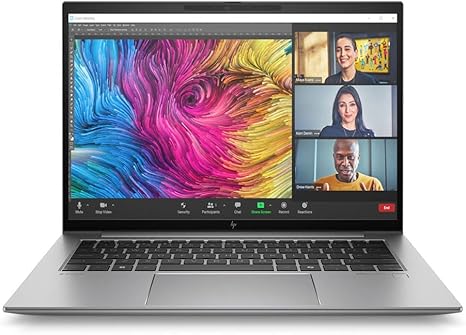
Welcome to Reviews inside tv! Today, we’re taking a look at the HP ZBook Firefly G11, a 16-inch mobile workstation that packs some serious punch for professionals on the go. If you’re someone who needs a reliable machine for heavy workloads, creative tasks, or business demands, this might just be the perfect fit. With its Intel Core Ultra 7 processor, ample RAM, and sleek design, this could be the mobile powerhouse you’ve been waiting for. But does it live up to the hype? Let’s find out.
The ZBook Firefly G11 comes equipped with the latest Intel Core Ultra 7 165H processor, which boasts 14 cores—yes, 14—making it one of the more powerful chips in its class. Clocking in with a turbo speed of up to 5 GHz, this CPU promises smooth multitasking, even when juggling complex applications like video editing or 3D rendering. The 32 GB of RAM, paired with the processor, makes for an exceptional combination, ensuring that even the most demanding tasks like large-scale data analysis or running multiple virtual machines don’t cause any slowdowns. Storage is handled by a 1 TB SSD, which, as you’d expect, offers lightning-fast data access and boot times, enhancing overall productivity.
The display on the ZBook Firefly is a 16-inch WUXGA screen, running at a resolution of 1920 x 1200. While this isn’t the highest resolution you’ll find in premium workstations, it’s more than sufficient for most office work, media consumption, and content creation tasks. The screen is clear and sharp, offering solid color reproduction that’s great for business presentations and everyday tasks. If you’re into creative work like photo editing or digital art, the lack of 4K or OLED might feel like a slight limitation, but it’s not a dealbreaker for many professionals who prioritize power over pixel density.
Let’s talk about performance. The Intel Core Ultra 7 165H isn’t just about raw speed—it’s about efficiency, too. Running productivity tasks like web browsing, document editing, or even video calls, this laptop feels seamless. You won’t notice any lag when flipping between spreadsheets or with multiple tabs open. As for content creators, if you’re into moderate photo editing or basic video editing, this laptop will hold up nicely. Gaming performance, however, isn’t its primary strength, although casual gaming is certainly possible, thanks to the Intel Arc integrated graphics.
In terms of thermals and noise, the ZBook Firefly holds its ground. Under light use, like typing or watching videos, the fans are practically silent. However, as you ramp up the workload—say, when running a heavy video export or 3D render—the fans will kick in, but they’re not overly loud or distracting. The temperature on the keyboard deck and underside stays relatively cool during these tasks, which is impressive for a mobile workstation.
Battery life is another strong point for this model. With a battery size that’s built to handle heavy workloads, you can expect between 8 to 10 hours of continuous use under moderate tasks like office work, web browsing, or media consumption. The charging speed is decent as well, and the laptop’s charger isn’t overly bulky, making it easy to carry on the go.
The keyboard and trackpad are both well-designed for long typing sessions. The key travel is just enough to provide a satisfying feel, and the trackpad is responsive, with accurate palm rejection. The layout includes a number pad, which is a bonus for those who often work with numbers. The function keys and power button are placed comfortably, and the overall typing experience is comfortable for extended sessions.
Port-wise, the ZBook Firefly G11 comes with a solid array of connections: you get a mix of USB-A and USB-C ports, including Thunderbolt 4, an HDMI port, and an SD card reader. There’s also Wi-Fi 6 for fast, reliable wireless connectivity, and Bluetooth 5.2, which is great for pairing with wireless peripherals. Whether you’re hooking up to an external monitor or docking to a station, this laptop has you covered.
Now, let’s dive into a quick comparison. The HP ZBook Firefly G11 competes with laptops like the Dell Precision 3560 and Lenovo ThinkPad P Series. Where the ZBook stands out is in its portability and performance balance. While the Precision offers more GPU options and the ThinkPad P Series excels in extreme workstation tasks, the ZBook Firefly delivers a better balance between power and portability, making it a great option for business professionals or creators who need both performance and convenience.
In terms of build quality, the ZBook Firefly G11 is made from sturdy, high-quality materials that feel solid but not overly heavy. It’s built for durability, making it a great option for people who travel frequently or work in varying environments. The chassis is rigid, the hinge is reliable, and while it doesn’t feel ultra-premium, it’s far from cheap.
At around 3.7 pounds, the ZBook Firefly is certainly portable for a 16-inch workstation. While it’s not the lightest laptop on the market, it’s compact enough to toss into a bag and carry around all day without feeling weighed down.
So, who is this laptop best suited for? If you’re a business professional or a content creator who needs a reliable, portable workstation that delivers solid performance without going overboard on GPU-heavy tasks, the ZBook Firefly G11 is a great choice. However, if you’re a gamer or a professional who demands a 4K display or cutting-edge GPU performance, you might want to look elsewhere.
In the end, the HP ZBook Firefly G11 is a highly capable mobile workstation that offers a great balance of power, portability, and build quality. It’s not perfect—its display could be sharper, and it’s not a gaming powerhouse—but for its price point and target audience, it offers a lot of value.
Thanks for watching! If you found this review helpful, make sure to hit that like button, subscribe, and ring the bell so you don’t miss any of our future reviews. The link to check out the HP ZBook Firefly G11 is in the comments box below, so feel free to take a look. Let us know if you’ve had any experience with this laptop or if you have any questions. Until next time, stay tuned for more reviews here on Reviews inside tv!
Available to buy here:


