

Available to buy here:
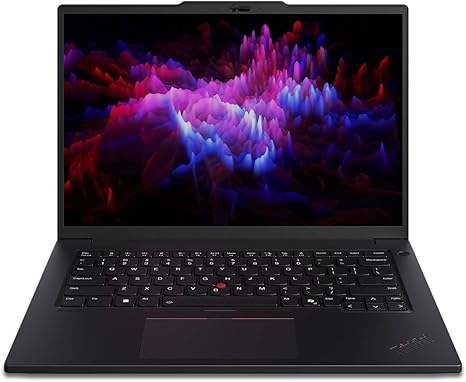
Welcome to “Reviews inside tv,” where we bring you the latest and most detailed tech reviews. Today, we’re diving into the Lenovo ThinkPad P14s Gen 5, a mobile workstation designed for professionals who need power, portability, and reliability. Whether you’re crunching numbers, working on creative projects, or multitasking through a mountain of apps, this machine promises to deliver. But does it live up to the hype? Let’s find out.
The Lenovo ThinkPad P14s Gen 5 is powered by the Intel Core Ultra 7 155H processor, which is part of Intel’s new generation of ultra-efficient chips. With a base clock speed that ramps up under load, this chip is designed to handle demanding workloads like video editing, data processing, and other professional tasks. It’s paired with 16 GB of RAM, which is a sweet spot for most users, allowing for smooth multitasking, even when you have numerous tabs or applications open at once. And when it comes to storage, you’re looking at a 512 GB SSD. While not massive, it’s more than enough for your essential files, documents, and media, with the added benefit of fast read/write speeds that dramatically reduce load times compared to older SATA drives.
On the graphics front, the P14s is equipped with the NVIDIA RTX 500 Ada Generation 4 GB discrete GPU. This isn’t a gaming powerhouse, but it’s designed to handle professional creative workloads with ease—whether it’s rendering 3D models, video editing, or working in CAD programs. For professionals who don’t need top-tier gaming performance but want solid multimedia capabilities, this GPU is more than sufficient.
Now, let’s talk about the display. The 14.5-inch WQXGA screen boasts a resolution of 2560 x 1600, offering sharp detail for both work and media consumption. The 16:10 aspect ratio provides a bit more vertical real estate than traditional 16:9 displays, which is great for productivity tasks like document editing or spreadsheet work. The screen is crisp, vibrant, and works well in a variety of lighting conditions. Whether you’re watching movies or looking at high-resolution graphics, the display provides a solid viewing experience. However, it’s important to note that the refresh rate is 60 Hz, which is perfectly fine for general use and productivity but might feel limiting for fast-paced gaming.
In terms of performance, the ThinkPad P14s excels in office and productivity tasks. Whether you’re browsing the web with several tabs open, working on spreadsheets, or attending video calls, everything runs smoothly. The 16 GB of RAM ensures that you won’t run into slowdowns, even when you’re juggling multiple tasks at once. For media consumption, this machine does a great job streaming HD video, with clear, vibrant colors and good brightness levels, making it a solid choice for watching your favorite shows or movies during a break.
For creators, the NVIDIA RTX 500 discrete graphics card provides enough power for tasks like photo editing and video rendering. While it’s not going to match up to high-end GPUs in workstation-grade laptops, it’s a capable performer for most professionals in the creative field. Video export times are fast, and photo editing is smooth. For gaming, however, this laptop isn’t built for high-end gaming performance. It can handle less demanding titles at 1080p but isn’t ideal for graphically intense games like Cyberpunk 2077 or Call of Duty at higher settings.
When it comes to thermals, the ThinkPad P14s does a good job maintaining a manageable temperature. Under heavy loads, like video editing or gaming, the laptop does warm up, but it doesn’t get uncomfortable to use on your lap. The fans can be noticeable, but they aren’t overwhelmingly loud, especially compared to other workstations. However, under extended stress, the laptop does show some signs of thermal throttling, which can impact performance over longer gaming sessions or video exports. This isn’t a dealbreaker for most users, but it’s something to keep in mind if you plan on running intense tasks for hours on end.
Battery life is where this machine shines for professionals. With a 50 Wh battery, you can expect around 8–10 hours of light office use, depending on your settings and work intensity. This isn’t a laptop that’s going to last you a full day of heavy use without a charge, but for standard work tasks, you should be able to get through a full workday without issue. The laptop also supports rapid charging, so you can juice it up quickly if you’re running low on power.
In terms of comfort, the keyboard on the ThinkPad P14s is excellent for long typing sessions. The key travel and feedback are both solid, making it a pleasure to type on, whether you’re typing up reports or coding. The trackpad is responsive, smooth, and accurate, with good palm rejection, ensuring that accidental touches don’t interfere with your work. It also has a fingerprint reader, adding an extra layer of security without being intrusive.
As for ports and connectivity, the ThinkPad P14s offers a solid selection, including USB-A, USB-C, Thunderbolt 4, HDMI, and an SD card reader, which makes it easy to connect to external devices, monitors, or storage. The laptop also supports Wi-Fi 6, ensuring fast and reliable wireless performance, and Bluetooth 5.2 for easy pairing with peripherals.
Build quality is typically ThinkPad—durable and professional-looking. The chassis is solid, with an aluminum finish that feels premium without being overly heavy. At 3.3 pounds, it’s not the lightest 14-inch workstation out there, but it’s still portable enough to carry around in a bag all day. The 14.5-inch display size strikes a good balance between portability and productivity, offering a larger screen than most 14-inch laptops without making the device too bulky.
Now, for the pros and cons: On the positive side, the ThinkPad P14s offers excellent performance for productivity, solid build quality, and an impressive display. Its portability and battery life make it a great choice for professionals on the go. However, the GPU performance is more suited for light creative work rather than demanding tasks, and it does show signs of thermal throttling during long, heavy tasks.
In terms of value for money, the ThinkPad P14s is priced competitively for a mobile workstation, offering a balance of power, portability, and reliability. If you’re looking for a workstation that excels at office tasks, light creative work, and offers a solid display with good battery life, this is a great choice. However, if you need raw graphics power or extended gaming performance, you might want to look elsewhere.
When comparing this laptop to others in the same range, like the Dell Precision 14 5000 or the HP ZBook Power G8, the ThinkPad P14s holds its own with strong performance and a reliable build. While the HP and Dell may offer better GPUs in some configurations, the ThinkPad excels in portability, keyboard comfort, and battery life.
The final verdict: The Lenovo ThinkPad P14s Gen 5 is an excellent choice for professionals who need a reliable, portable workstation for everyday tasks, light creative work, and office productivity. It’s not the best option for hardcore gamers or users who need extreme GPU performance, but it offers solid all-around performance with a premium build, great display, and excellent keyboard. If you fit that use case, it’s a solid investment.
Thanks for watching! Be sure to check the comments box for the link to this laptop. If you already own it, feel free to share your thoughts or ask any questions you may have. Until next time, stay productive and keep those keys clicking!
Available to buy here:


