

Available to buy here:
Welcome to “Reviews inside tv,” where we bring you the latest in tech with real insights from an expert’s perspective. Today, we’re checking out the Microsoft Surface Laptop for Business (2025), an ultra-slim powerhouse that blends impressive performance with top-tier security and AI capabilities. Whether you’re managing projects, working on presentations, or diving into creative tasks, let’s see if this laptop delivers what you need in your day-to-day business life.
Starting with the specs, the Surface Laptop for Business is powered by the Intel Core Ultra 7 (Series 2), a top-tier processor designed for productivity and multitasking. With 16GB of RAM and a 256GB SSD, this setup offers a smooth experience for everything from heavy document editing to running multiple applications at once. If you’re the type who needs fast boot times and quick file access, the SSD will certainly give you that edge, while the 16GB of RAM means you can seamlessly toggle between tabs and programs without any lag.
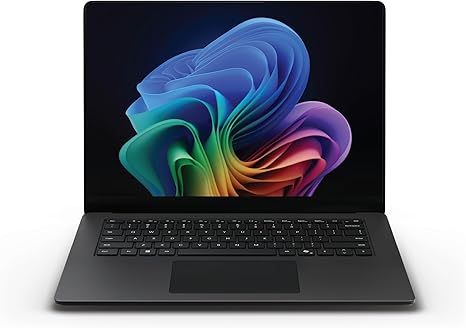
The real standout here is the 13.8-inch Surface PixelSense Flow display. With razor-thin bezels, a 3:2 aspect ratio, and an immersive touchscreen, it’s perfect for anyone who needs clarity and precision in their work. Whether you’re drafting reports, editing spreadsheets, or catching up on video calls, this screen delivers sharp, vibrant visuals with impressive color accuracy. But, if you’re using it for media consumption or creative projects, the display’s wide color gamut ensures rich, true-to-life colors, making it ideal for both work and play.
Now, let’s talk about performance. For office tasks, this laptop absolutely shines. Whether you’re juggling web tabs, reviewing emails, or hopping between spreadsheets, the Intel Core Ultra processor handles it all with ease. For those heavier workloads, like video editing or light gaming, it holds up well too, especially with the AI capabilities integrated into the chip. The Intel AI Boost NPU, with up to 48 TOPS, accelerates AI-driven tasks, making your experience faster and more intuitive. This means if you’re running advanced AI apps or collaborating on machine learning models, you’ll notice a significant boost in efficiency.
But performance isn’t just about speed—it’s about endurance. And this is where the Surface Laptop for Business really stands out. With up to 22 hours of battery life, you can easily power through an entire workday, and then some. Whether you’re attending back-to-back meetings, working on long documents, or simply enjoying some downtime with streaming videos, this laptop keeps going. Plus, with Fast Charging via Surface Connect or USB-C, you can get back to work in no time. Charging up to 80% in just under an hour is a game-changer for those busy days when you need to power up quickly.
For a laptop that offers so much, the ergonomics are spot on. The keyboard provides satisfying key travel with great feedback, making long typing sessions feel comfortable. Plus, the layout is well thought out—arrow keys and function keys are easy to navigate, and the power button is conveniently placed without any awkward reaches. The trackpad is large, responsive, and accurate, with good palm rejection. If you’re using Windows 11 Pro, the additional security features make the experience even more reliable. The fingerprint reader is fast and works seamlessly, adding an extra layer of security without a hitch.
On the connectivity front, this laptop gives you a decent range of ports. There’s a USB-C port, which supports Thunderbolt, HDMI, and Surface Connect for docking options. You can easily hook up an external monitor or dock to expand your workspace. The inclusion of Wi-Fi 6 ensures a solid, stable internet connection, and Bluetooth 5.1 ensures smooth performance with wireless peripherals. There’s no SD card reader, but given its intended use as a business laptop, this may not be a dealbreaker for most.
As for thermals, the Surface Laptop for Business handles everyday tasks without heating up much. Even during extended work sessions, the fan noise remains relatively quiet. The laptop stays cool on the keyboard deck, and there’s no noticeable thermal throttling during typical workloads. However, if you plan to do any extended heavy processing, such as video exports or using resource-intensive software, the fan will become more noticeable, though it still doesn’t get overly loud.
When it comes to build quality, the Surface Laptop for Business feels premium. The aluminum body gives it a solid, sturdy feel while remaining relatively lightweight for easy portability. At just 2.57 pounds, it’s easy to carry around in a bag all day, making it an excellent choice for business professionals and students who are constantly on the move. The sleek black finish adds a touch of sophistication, and the thin profile ensures it doesn’t take up much space in your bag.
In terms of value for money, this laptop offers a premium set of features, but it does come at a higher price point than some other business laptops. While there are cheaper alternatives, like the Dell XPS 13 or HP Spectre x360, those who want top-notch security, AI processing, and an excellent display will find the Surface Laptop for Business worth the investment. If you need a laptop that handles everyday tasks with ease, offers outstanding battery life, and provides top-tier performance in a slim, portable package, this model is hard to beat.
For those looking at alternatives, the Dell XPS 13 and Lenovo ThinkPad X1 Carbon are worth considering. Both offer similar performance, but the Surface Laptop for Business wins with its superior battery life and the integration of Intel’s AI Boost NPU. While the ThinkPad X1 Carbon is more geared toward traditional business use with better durability, the Surface’s sleek design and immersive display make it a more well-rounded option for those seeking a blend of work and play.
To wrap things up, the Microsoft Surface Laptop for Business (2025) is a fantastic option for professionals, students, and anyone in need of a reliable, stylish machine that offers excellent performance, an impressive display, and outstanding battery life. Whether you’re focused on productivity, media consumption, or creative tasks, it handles it all effortlessly. If you’re willing to pay for that extra power and sleek design, this laptop is definitely worth considering.
Thanks for watching, and don’t forget to like, subscribe, and hit the bell icon to stay updated with our latest reviews. If you’ve used this laptop or have any questions, feel free to drop a comment below. We’d love to hear about your experiences. Until next time, this is Reviews inside tv, signing off with another great tech review.
Available to buy here:


