

Available to buy here:
Welcome to “Reviews inside tv.” Today, we’re taking a closer look at the HP ZBook Ultra G1a 14″ Mobile Workstation, a powerhouse designed to deliver top-tier performance in a compact package. This workstation is aimed at professionals who need reliable performance for demanding tasks, whether it’s for creative work, data-heavy applications, or multitasking across various business tools. But does it live up to the hype? Let’s find out.
First off, let’s talk about the specs. This laptop comes packed with an AMD Ryzen AI MAX PRO 390 processor, a powerhouse in its class. The Ryzen AI series is built to handle complex, multi-threaded tasks, offering impressive performance for everything from video editing to data analysis. Paired with 32GB of RAM, multitasking should be a breeze, whether you’re juggling several applications or dealing with large files. If you’ve been struggling with lag or slowdowns, the ample RAM here should solve that, making for a smooth, uninterrupted workflow.
The 1TB SSD gives you plenty of storage space, so you won’t run out of room anytime soon. And because it’s an SSD rather than an HDD, you get faster boot times, quicker file access, and generally snappier overall performance. You’ll notice the difference immediately, whether you’re launching software, transferring files, or booting up your system. With 1TB of space, you can keep your project files, media libraries, and work documents close at hand without worrying about running out of space.
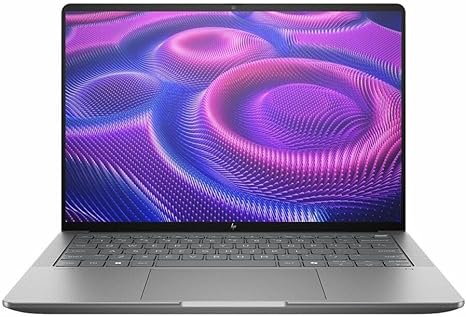
The 14-inch WUXGA (1920 x 1200) display is where the HP ZBook really shines, especially for content creators or anyone who spends a lot of time looking at detailed visuals. It’s not quite 4K, but it offers a crisp, clear image with good color accuracy. For tasks like photo or video editing, the screen should provide enough detail for precise work. The aspect ratio is slightly taller than typical Full HD displays, giving you a bit more vertical space to work with, which is a bonus for productivity.
The battery life is another major strength. With up to 14.5 hours of run time, this laptop can keep you unplugged throughout a full workday. Whether you’re working from a coffee shop or on the go, the ZBook’s stamina means you can get through meetings, presentations, and editing sessions without scrambling for a charger. When it’s time to recharge, the charging speed is fast, so you won’t be stuck waiting long.
Now, let’s dive into how this machine performs day-to-day. In terms of office productivity, it handles tasks like web browsing with multiple tabs, document work, spreadsheets, and video calls without breaking a sweat. Thanks to the Ryzen processor and 32GB of RAM, even with several programs open, it stays responsive and quick. You won’t experience the annoying slowdowns or lags that plague lesser systems when you’re working with multiple windows and tasks simultaneously.
When it comes to media consumption, the ZBook does a solid job. The display’s decent color accuracy makes it a good option for watching movies or videos in HD. The speakers, while not the loudest or most bass-heavy, do a fine job filling a small room or a quiet office with sound. However, if you’re looking for a truly immersive audio experience, you might want to pair it with external speakers or headphones.
Content creators will also appreciate the ZBook’s capabilities. With 32GB of memory, you can smoothly edit photos, videos, and even music production without feeling restricted. The SSD ensures that file loading and saving are quick, and tasks like exporting videos won’t feel like a chore. The Ryzen AI MAX PRO 390 can handle creative software like Adobe Premiere or Photoshop without noticeable lag, though keep in mind that this machine isn’t designed for top-tier gaming or extreme workloads like 3D rendering.
Speaking of gaming, the ZBook is not a gaming laptop, and while it can handle light gaming and older titles, don’t expect it to be a powerhouse in this area. For casual games like indie titles, it’ll perform decently, but graphically intense AAA games will likely be a struggle.
Now, let’s talk about thermals. The HP ZBook stays relatively cool under everyday use, but the fan can get a little noisy when pushed. This is especially noticeable when performing demanding tasks like video rendering or gaming. However, the thermal performance is pretty solid for a 14-inch workstation. During extended sessions, you might notice some warmth under the keyboard and on the underside, but it’s never uncomfortable to the point of being distracting. It doesn’t suffer from any significant thermal throttling, so performance remains stable even under load.
The keyboard is another strong point. With good key travel and feedback, it’s comfortable for long typing sessions. The trackpad is large, responsive, and accurate, with good palm rejection, which is essential for long workdays. The overall layout is well thought out, and the addition of a number pad makes it convenient for those who frequently work with numbers.
When it comes to ports and connectivity, the ZBook has you covered. It comes with several USB-A and USB-C ports, an HDMI output, and even an SD card reader, making it easy to connect external monitors, docks, or accessories. It also supports fast Wi-Fi standards and Bluetooth, ensuring that it’s ready for whatever peripherals you need to work with.
In terms of portability, the HP ZBook is relatively light for a workstation, weighing in at just under 3.5 pounds. It’s easy to carry around in a bag, making it a good option for professionals who are always on the go. The chassis feels sturdy, and while it’s not the most premium feeling, it’s still well-constructed. The Meteor Silver color gives it a sleek, professional look that’s sure to stand out in meetings or presentations.
So, who should consider this laptop? If you’re someone who needs reliable performance for productivity, content creation, or business tasks, the ZBook Ultra G1a is a solid option. Its impressive battery life, strong performance, and high-quality display make it a great choice for those who need to get work done without compromise. However, if gaming is a priority, or you need extreme processing power for 3D rendering or heavy simulations, you might want to look elsewhere.
As for value, the HP ZBook Ultra G1a comes in at a higher price point, but its specs justify the cost, especially for professionals who need consistent, dependable performance. If you’re looking for a machine that balances work and play with reliability, the ZBook Ultra G1a is a strong contender. But keep in mind, you’re paying for that premium workstation experience, and if you don’t need that level of performance, there may be more affordable options available.
Thanks for watching! If you want to grab the HP ZBook Ultra G1a, you’ll find the link in the comments box below. If you’ve already used this laptop, feel free to drop a comment with your thoughts or ask any questions. Until next time, stay productive and keep working smarter!
Available to buy here:


