

Available to buy here:
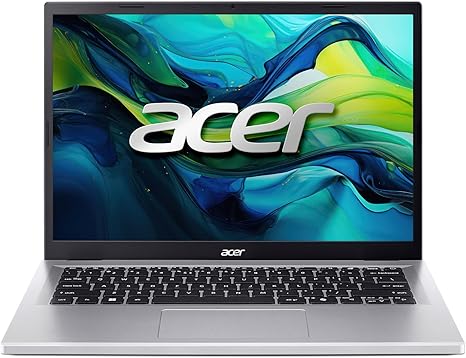
Welcome to “Reviews inside tv,” where we break down the latest tech to help you make informed decisions. Today, we’re taking a closer look at the Acer Aspire Go 14 AI Ready Laptop. This 14-inch powerhouse combines impressive productivity features, advanced AI integration, and solid build quality. But does it truly deliver on its promises, or is it just another average mid-range laptop? Let’s find out.
The Acer Aspire Go 14 is powered by the Intel Core i5-13420H processor, a chip designed for efficient multitasking and balanced performance. With four performance cores and eight threads, it’s capable of handling a variety of tasks like office work, media consumption, and even light creative work. Paired with 16GB of DDR5 RAM, this laptop should have enough muscle for smooth multitasking, even when you’re running multiple apps and browser tabs simultaneously. The 512GB PCIe Gen4 SSD offers fast read and write speeds, meaning boot-up times and file transfers should be snappy, providing an overall responsive experience.
This laptop’s 14-inch WUXGA (1920 x 1200) IPS display delivers vibrant, sharp visuals. With a 16:10 aspect ratio, it offers a bit more vertical space than traditional 16:9 screens, which can be helpful for productivity tasks and casual browsing. The narrow bezels help keep the display feeling expansive, while Acer’s BluelightShield reduces eye strain, which is a nice touch for those long working hours. Whether you’re watching videos or scrolling through social media, this screen should provide an immersive, pleasant viewing experience.
In terms of connectivity, the Aspire Go 14 offers dual USB Type-C ports, which support up to 65W charging and data transfer speeds of up to 10 Gbps. If you’re using a USB-C hub or docking station, you’ll have no trouble connecting multiple devices at once. The HDMI 2.1 port is a great addition for anyone looking to connect to an external monitor, and the Wi-Fi 6 technology ensures faster, more reliable wireless connections. Bluetooth 5.1 support adds additional versatility for connecting peripherals like wireless headphones, speakers, or a mouse.
Real-world performance with this laptop is where it truly shines for everyday users. When it comes to office and productivity tasks, whether it’s managing emails, attending video calls, or working with spreadsheets, the Acer Aspire Go 14 doesn’t skip a beat. The Core i5 processor, combined with 16GB of RAM, allows for smooth multitasking. Opening several tabs in a web browser or running light photo editing software will feel seamless. If you’re in a creative field, you’ll find that the laptop can handle photo editing apps like Adobe Photoshop without any noticeable lag, though it may struggle with more demanding tasks like 4K video editing or rendering.
For those who love streaming, the Aspire Go 14 excels. The WUXGA display is perfect for binge-watching your favorite shows or streaming movies in full detail. Plus, the laptop’s speakers should offer a decent audio experience, though it’s always best to use headphones or external speakers for enhanced sound quality. The AI noise-reduction tech, available through Acer’s PurifiedVoice feature, is especially helpful for clear voice calls during Zoom meetings or video chats.
If you’re a casual gamer, this laptop can handle a few light gaming titles. While it’s not geared for heavy-duty gaming, the Intel UHD Graphics will allow you to play games like “Fortnite” or “Minecraft” at lower settings. More graphically demanding games will likely need to be played at low settings or avoided altogether. That said, it’s not marketed as a gaming laptop, so if that’s your main focus, you’ll probably want to look elsewhere.
Now, let’s talk about the thermals. With an all-plastic chassis and the Core i5 processor, the Aspire Go 14 remains relatively cool during light use. However, when pushed with heavier tasks, like gaming or extended video editing, the fans do become more noticeable, though they are not overly loud. The laptop does warm up a bit, especially near the keyboard, but it doesn’t get uncomfortably hot. Long gaming or creative sessions might see some performance throttling to keep temperatures in check, but for most users, the thermal performance is sufficient for casual tasks.
Battery life is another area where the Aspire Go 14 performs well. With a 50Wh battery, you can expect around 7 to 9 hours of usage during light tasks such as web browsing or document work. Streaming videos might reduce that a bit, but overall, you can count on a full workday of battery life if you’re not doing anything too demanding. The laptop charges relatively quickly, and the compact power adapter makes it easy to take on the go, which is a nice touch for portability.
When it comes to the keyboard and trackpad, the Aspire Go 14 delivers a comfortable typing experience. The key travel is adequate, and the feedback is decent, though it’s not as tactile as some premium laptops. The layout is standard, with well-placed arrow keys, though there’s no number pad—something to keep in mind if you often work with numbers. The trackpad is responsive, with good palm rejection, making it pleasant for everyday use.
In terms of build quality, the Aspire Go 14 has a solid, if unspectacular, plastic design. While it doesn’t feel as premium as some all-metal laptops, it’s sturdy and lightweight. At around 3.1 pounds, it’s easy to carry around in a bag, making it a good option for students or professionals who need a portable device.
So, who is the Acer Aspire Go 14 best suited for? If you’re someone who needs a solid, everyday laptop for productivity tasks, light media consumption, and casual gaming, this laptop is a great choice. It’s not going to blow you away with power, but it delivers solid, dependable performance. The display, battery life, and AI features make it an appealing option for students or remote workers looking for something reliable without breaking the bank.
If you’re in the market for a higher-end gaming laptop or need raw power for video editing or 3D rendering, this probably isn’t the right fit. But for the vast majority of everyday users, the Aspire Go 14 is a solid choice. It offers great value for money, especially considering its productivity features, connectivity options, and solid battery life.
Thanks for tuning in! If you’re interested in picking up the Acer Aspire Go 14, the link to find it is in the comments box below. If you’ve got any questions, feel free to drop them in the comments, or share your thoughts if you already own one of these laptops. Don’t forget to like, subscribe, and hit that bell icon for more honest, in-depth tech reviews. Until next time, happy computing!
Available to buy here:


