

Available to buy here:
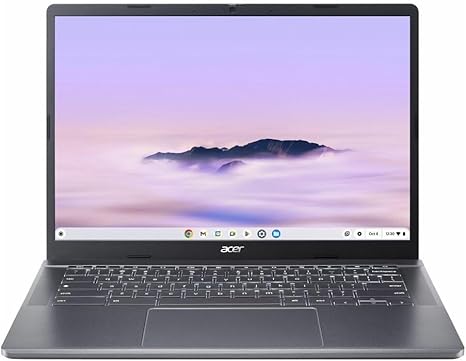
Welcome to “Reviews inside tv!” Today, we’re checking out the Acer Chromebook Plus Enterprise 514 Touchscreen Notebook, a device that’s making waves in the business and productivity sectors. But how does it stack up in terms of performance, usability, and overall value? Stick around to find out!
Let’s get into the specs. The Acer Chromebook Plus Enterprise 514 is powered by the AMD Ryzen R3 7320C processor, which features a 2MB L2 cache and up to 4MB L3 cache. It operates at a base speed of 2.4 GHz, with a boost up to 4.1 GHz. This processor is geared for light to moderate productivity tasks, so don’t expect it to handle the most intensive creative or gaming workloads, but it should serve office applications, web browsing, and multimedia tasks very well. The 8GB of LPDDR5X RAM ensures smooth multitasking performance, and the 256GB PCIe Gen 4 NVMe storage means faster read/write speeds compared to traditional SATA drives, making boot times snappy and file access quicker.
The 14-inch touchscreen display is a standout feature. While it’s not a high-end OLED or mini-LED, it offers a full HD resolution, making it more than enough for day-to-day productivity tasks, media consumption, and even some light content creation. The brightness isn’t quite a standout at 250 nits, but it’s decent for indoor use and casual work, though you might struggle with outdoor visibility on bright days. Color accuracy is adequate for basic tasks, but creative professionals who require precise colors might find this lacking.
Moving on to performance. In terms of office work, the Acer Chromebook Plus handles web browsing, document editing, and video calls with ease. Thanks to the Ryzen processor and the ample 8GB of RAM, you won’t be stuck waiting for pages to load or for apps to respond when switching between tasks. Streaming video on the 14-inch screen is a pleasant experience, with sharp resolution and smooth playback, but the lack of higher brightness may impact viewing in well-lit rooms.
If you’re a content creator, this laptop isn’t really designed for high-end photo or video editing. You could technically do some light editing, but export times may be slow, and the graphics card (AMD Radeon 610M) won’t provide the performance needed for heavy lifting. For casual gaming, titles like Stardew Valley or Minecraft may run well on lower settings, but don’t expect a great experience with anything more graphically demanding.
Thermals are fairly well-managed for this device. The Chromebook stays cool under normal use, but you’ll notice it heating up a little under load, especially during extended use. The fan isn’t too noisy, which is a plus for those working in quieter environments, but it may ramp up a bit when running intensive apps. Overall, this machine’s thermals are better than many other budget Chromebooks, though not as refined as pricier models.
Battery life is where this Chromebook shines. With a 50Wh battery, you can expect around 8 to 10 hours of use depending on your activity. Light office work will definitely push this laptop closer to the 10-hour mark, while streaming and heavier workloads may reduce it to closer to 8 hours. It’s also equipped with fast charging, so you won’t be tied to your desk for too long if the battery runs low.
On the portability front, the Acer Chromebook Plus weighs about 3.3 pounds, making it light enough to carry around for long periods without straining your bag or your shoulders. It’s not the thinnest device, but it’s still slim and travel-friendly. The build quality is solid for the price, with a plastic chassis that feels durable enough for everyday use but not quite as premium as metal alternatives.
Now let’s talk about the keyboard and trackpad. The keyboard features decent key travel and feedback, making it comfortable enough for long typing sessions. It’s not the best you’ll find, but for the price, it’s more than adequate. The trackpad is responsive, though it’s on the smaller side for a 14-inch laptop. It supports multi-touch gestures, and palm rejection is effective, making it easy to use for everyday tasks. There’s no fingerprint reader or facial recognition, but at this price point, that’s not a dealbreaker.
When it comes to ports, the Chromebook Plus has a good selection: two USB-C ports (with Thunderbolt support), a USB-A port, an HDMI port, and a headphone jack. The inclusion of USB-C and HDMI makes it suitable for connecting to external monitors or docking stations, while the USB-A port is a handy legacy feature for older peripherals. Wi-Fi 6E and Bluetooth 5.2 ensure strong wireless performance, providing faster speeds and more stable connections, especially in environments with heavy traffic.
One downside to keep in mind is the limited upgradability. The RAM is soldered, meaning you can’t expand it down the line, and while the 256GB of PCIe storage is good, there’s no option to add an additional hard drive or SSD. This could limit future-proofing if you plan on keeping the laptop for several years.
Let’s break it down. The Acer Chromebook Plus Enterprise 514 does a lot of things well for a business laptop. It offers a good balance of performance, portability, and battery life, all in a solid package. The display is good for casual media consumption, but creators and gamers should look elsewhere. The keyboard and trackpad are functional, and the port selection is great for everyday tasks.
As for the cons, the limited display brightness and the soldered RAM might be dealbreakers for some. The performance is good for most office tasks but falls short for anything too demanding. If you’re expecting high-end graphics or a vibrant display for editing work, this isn’t the right choice.
Is it worth the price? For casual users, office workers, and students who prioritize a solid laptop with decent performance and battery life, the Acer Chromebook Plus Enterprise 514 is a solid pick. It won’t win awards for its design or its performance in intensive tasks, but it’s a reliable, portable machine that can handle most day-to-day tasks with ease.
Compared to similar Chromebooks, it offers a good balance of features and price. Laptops like the Lenovo Chromebook Flex or HP Chromebook x360 offer similar specs but come at a slightly higher price, with the added flexibility of touchscreens and 360-degree hinges.
Ultimately, the Acer Chromebook Plus Enterprise 514 is best suited for users who need a reliable laptop for work, school, or entertainment without breaking the bank. If you’re looking for a laptop for gaming or high-level content creation, though, this model won’t cut it.
Thanks for watching! Don’t forget to like, subscribe, and hit the bell icon so you never miss our latest reviews. If you’ve used the Acer Chromebook Plus Enterprise 514, drop a comment below and share your thoughts. You’ll find the link to pick up this laptop in the comments box. Catch you in the next one—take care, and happy computing!
Available to buy here:


