

Available to buy here:
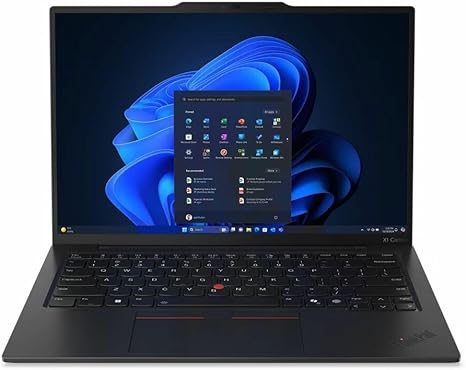
Welcome to “Reviews inside tv”! Today, we’re looking at the Lenovo ThinkPad X1 Carbon Gen 13, a premium ultrabook built for professionals who demand power, portability, and performance. Whether you’re in the office, at home, or on the go, this laptop promises to be your reliable companion. But does it live up to the hype? Let’s break it down.
The ThinkPad X1 Carbon Gen 13 is equipped with the Intel Core Ultra 7 266V processor, a part of Intel’s new Ultra series designed for ultra-thin devices without sacrificing performance. This means you’ll have plenty of power for multitasking, running productivity apps, and even tackling more intensive tasks like light video editing or 3D rendering. The integrated graphics are adequate for most office work and media consumption, but if you’re looking to game or push demanding creative workflows, you may want a more powerful GPU.
It features 16GB of RAM, which is perfect for professionals who need to run multiple applications at once. The extra memory helps avoid slowdowns during heavy multitasking, whether you’re working with large spreadsheets, switching between dozens of browser tabs, or running demanding apps. This, combined with a 512GB SSD, gives you fast access to your files and programs, making boot-ups and file transfers snappy. The SSD also ensures that your laptop will remain responsive even after extended use.
When it comes to display quality, the 14-inch 2880 x 1800 resolution screen stands out. Offering vibrant colors and sharp detail, the display is perfect for working on spreadsheets, writing documents, or enjoying media. The wide viewing angles make it easy to share content, whether you’re presenting in a meeting or watching a video with colleagues. It’s an IPS panel, so color accuracy is on point for professional tasks like photo and video editing, and the high pixel density makes text crisp and easy to read for long work sessions.
Battery life is always a major consideration for ultrabooks, and the ThinkPad X1 Carbon delivers here as well. You can expect up to 10-12 hours of battery life under typical office use, like browsing the web, streaming videos, and running office applications. Of course, demanding tasks will drain the battery faster, but for the average user, this laptop offers solid all-day performance. The laptop also supports rapid charging, so even a short break can give you hours of use, making it ideal for professionals on the move.
Speaking of mobility, the X1 Carbon is extremely portable, weighing just under 2.5 pounds. At only 0.6 inches thick, it’s one of the slimmest, most lightweight business laptops you can find. Toss it in a bag, and you won’t feel like you’re carrying around a burden. The design feels premium, too, with a sturdy carbon fiber and magnesium alloy body that balances durability with a sleek, professional look.
Now, let’s talk about the keyboard and trackpad. The ThinkPad X1 Carbon is known for its exceptional typing experience, and this model is no different. The keys have a deep travel and responsive feel, making it great for long typing sessions. Whether you’re writing a report, responding to emails, or drafting a presentation, the keyboard is comfortable and efficient. The trackpad is large, smooth, and responsive, with great palm rejection, so you won’t have to worry about accidental touches while typing.
For ports, Lenovo keeps it practical but sufficient for most users. You get two USB-C 3.2 ports with Power Delivery and DisplayPort 1.4, two USB-A 3.2 ports, an HDMI 2.0 port, a microSD card reader, and a headphone jack. There’s no Ethernet port, but with fast Wi-Fi 6E support, you’ll rarely need it. Bluetooth 5.2 ensures reliable connectivity with peripherals. It’s also worth noting that the SSD is soldered, so no upgrades are possible, but the 512GB storage should be more than enough for most users, especially with cloud storage options readily available.
Now, for the thermals and noise: the X1 Carbon remains impressively cool under load. Even when performing heavier tasks, the laptop maintains a steady temperature. The fan noise is barely noticeable, even under stress, making this a great option for quiet environments like libraries or meeting rooms. This laptop is built to handle long sessions without overheating or making loud fan noises, ensuring comfort throughout the day.
When it comes to real-world usage, this ultrabook handles everything you throw at it with ease. Whether you’re working on Excel spreadsheets, video conferencing, or watching movies, it offers smooth performance. During light gaming or media consumption, the 14-inch display is a treat, with its sharp resolution and solid color accuracy. While it’s not designed for gaming at high settings, it can handle casual titles or older games without issue, but don’t expect to play graphically demanding games on it.
For those of you who like to work on the go, the ThinkPad X1 Carbon excels in portability. It’s easy to carry in a backpack, and the build quality ensures it can withstand the bumps and scratches of everyday use. The long battery life ensures you won’t be searching for a power outlet in the middle of your workday, and the lightweight nature means you can carry it with you wherever you go.
But, like all laptops, there are a few downsides. One potential drawback is the limited upgradability. The RAM is soldered on, which means you can’t upgrade it after purchase. The lack of a dedicated GPU also means that for gamers or creative professionals who rely on graphic-heavy tasks, this laptop might not provide the raw power they need. Additionally, while the 512GB SSD is fast, it may feel restrictive for users who need a massive amount of local storage for large files, especially video editors or content creators.
Now, let’s talk value for money. The ThinkPad X1 Carbon is definitely on the pricier side, but you’re paying for a premium experience. The build quality, battery life, portability, and overall performance justify the price for business users and professionals who need a reliable, lightweight, and powerful machine. It’s a fantastic choice for office work, light media consumption, and general productivity, though if you need heavy-duty graphics performance, you might want to look elsewhere.
In comparison to other ultrabooks in the same price range, the X1 Carbon stands out with its exceptional keyboard, high-quality display, and long-lasting battery. However, competitors like the Dell XPS 13 or HP Spectre x360 may offer similar specs, with some differences in display quality, ports, or design. If you’re looking for a more budget-friendly alternative, there are options that can handle everyday tasks just as well, though they may not match the Lenovo in build quality or battery longevity.
To wrap it up, the Lenovo ThinkPad X1 Carbon Gen 13 is an outstanding choice for business professionals, students, or anyone who needs a reliable, ultra-portable laptop with great performance for everyday tasks. If you don’t need a dedicated GPU or massive storage, it could be your ideal work companion.
Thanks for watching! If you found this review helpful, don’t forget to hit that like button, subscribe to “Reviews inside tv,” and tap the bell icon so you won’t miss out on our next review. Feel free to leave your questions or experiences in the comments below.
See you in the next one!
Available to buy here:


