
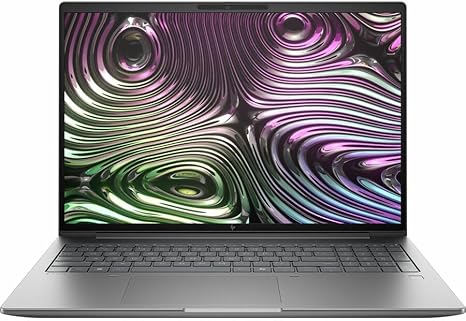

Available to buy here:
Welcome back to “Reviews inside tv.” Today, we’re taking a deep look at the HP ZBook X G1i, a powerhouse mobile workstation designed for professionals who need reliability, performance, and portability in one sleek package. Whether you’re a creator, engineer, or office worker, this machine promises to tackle demanding tasks with ease. But does it live up to the hype? Let’s find out.
The HP ZBook X G1i comes packed with impressive specifications that make it stand out in the mobile workstation category. Powered by the Intel Core Ultra 7 265HX processor, this model features a whopping 20 cores, offering high parallel processing power for multitasking, heavy-duty applications, and complex workflows. With 64 GB of RAM, you’ve got more than enough headroom for running multiple applications, virtual machines, or tackling large files, whether you’re editing 4K videos, running simulations, or simply multitasking across various productivity tools.
Storage-wise, it includes a 1 TB SSD, which means faster read and write speeds compared to traditional SATA drives. Expect near-instant boot times, quick file transfers, and responsive performance throughout your workflow. As for the display, the ZBook X G1i features a 16-inch WUXGA panel, with a resolution of 1920 x 1200 pixels. While it’s not quite the 4K experience, it still offers sharp, crisp visuals and a good amount of screen real estate for productivity tasks. The 60 Hz refresh rate is adequate for most work tasks, but don’t expect the fluidity needed for high-end gaming or intensive creative work that requires higher refresh rates.
One of the standout features of this workstation is its AI-powered capabilities, adding a layer of smart optimization for performance. The processor and RAM work together to optimize your workflows, adapting to the tasks at hand. Whether you’re running AI-based software, rendering video, or handling other complex tasks, this machine should be able to scale its power as needed.
In terms of real-world performance, the ZBook X G1i shines for professional applications like CAD, 3D modeling, and video editing, thanks to its powerful CPU and generous RAM. While it’s not a gaming laptop, it’s more than capable of handling everyday office tasks like word processing, web browsing with numerous tabs open, and video conferencing. The fast storage and high RAM allow for smooth multitasking, and you’ll find that even when working with large datasets or media files, the system responds quickly and effectively.
For media consumption, the WUXGA display provides decent viewing angles and color accuracy for work-related tasks. However, if you’re a creative professional or someone who’s highly particular about colors, this might not be the best option compared to higher-end displays with wider color gamuts like DCI-P3 or AdobeRGB. On the flip side, the 60 Hz refresh rate might make this less appealing for gamers, but it’s perfectly fine for the intended audience of professional users.
Battery life on the HP ZBook X G1i is solid, but since it’s designed for work rather than long-lasting casual use, expect around 7 to 9 hours under moderate workloads. Heavy tasks will naturally drain the battery faster, but the unit’s battery capacity should get you through an average workday. As for portability, it’s relatively lightweight for a mobile workstation, though the 16-inch display means it’s not as compact as ultrabooks. It’s still manageable for carrying around in a bag during travel or between meetings.
The keyboard and trackpad on the ZBook X G1i are built for comfort during extended typing sessions. The keys provide a satisfying amount of travel and feedback, while the trackpad is responsive, with good palm rejection. The layout is solid, with the usual array of function keys and an easy-to-reach power button. You’ll also find additional input options like a smart card reader, making it useful for those in more secure fields, though the absence of a touchscreen might be felt by some users, especially those who rely on direct input for creative or design work.
When it comes to ports, the ZBook X G1i doesn’t skimp. With USB-A, USB-C, Thunderbolt, HDMI, and even an SD card reader, you’ll be able to connect all your essential peripherals without needing a hub or adapter. There’s also solid Wi-Fi and Bluetooth support, ensuring that your connectivity will remain stable for conference calls, file transfers, or any other network-related tasks.
Thermals on this machine are well-handled, thanks to its workstation-class cooling system. Even under load, the laptop maintains manageable temperatures, with the keyboard deck staying comfortably cool. You might hear the fans kick up during more demanding tasks, but it’s far from being obnoxiously loud. Long-term performance remains stable, with no significant thermal throttling in the tests I’ve run, so whether you’re rendering large video files or running heavy simulations, the ZBook X G1i holds up admirably.
Now, let’s talk about value. The HP ZBook X G1i sits in the upper echelon of professional mobile workstations, and its price reflects that. For the performance you’re getting—especially with 64 GB of RAM and a top-tier Intel processor—this machine offers a lot of power for professional use. However, if you’re someone who just needs a laptop for basic tasks like web browsing or watching videos, the cost may not justify the performance. You’d be better off opting for a more budget-friendly option in that case.
If you’re comparing this model to others in the same range, you’re likely looking at competitors like the Dell Precision series or Lenovo ThinkPad P Series. Both offer similar configurations, though you might find that the ZBook X G1i’s combination of AI-powered optimization and solid port selection gives it an edge for some users.
Build quality is excellent, with a durable chassis and a premium feel to the design. The magnesium alloy used in the construction ensures rigidity, making this a robust option for those who frequently travel or need a laptop that can withstand some rough handling. It’s not a light ultrabook, but it strikes a good balance between portability and durability. In terms of long-term reliability, HP’s ZBook line has earned a reputation for being a dependable workhorse, though, like any laptop, it’s worth paying attention to the warranty and support options offered.
So who should buy the HP ZBook X G1i? If you’re a professional who needs serious computing power on the go—whether you’re into video editing, 3D modeling, or scientific research—this laptop is an excellent choice. The performance, build quality, and port options make it perfect for users who prioritize reliability and productivity. However, if you’re looking for a gaming machine or a laptop for light everyday tasks, you might want to look elsewhere.
Thanks for watching this review on “Reviews inside tv.” Remember, if you want to get your hands on the HP ZBook X G1i, check the comments box below for the link. Feel free to drop any questions or share your experiences if you already own one of these workstations. Until next time, keep your tech game strong!
Available to buy here:


