

Available to buy here:
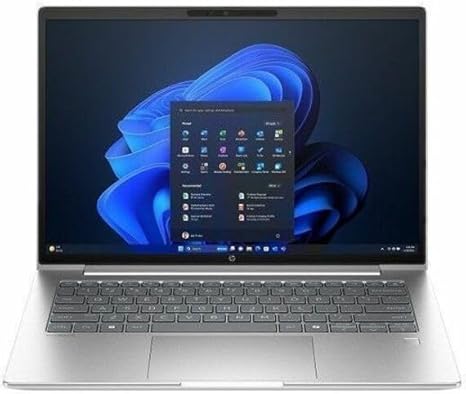
Welcome back to Reviews inside tv, where we bring you the latest and most in-depth tech reviews. Today, we’re taking a closer look at the HP ProBook 4 G1i 14″ Touchscreen Notebook. With its sleek design, impressive specs, and solid feature set, this laptop is positioned as a reliable option for professionals and power users alike. But does it deliver in real-world usage? Let’s find out.
First off, let’s break down the key specs. The HP ProBook 4 G1i comes equipped with Intel’s Core Ultra 7 255U processor, boasting 12 cores. That’s right—12 cores! This promises some serious multitasking power, whether you’re running office apps, juggling browser tabs, or working with creative software. The laptop is backed by 16GB of RAM, which is more than enough for most everyday tasks and some heavier workloads, like editing photos or video. The 512GB SSD provides ample space for your files, plus the speed of an NVMe drive ensures quick boot times and fast file transfers. It’s running Windows 11 Pro, giving you access to all the latest features and security options.
The display is a 14-inch WUXGA touchscreen with a 1920 x 1200 resolution. While it’s not quite Full HD, the 16:10 aspect ratio gives you a bit more vertical space, making it a good option for productivity, reading, and web browsing. The touchscreen functionality is a nice touch—pun intended—for those who like a more interactive experience, although it may not be as responsive or fluid as higher-end models with OLED or mini-LED screens.
As far as everyday use is concerned, the HP ProBook 4 G1i feels snappy. Whether you’re handling multiple browser tabs, working on spreadsheets, or hopping between apps, the 12-core CPU and 16GB of RAM offer a smooth experience. The system feels responsive, and tasks like opening apps or switching between programs are quick, thanks to the solid-state drive. For media consumption, the 14-inch screen offers decent color reproduction, though you might notice some dullness in brightness levels compared to more premium displays. Still, it holds up well for streaming movies or watching YouTube videos in the comfort of your home office.
If you’re a creator or someone who works with more demanding software, this laptop is equipped for light content creation—think photo editing or light video work. Heavy video rendering or 3D modeling may push the system a bit too far, especially considering it lacks a dedicated GPU, but for lighter tasks, you should see a smooth experience. That said, if gaming or high-end content creation is your primary goal, this laptop probably isn’t the one to focus on.
Now, let’s talk about thermals and noise. The HP ProBook 4 G1i handles everyday tasks without breaking a sweat. The fans are fairly quiet in normal use, which is perfect for anyone who needs a quiet workspace. Under heavier loads, like video editing or multiple programs running simultaneously, you might notice a bit of fan noise, but it’s nothing extreme. The chassis doesn’t get uncomfortably hot, but it does warm up a bit under stress, especially near the keyboard deck and underside. Still, it’s manageable for most use cases, and you probably won’t notice it during lighter activities like web browsing or office work.
When it comes to battery life, the 52Wh battery provides decent endurance. For lighter office tasks, you can expect around 8 to 9 hours of use, which is great for a full workday. For more demanding workloads, like video streaming or heavier multitasking, that number will drop a bit, but you should still get a solid 6 to 7 hours. The laptop charges fairly quickly, which is always a plus if you’re in a pinch, though the charger itself is on the larger side, so it’s something to consider when packing it into your bag.
As for the keyboard and trackpad, the ProBook offers a comfortable typing experience. The key travel and feedback are solid, and if you’re typing for long hours, it won’t feel like a chore. The trackpad is responsive and accurate, with good palm rejection, though it’s not the largest one on the market. If you’re used to larger, more premium trackpads, this one might feel a bit cramped, but it gets the job done. The layout is standard, with no surprises—just a clean, easy-to-use setup.
Connectivity-wise, the ProBook 4 G1i offers a good range of ports: two USB-A 3.2 ports, one USB-C 3.2 port, an HDMI 2.0 port for external displays, and an SD card reader. You’ll also find a headphone jack and a full-size Ethernet port for wired internet connections. There’s no Thunderbolt support, which could be a downside for those who rely on high-speed data transfer or external GPU setups. Wi-Fi 6 support ensures that you’ll get fast, reliable wireless speeds, which is great for video calls, file transfers, or even streaming content over the internet. The RAM and storage are not upgradable, as they’re soldered into the motherboard, so it’s something to consider if you anticipate needing more performance down the line.
The build quality of the HP ProBook 4 G1i feels sturdy. The Pike Silver finish gives it a premium look, but the materials are mostly plastic, which makes it feel slightly less rugged than metal-bodied laptops. Still, it feels solid enough for daily use and should be able to handle a bit of travel. The weight comes in at around 1.6 kg, so it’s not the lightest laptop, but it’s certainly portable enough to carry around in a backpack or bag throughout the day.
Now, let’s talk about value. The HP ProBook 4 G1i is priced competitively for what it offers. For a laptop with 12 cores, 16GB of RAM, and a 512GB SSD, it’s a solid choice for anyone in need of a reliable, all-around work machine. However, if you’re looking for something with a better display or higher-end graphics, you might want to check out some alternatives in this price range. It’s not the best choice for gamers or heavy creators, but for most office workers, students, and light content creators, it’s a well-rounded option.
In terms of competitors, laptops like the Dell Latitude 5420 or the Lenovo ThinkPad L14 are in a similar price range and offer solid performance. However, the HP ProBook 4 G1i edges out in terms of sheer multitasking power thanks to the 12-core Intel Core Ultra processor.
In conclusion, the HP ProBook 4 G1i is a strong choice for those who need a reliable, versatile laptop for everyday work, light content creation, and media consumption. It offers solid performance, a decent display, and a comfortable typing experience, all while maintaining a portable design. It’s not the right fit for gamers or power users who need high-end performance, but for most professionals or students, it’ll do the job well.
Thanks for watching! Don’t forget to check the comments box for the link to get the HP ProBook 4 G1i. Let me know if you have any questions, or if you already own this laptop, share your thoughts! Catch you in the next review.
Available to buy here:


