

Available to buy here:
Welcome to “Reviews inside tv”! Today, we’re taking a close look at the HP Pavilion x360 14-inch laptop, a sleek and versatile 2-in-1 device that’s aimed at everyday users who need a balance of performance, portability, and flexibility. Whether you’re a student, a professional working from home, or someone who just needs a reliable laptop for daily tasks, this model promises to deliver.
The Pavilion x360 14-ek1010nr comes packed with a 13th generation Intel Core i3-1315U processor, paired with 8GB of DDR4 RAM and a 256GB PCIe NVMe SSD. These specs are designed to offer a smooth computing experience for general productivity tasks, light multimedia consumption, and casual gaming. The 14-inch Full HD touchscreen display offers a resolution of 1920 x 1080, providing clear visuals and intuitive touch controls. With Intel UHD Graphics onboard, it promises to handle basic gaming and 4K streaming without a hitch, though we’ll see how well it holds up in real-world usage.
When it comes to memory and storage, the 8GB of RAM is adequate for multitasking, especially if you’re juggling a few browser tabs, light office work, or some media streaming. The 256GB SSD, while not massive, is a solid option for a laptop in this price range, providing fast read and write speeds compared to traditional hard drives. That PCIe NVMe M.2 interface means faster boot times, quicker file transfers, and a more responsive system overall, making it a noticeable upgrade over older storage types.
Now, onto the display—this 14-inch Full HD touchscreen is a real highlight. At 1920 x 1080, the screen is crisp enough for work and entertainment. The touchscreen adds a layer of versatility, allowing you to interact with your content more intuitively. While it doesn’t feature OLED or mini-LED technology, it’s a solid panel for day-to-day tasks like browsing the web, watching videos, or video calls. The display is bright enough for indoor use but might struggle a bit in direct sunlight. Color reproduction is decent, but you won’t get the same accuracy or vibrancy that higher-end models with better displays offer, which is something to keep in mind if you do a lot of photo or video work.
In terms of performance, the Intel Core i3-1315U processor is an entry-level chip that offers decent power for typical productivity tasks. It’s not a powerhouse, so if you’re planning to run demanding software like video editing suites or heavy 3D applications, this might not be the best choice. But for everyday tasks like web browsing, word processing, or streaming content, it will serve you well. When paired with the 8GB RAM and Intel UHD Graphics, you can expect a smooth experience for office tasks, some light photo editing, and even casual gaming, but don’t expect to play the latest AAA titles at high settings.
Battery life is always a key factor with portable laptops, and the Pavilion x360 impresses here. With a 41Wh battery, you can expect around 6 to 8 hours of use under moderate workloads—think web browsing, watching videos, and working in office apps. Of course, heavier tasks like gaming or video editing will drain the battery more quickly, but for typical day-to-day use, it holds up pretty well. Charging is relatively fast, with HP’s smart charging technology getting you back up to 50% in about 45 minutes, which is a nice touch for when you’re in a rush.
When it comes to comfort and usability, the keyboard on the Pavilion x360 offers decent key travel and feedback. It’s not the best keyboard for long typing sessions, but for short bursts of writing or working, it’s functional. The trackpad is smooth and responsive, with no issues when navigating or performing gestures. I also appreciate the inclusion of a fingerprint reader for quick logins and additional security. It’s one of those features that might seem small but adds a lot of convenience to daily use.
Connectivity is solid, with a good selection of ports, including two USB-A, one USB-C, and a full-size HDMI port, which is great for connecting to external monitors or projectors. It also features an SD card reader, which is a handy addition for photographers or content creators who need to transfer files quickly. The Wi-Fi 5 and Bluetooth 5.0 ensure reliable wireless performance, although you may notice a slight performance bump with Wi-Fi 6 on more premium devices.
Now, let’s talk about thermals and noise. Under light workloads, the Pavilion x360 stays relatively cool, with no major heat buildup on the keyboard or underside. However, when pushed with more demanding tasks like streaming 4K video or running multiple applications simultaneously, the fans will kick in, and they do get a bit louder. It’s not obnoxiously loud, but it’s worth noting if you’re working in a quiet environment. Thermal throttling doesn’t seem to be a major issue, but the laptop can get a little warm under load, especially on the underside.
On the portability side, the Pavilion x360 is a breeze to carry around. It weighs in at just 3.3 pounds, which is light enough to tote around in a backpack or bag without feeling like you’re lugging around a heavy device. It’s also thin enough to slip into most bags, making it a great option for students, commuters, or anyone who needs a compact laptop for daily use.
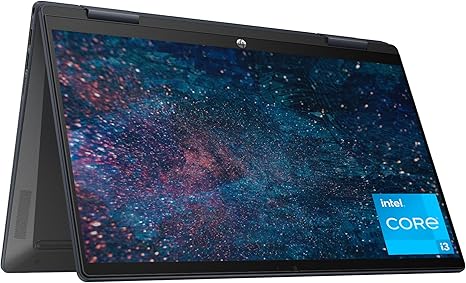
In terms of build quality, the Pavilion x360 features a plastic chassis that feels sturdy enough for everyday use. It’s not the most premium feeling device, but it’s well-built for its price range. The hinges are smooth, allowing for easy transition between laptop and tablet modes. That 360-degree hinge gives you the flexibility to use the device in tent mode or as a stand for presentations or watching videos.
Let’s talk about the value for money. With its solid performance, responsive touchscreen, good battery life, and portable design, the HP Pavilion x360 is a great choice for everyday users who need a reliable laptop for office work, media consumption, and casual use. The price is competitive, especially when compared to similarly priced competitors, but it does have some limitations, like the mid-range display and lack of a high-end GPU for gaming or creative work. If you need a laptop for more intensive tasks, you might want to look elsewhere, but for the majority of users, it offers a solid mix of performance and value.
So, who’s this laptop best for? If you’re a student, a home office worker, or someone who just needs a reliable laptop for browsing, streaming, and light productivity tasks, this model is perfect for you. It’s lightweight, portable, and offers great performance for typical day-to-day activities. However, if you’re looking for a machine to handle high-end gaming or professional-grade video editing, you may want to consider stepping up to something with a more powerful CPU and dedicated GPU.
Before we wrap up, don’t forget to like, subscribe, and hit that bell icon to stay updated with all our latest reviews and tech insights. We’ve got plenty of great content coming your way.
Thanks for watching! If you’ve got any questions or want to share your own experience with the HP Pavilion x360, feel free to drop a comment below. The link to grab the laptop is in the comments box. Until next time, take care, and remember—choosing the right laptop is more about how it fits your needs than anything else. Keep it smart, keep it efficient!
Available to buy here:


