

Available to buy here:
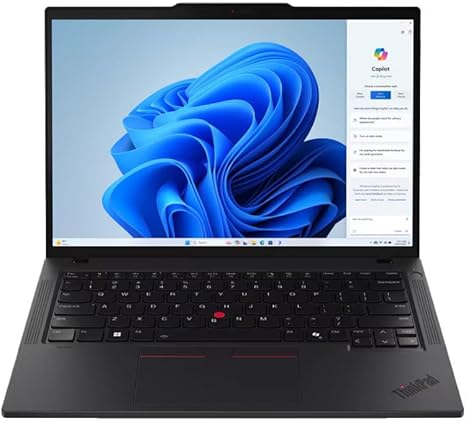
Welcome to “Reviews inside tv,” where we bring you honest, in-depth tech reviews. Today, we’re taking a closer look at the Lenovo ThinkPad P14s Gen 5, a mobile workstation that promises to balance power, portability, and productivity. With its AMD Ryzen 7 PRO 8840HS processor, 32 GB of RAM, and a 1 TB SSD, it’s designed to handle demanding tasks while remaining compact enough for on-the-go use. But does it live up to the hype? Let’s dive into the details.
When it comes to specs, the ThinkPad P14s Gen 5 offers a solid combination of power and efficiency. The Ryzen 7 PRO 8840HS is an 8-core, 16-thread processor built for professionals who need solid performance without sacrificing battery life. Whether you’re handling large spreadsheets, multitasking with numerous browser tabs, or editing 4K videos, the CPU is more than capable. Its performance in day-to-day office tasks feels seamless, with no noticeable lag when switching between programs. The integrated AMD Radeon graphics aren’t geared for heavy gaming, but for most creative workloads like photo editing or light video rendering, they do the job just fine.
Coupled with the 32 GB of RAM, multitasking is a breeze. Whether you’re running several applications at once or working with large datasets, the ample memory ensures smooth performance. The 1 TB SSD is another key feature, offering fast boot times and almost instant access to files. Compared to traditional SATA drives, this NVMe SSD reduces load times significantly, which is especially noticeable when moving large files or running memory-intensive software.
The 14-inch display with a WUXGA resolution (1920 x 1200) strikes a great balance between screen real estate and portability. While it’s not as high-res as some 4K screens, it offers a sharp, clear image perfect for business presentations, media consumption, and casual browsing. It’s bright enough for indoor use, though you may notice some glare in direct sunlight. The color accuracy is decent, though for professionals working with critical color, the display might not be as precise as higher-end options like OLED or more premium IPS panels.
Battery life is a critical aspect for a mobile workstation, and the ThinkPad P14s doesn’t disappoint. Thanks to its 50 Whr battery, you can expect up to 8 hours of use under moderate load—perfect for an all-day work session. This will vary depending on what you’re doing, of course. If you’re video conferencing or running multiple apps, you may find the battery life closer to 6 hours. However, for lighter tasks like browsing or working in documents, you can stretch it closer to a full 8 hours. Charging is relatively quick too, so you won’t be tethered to an outlet for long.
Let’s talk about the keyboard and trackpad, which are essential for long typing sessions. Lenovo’s keyboards are renowned for their comfortable key travel and tactile feedback, and the ThinkPad P14s is no exception. The keys have a satisfying depth, making it a great choice for anyone who types for hours at a time. The trackpad is smooth and responsive, and palm rejection works well. There’s also a pointing stick for those who prefer a more traditional input method.
In terms of ports and connectivity, the ThinkPad P14s offers a good selection. You’ll find two USB-C ports, including one that supports Thunderbolt, two USB-A ports, an HDMI 2.0 port, a headphone jack, and even an SD card reader. This is fantastic for those who need to hook up to multiple monitors, external storage devices, or docks. The inclusion of Thunderbolt support is a big plus, especially for users looking to connect high-performance peripherals or external GPUs. Wi-Fi 6 and Bluetooth 5.1 are on board too, ensuring fast and stable wireless connections.
The laptop’s thermals are well-managed, thanks to Lenovo’s efficient cooling system. Under light to moderate use, the laptop stays cool, and you won’t hear the fans kicking up much noise. During heavier workloads like video rendering or running more intensive software, the fans do become audible, but they don’t get excessively loud. The keyboard and palm rest areas stay comfortable for long periods, with only minor warmth under heavy load.
Now, let’s take a look at the build quality and portability. The ThinkPad P14s is made of high-quality, durable materials. Its chassis feels solid and rigid, with minimal flex. It’s built to survive the rigors of daily travel, which is perfect for anyone who needs a reliable machine for work on the go. At just around 3.5 pounds, it’s light enough to slip into a backpack without weighing you down, but it’s still substantial enough to feel like a premium device.
So, how does the P14s perform in real-world usage? Whether you’re working through a day of spreadsheets, writing emails, or running heavy applications, the P14s holds up well. Video streaming is smooth, thanks to the decent display and stereo speakers that do a good job filling a room with sound, though they won’t match the quality of premium laptop speakers. For media consumption, it’s perfectly fine for casual use, but if you’re an audiophile or movie buff, you may want to use external speakers or headphones.
When it comes to performance, the AMD Ryzen 7 PRO 8840HS really shines in office productivity and content creation tasks. However, the integrated GPU won’t give you the best experience for gaming. In titles like “Cyberpunk 2077,” “Call of Duty: Warzone,” or “Alan Wake 2,” you can expect low to medium settings for playable frame rates. Real-world performance benchmarks suggest an average FPS of around 30 to 40 on medium settings, with a noticeable drop in frame rates under more intense scenes. For those looking to game seriously, this laptop might not be the best fit.
Thermally, the P14s does a decent job, though it does get warm under load. However, thermal throttling isn’t a major concern, and the cooling system does enough to ensure that performance doesn’t degrade significantly during extended gaming or video exports. The display’s 60 Hz refresh rate is adequate for general use, but for smoother gaming or higher frame rates, you’d likely want to look elsewhere.
In terms of value for money, the Lenovo ThinkPad P14s is a solid investment for anyone who needs a portable workstation with strong CPU performance, good build quality, and a reliable keyboard. It’s not the cheapest laptop in its class, but it delivers on the essentials—performance, durability, and comfort. In comparison with other similar models like the Dell Precision 14 or HP ZBook Firefly, the P14s holds up well but might fall short in the display department for those who need ultra-vibrant colors or higher refresh rates.
To wrap up, the Lenovo ThinkPad P14s Gen 5 is a versatile machine that hits all the right notes for office users, business professionals, and casual creators. It provides solid performance, excellent build quality, and a reasonable price, making it a great choice for most productivity-focused tasks. If you’re a gamer or need a more premium display, though, you might want to consider a different option.
Thanks for watching! The link to grab the Lenovo ThinkPad P14s is in the comments box below. Let us know if you have any questions or if you’re already using this model—share your experience in the comments. Until next time, take care and happy reviewing!
Available to buy here:


