

Available to buy here:
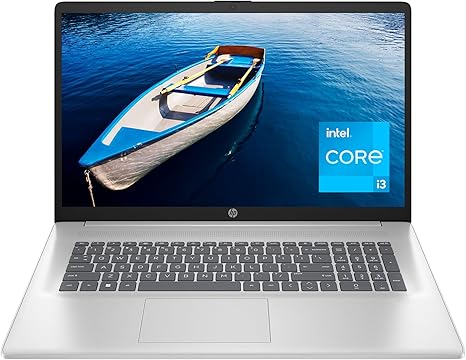
Welcome to “Reviews inside tv,” where we give you the honest scoop on the latest tech to help you make smarter buying decisions. Today, we’re taking a look at the HP Laptop 17-cn2000nr, a 17.3-inch laptop that’s designed to give you a bigger, more comfortable view, whether you’re working or watching movies. But does it live up to the hype? Let’s take a closer look.
This model is powered by the 12th generation Intel Core i3-1215U processor, which has a base clock speed of 3.3 GHz and can boost up to 4.4 GHz when needed. While it may not be the powerhouse of the i7 or i9 chips, the i3-1215U is more than capable of handling day-to-day tasks like web browsing, document editing, and streaming. You won’t be using this for hardcore gaming or video editing, but for standard office work and light media consumption, it gets the job done.
The laptop is equipped with Intel UHD Graphics, which means you can easily stream 4K content without stutter or lag. Don’t expect to play graphically demanding games at high settings, but for casual gaming, like lighter titles or older games, it’ll hold up fairly well. The 8GB of DDR4 RAM and 256GB PCIe NVMe M.2 SSD storage are a solid combination for general multitasking, allowing you to juggle several browser tabs and apps without much slowdown. The SSD is particularly nice for faster boot-up times and improved overall system responsiveness compared to a traditional HDD.
Now, let’s talk about the display. The HP 17-cn2000nr boasts a 17.3-inch HD+ BrightView touch display. The touch functionality adds a layer of versatility for navigating through tasks, but the HD+ resolution (1600×900) is a bit of a letdown compared to Full HD or higher resolutions available in many other laptops at this price point. It’s decent for everyday use but won’t deliver that stunning clarity you’d expect for things like content creation or watching high-definition videos. The brightness level and color accuracy also leave a bit to be desired, especially for those working in creative fields where color precision is crucial. Still, for casual use and media consumption, it’s passable.
Battery life is always an important factor, and with a battery capacity that’s designed to last, you can expect around 6 to 7 hours of use under moderate conditions—think light office work, web browsing, or watching videos. It’s not a battery champ, but it should get you through most of a workday without needing to plug in. The charging speed isn’t the fastest either, so keep the charger handy if you’re pushing the battery to its limits.
One feature worth mentioning is the lift-hinge design, which elevates the keyboard for a more natural typing angle. This is a nice touch, especially if you plan on typing for long periods. The keyboard itself is comfortable enough for everyday tasks, though the key travel might not be as satisfying for those who prefer a more tactile feel. The trackpad is responsive and accurate, though the surface could feel a bit slippery for some users. The addition of a physical privacy shutter for the camera is a neat security feature for those who value privacy.
Connectivity is pretty standard for a laptop in this category. You get a decent array of ports, including USB-A and USB-C, as well as HDMI for connecting to external displays. Wi-Fi 5 support ensures stable internet connections, though if you’re looking for future-proofing with faster speeds, Wi-Fi 6 is noticeably absent. For storage expansion, the laptop doesn’t offer an SD card slot, so keep that in mind if you often work with media that requires extra storage.
Thermals are something you’ll want to pay attention to here. Under light usage, the laptop stays relatively cool, but under heavier workloads, especially when streaming video or multitasking, you might notice the fans kicking in. While not obnoxiously loud, they’re audible enough to be a bit distracting if you’re in a quiet environment. Thankfully, the heat doesn’t become unbearable on the keyboard or underside, making it a relatively comfortable experience, though long sessions of heavier tasks could lead to some thermal throttling and a drop in performance.
In terms of portability, this laptop is lightweight enough for its size but definitely not ultra-portable. At just under 5 pounds, it’s a bit hefty compared to more compact 15-inch options. However, the large screen size makes up for the bulk if you prefer more screen real estate. If you’re commuting or traveling frequently, it might be worth considering whether the size is ideal for you.
When it comes to value for money, this laptop is aimed squarely at people who need a dependable laptop for office work, media consumption, and light tasks—nothing more, nothing less. For the price, it’s a solid option, though the display and lack of higher-end features may leave some wanting more. If you’re willing to spend a bit more, you can find better options with Full HD displays and faster processors.
So who is this laptop for? It’s perfect for casual users, students, or anyone who needs a simple machine for work and entertainment. It’s not ideal for gamers or creators looking for high-end specs, but for everyday tasks, it gets the job done. If you’re looking for more power or a sharper screen, you might want to look at other models in this price range.
In conclusion, the HP Laptop 17-cn2000nr is a solid choice for people who need an affordable, larger screen laptop for daily tasks, but don’t expect groundbreaking performance or a top-tier display. It’s a good option for students or office workers who need something simple without the bells and whistles of high-end machines.
If you found this review helpful, be sure to like, subscribe, and hit that bell icon for more honest, straightforward reviews. We’ve got plenty more laptops to cover, so stay tuned. Thanks for watching, and I’ll see you in the next one!
Available to buy here:


