

Available to buy here:
Welcome to Reviews Inside TV, where we dive into all things tech to help you make informed decisions. Today, we’re looking at the Lenovo ThinkPad P14s Gen 6, a powerful mobile workstation that promises a lot, but does it deliver? With an AMD Ryzen AI 7 PRO 350 processor, 32 GB of RAM, and a 1 TB SSD, this laptop seems built for serious work. Whether you’re a student, a professional, or a creator, let’s break down how this machine performs and whether it’s worth the investment.
Starting with the basics, this ThinkPad model is designed as a mobile workstation, perfect for professionals who need reliable performance on the go. It packs an AMD Ryzen AI 7 PRO 350 processor, which is part of AMD’s latest lineup, offering great processing power for both multitasking and demanding tasks. With 32 GB of DDR5 RAM, it ensures that even heavy workloads, like video editing or running multiple virtual machines, won’t cause any slowdowns. The 1 TB SSD gives you plenty of space for all your files, software, and media, and its NVMe connection guarantees fast read and write speeds. For graphics, the laptop comes with integrated AMD Radeon graphics, which should suffice for most office tasks, media consumption, and light creative work, though it’s not meant for heavy gaming or high-end 3D rendering.
The 14-inch WUXGA anti-glare display stands out in terms of clarity and color accuracy, making it a solid choice for both professional and personal use. The 1920 x 1200 resolution gives you plenty of screen real estate for productivity, offering more vertical space than a standard 1080p screen. While not as sharp as a 4K panel, it strikes a balance between sharpness and battery efficiency. The anti-glare coating helps reduce reflections, making it easier to use in brightly lit environments. However, its brightness and color accuracy will be key factors for anyone doing design or photo editing work. You’ll likely get a good experience for most office tasks and media consumption, but creators may want to check the exact color gamut coverage for more critical work.
In terms of battery, the P14s comes with a sizable battery, though the real-world life will depend heavily on how demanding your workload is. For light office work, browsing, and video streaming, you can expect around 8-10 hours, but if you’re pushing the CPU and RAM with more intensive tasks like rendering or multitasking with heavy apps, you may see that drop closer to 5-6 hours. The laptop also supports fast charging, which means a quick top-up between meetings or work sessions can give you a decent boost. It’s not the longest-lasting machine for all-day use without a plug, but it should be good for most professionals who have access to charging spots during the day.
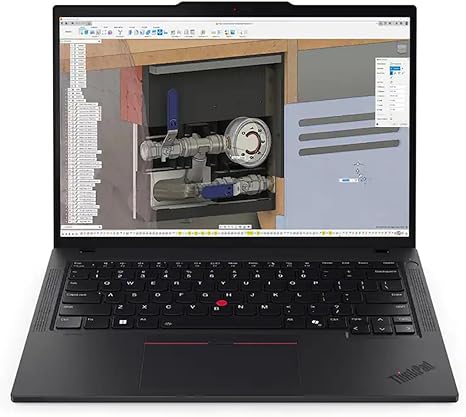
Now, let’s talk about the keyboard and trackpad. Lenovo’s ThinkPad keyboards are legendary, and this one continues that tradition. With good key travel and tactile feedback, it’s easy to type for long periods without strain. Whether you’re drafting emails, coding, or taking notes, you’ll appreciate the comfortable typing experience. The trackpad is responsive and accurate, and it’s big enough to make multitouch gestures feel natural. The physical buttons below the trackpad add to the traditional ThinkPad feel, which many users enjoy for their precision.
When it comes to ports and connectivity, the P14s offers a solid selection. On the left side, you’ll find two USB-A 3.2 Gen 1 ports, an HDMI 2.0, and a combo audio jack. On the right side, you get a USB-C 3.2 Gen 2 port, which supports Power Delivery, a second USB-A port, and a microSD card reader. There’s also a full-size Ethernet port for those who need a wired connection. Wi-Fi 6 and Bluetooth 5.2 ensure fast, reliable wireless connectivity for both home and office setups. Having two USB-C ports with Power Delivery is a nice touch, especially for anyone using a single cable to dock or charge the laptop. However, the lack of Thunderbolt support may be a drawback for those relying on high-speed peripherals or external GPUs.
Moving on to thermals and noise, the P14s does a good job of staying cool under normal use. The fans are quiet when handling basic tasks, and you won’t notice much noise during typical office work or browsing. Under heavier loads, like when rendering or running simulations, the fans do spin up, but they’re not overwhelmingly loud. However, if you’re using this laptop for long gaming or video editing sessions, it might heat up a bit. The keyboard deck stays relatively cool, but the underside can get warm. It’s not a dealbreaker, but if you plan on using this laptop on your lap for extended periods, the temperature might become uncomfortable after a while.
As for real-world usage, this machine performs well across a variety of tasks. Office and productivity work is a breeze, with fast application launches, responsive multitasking, and smooth video calls. For media consumption, the WUXGA display does a decent job of streaming shows and movies, with decent contrast and color, though it’s not as vivid as OLED displays. If you’re into content creation, the laptop handles photo editing and light video editing without any hiccups, though for serious creative work, you might want a machine with more powerful GPU support. As for gaming, you’re not going to be playing the latest AAA titles on high settings, but it’s perfectly fine for casual gaming at 1080p on lower settings.
Now, let’s take a closer look at the performance and thermals. In published benchmarks, the ThinkPad P14s consistently delivers solid performance across a variety of tasks. In gaming, it can handle titles like Shadow of the Tomb Raider at 1080p on medium settings with an average of 40-50 FPS. In CPU-intensive tasks, like video rendering or running software simulations, the Ryzen AI 7 PRO 350 shows its strength, easily managing long sessions without significant throttling. The thermals are decent, with temperatures staying within a comfortable range during most activities, but expect some heat buildup under full load. This won’t necessarily throttle performance, but it’s worth noting if you plan on heavy tasks for extended periods.
When it comes to portability, the P14s is a great choice for anyone who needs a powerful machine in a compact form. Weighing just around 3.5 pounds, it’s light enough to carry around throughout the day without being a burden. The 14-inch screen size strikes a nice balance between screen real estate and portability, and its slim profile fits easily in most backpacks.
Finally, let’s talk about value for money. At its price point, the Lenovo ThinkPad P14s Gen 6 offers excellent value for professionals who need a reliable workstation without going overboard on performance. It’s not the cheapest option out there, but its combination of powerful specs, solid build quality, and a great keyboard make it an attractive choice for office workers, creators, and anyone in need of a no-nonsense machine. Competitors like the HP ZBook or Dell Precision might offer similar specs, but Lenovo’s reputation for durability and comfort makes this an excellent option for long-term reliability.
In conclusion, the Lenovo ThinkPad P14s Gen 6 is a great choice for professionals who need a balance of power, portability, and build quality. It excels at office tasks, media consumption, and light creative work, but it’s not a machine for heavy gaming or high-end 3D rendering. The price is justified by its performance, keyboard, and solid build, making it a great option for anyone in need of a reliable mobile workstation.
Thanks for watching, and don’t forget to hit that like button, subscribe, and ring the bell for more detailed reviews. You can find the link to grab this laptop in the comments box below. If you’ve used this machine, or if you have any questions, feel free to drop them in the comments. See you next time!
Available to buy here:


