

Available to buy here:
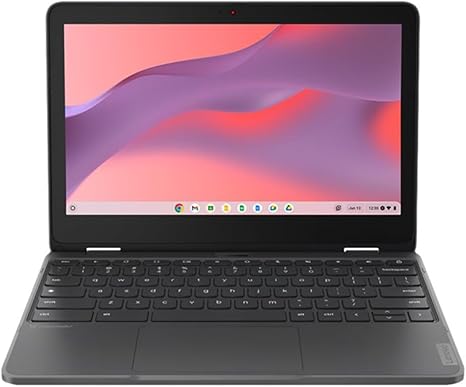
Welcome back to “Reviews inside tv”! Today, we’re taking a look at the Lenovo 300e Yoga Chromebook Gen 4. If you’re in the market for an ultra-portable convertible Chromebook with a focus on affordability, performance, and long battery life, this might be right up your alley. Let’s see if this budget-friendly option can really deliver the goods or if it’s just a compromise on the essentials.
This model features an 11.6-inch touchscreen with a 1366 x 768 HD resolution, which is fairly standard for budget devices. You won’t be getting a high-end display here, but the 11.6 inches should offer enough space for casual browsing, office work, and streaming video. The resolution may feel limiting for those used to Full HD or higher, but for light tasks and media consumption, it’s more than enough.
Under the hood, the Lenovo 300e Yoga Chromebook packs an octa-core ARM Cortex A76 dual-core and Cortex A55 hexa-core processor. It’s not the most powerful chip out there, but it does a solid job for everyday tasks like web browsing, document editing, and streaming. You can expect smooth performance when juggling a handful of tabs, using office apps, or even jumping between video calls. However, it’s not going to handle resource-heavy apps or multitasking with ease—so if you need something for heavy creative work or gaming, look elsewhere.
On the memory side, you’ve got 4GB of RAM. This is enough for basic tasks, but you might notice some slowdowns if you push it too hard with too many apps open. The 4GB will certainly get you through light tasks, but if you’re planning to keep many tabs open or multitask regularly, it could feel a bit tight. For casual use, it’s adequate, but power users may want to consider something with more memory.
The storage, like most Chromebooks, is relatively limited with 64GB of eMMC storage. eMMC is fine for basic use, but if you find yourself storing a lot of media or apps, you might feel the pinch. The upside is that the Chromebook comes with built-in cloud storage, so if you’re primarily using web apps, you won’t notice the storage limitations as much. For those who want local storage, though, a microSD card can be added for extra space.
Battery life is where this device really shines. Lenovo claims up to 16 hours of battery life, and that’s something we can confirm in real-world usage. During light office work, web browsing, or watching videos, you can easily get a full day’s work without needing to charge. This is perfect for students or anyone who’s always on the move and doesn’t want to be tied down to an outlet all day.
When it comes to performance, it’s solid but not exceptional. The laptop is geared towards light office tasks, schoolwork, and casual browsing. If you’re someone who spends a lot of time writing, checking emails, or browsing social media, the 300e Yoga will get the job done without too much fuss. However, I wouldn’t recommend this Chromebook for heavy content creation like video editing or large-scale photo manipulation—it just doesn’t have the horsepower for those kinds of tasks.
One thing that’s great about this device is how versatile it is. The Lenovo 300e Yoga Chromebook is a convertible 2-in-1, meaning it flips into tablet mode, which can be handy for presentations, watching movies, or using the touchscreen for some quick navigation. The screen is responsive to touch, but keep in mind, the resolution is limited, so don’t expect ultra-sharp visuals.
Let’s talk about the keyboard and trackpad. The keyboard is a bit cramped but functional. It’s not the most comfortable for long typing sessions, but for shorter tasks like note-taking, emails, or chats, it works fine. The trackpad, though small, is responsive enough for daily use. It’s not going to wow you with precision, but for basic navigation and gestures, it gets the job done.
Now, the thermals. Since this is a lower-powered machine with an ARM-based processor, it stays relatively cool under normal usage. You won’t notice the laptop heating up unless you push it with multiple tabs or media-heavy tasks. The fan noise is minimal, so it’s great for quiet environments like libraries or meetings.
As for ports and connectivity, you get a couple of USB-C ports, a USB-A port, a headphone jack, and a microSD card slot. You won’t find Thunderbolt here, but USB-C will cover most of your charging and peripheral needs. The Wi-Fi performance is solid, and Bluetooth connectivity works well for external devices like speakers or a mouse.
The 300e Yoga is also built to withstand a bit of rough treatment. It meets military standards for durability, so it should handle the occasional drop or bump without issues. However, while the build feels sturdy for a Chromebook, the plastic chassis does make it feel a little less premium compared to aluminum or magnesium devices.
Is this Chromebook worth the money? Well, if you’re looking for a device that balances affordability, portability, and battery life for basic tasks, it’s a solid choice. For those who want a light laptop for browsing, watching movies, or working on office documents, the Lenovo 300e Yoga Chromebook is more than capable. However, if you need something for more intensive tasks, you’ll need to look elsewhere.
Comparing it to other Chromebooks in this range, the 300e Yoga holds its own with its impressive battery life and solid build quality. However, some competitors might offer slightly higher specs or better displays for a similar price. If you can find a model with more RAM and storage for the same price, it could be worth considering, especially if you need to do more than just the basics.
So, who is this laptop best suited for? It’s ideal for students, casual office workers, or anyone who needs a no-fuss device for light tasks. If you’re a creator or gamer looking for something that can handle demanding software or games, you should probably skip this one.
Thanks for tuning in to this review of the Lenovo 300e Yoga Chromebook Gen 4! If you’re looking to grab one for yourself, be sure to check out the link in the comments box. Let us know if you’ve tried this Chromebook already—drop your thoughts or any questions below, and we’ll catch you in the next one. Don’t forget to like, subscribe, and hit the bell icon so you won’t miss out on more honest reviews from “Reviews inside tv.”
Available to buy here:


