

Available to buy here:
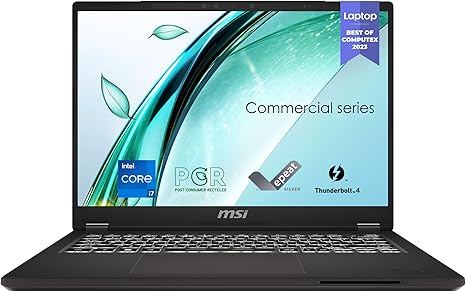
Welcome to “Reviews inside tv”! Today, we’re exploring the MSI Commercial 14 H, a laptop designed to power through both business tasks and creative projects with ease. It’s a sleek, professional option for anyone looking for strong performance in a compact package. But does it deliver? Let’s break it down.
First, let’s talk about the heart of this laptop—the processor. The MSI Commercial 14 is powered by a 13th Gen Intel Core i5 processor. This chip is part of Intel’s latest lineup and offers solid performance for both productivity and multitasking. Whether you’re running spreadsheets, multiple browser tabs, or video conferencing, the Core i5 manages these tasks without hiccups. But how does it hold up for more demanding tasks? It delivers respectable performance, though not quite the heavy-duty power needed for things like video editing or high-end gaming. Still, it’s more than capable for everyday office work, light content creation, and web browsing.
Coupled with the processor is the Intel Iris Xe integrated graphics. While not as powerful as dedicated GPUs, the Iris Xe provides a notable boost for light photo editing, basic video work, and casual gaming. It’s a step up from older Intel integrated solutions, handling moderate creative tasks with better fluidity, but don’t expect to run graphically intense games or heavy software smoothly. The GPU here is best suited for productivity work and light creative tasks, not for gamers or professional creators needing serious graphical power.
When it comes to memory and storage, the MSI Commercial 14 offers 16GB of DDR4 RAM and a 512GB NVMe SSD. The 16GB of RAM is fantastic for multitasking, meaning you can have several applications open simultaneously without seeing a noticeable slowdown. Whether you’re bouncing between Word documents, spreadsheets, and video calls, this laptop handles it with ease. The 512GB NVMe SSD is another strong feature, offering quick boot times, fast file transfers, and plenty of space for work files, documents, and media. The speed of an NVMe drive over traditional SATA SSDs really shines in everyday use, reducing load times and making the overall experience feel snappy.
Display-wise, you’re looking at a 14-inch panel with a 60Hz refresh rate. While the display doesn’t have the high refresh rates or color accuracy of premium panels, it’s perfectly serviceable for daily tasks like browsing, reading, and watching videos. The 60Hz refresh rate means it’s not geared for fast-paced gaming or high-speed graphics work, but for most professional and casual use, it will get the job done. Color reproduction is decent, though not on par with higher-end displays like OLED or mini-LED, so if you’re a designer or video editor, you may want to look elsewhere for better accuracy.
Battery life is another crucial factor for any business laptop, and the MSI Commercial 14 holds up decently. The battery can last for several hours during typical work use, like web browsing, document editing, and streaming media. However, under heavy load, such as video rendering or gaming, you might see the battery drain more quickly. Charging is straightforward, and with Thunderbolt 4 support, you can expect fast charging speeds to get you back up and running quickly.
In terms of build quality, this laptop strikes a good balance between durability and portability. It’s not the lightest option out there, but at around 3.1 pounds, it’s easy to carry around in a bag for day-to-day business tasks. The chassis is sturdy, though it doesn’t feel particularly premium. The material feels like a mix of plastic and aluminum, giving it a solid, no-frills feel that’s typical for business-oriented laptops. It should withstand daily wear and tear without any issues.
Now, let’s talk thermals. During light tasks like office work or web browsing, the MSI Commercial 14 remains cool and quiet, with minimal fan noise. However, under heavier workloads like video editing or multitasking with many apps, the fan kicks in, and the temperature rises. It’s not as noisy as some other laptops under load, but you’ll still hear it if you’re pushing the system. The underside gets warm, but it’s nothing that should make using it uncomfortable.
The keyboard on the MSI Commercial 14 is responsive, with decent key travel and a comfortable feel for typing over long sessions. There’s a fingerprint reader built into the power button, which adds an extra layer of convenience and security. The trackpad is smooth, accurate, and supports multi-touch gestures, making it easy to navigate. The overall input experience is solid, though the layout is fairly standard, so if you’re used to a more spacious keyboard with a dedicated number pad, you might find the smaller layout a bit tight.
When it comes to connectivity, the MSI Commercial 14 is well-equipped. You get a decent selection of ports, including USB-A, USB-C, HDMI, and an SD card reader. This allows you to easily connect to external displays, storage devices, and peripherals, which is crucial for a business laptop. It also features Wi-Fi 6 and Bluetooth 5.2, ensuring fast and reliable wireless performance.
As for expandability, the RAM is soldered, so you can’t upgrade it later. The storage, however, is upgradeable, so you can replace or expand the 512GB SSD if you need more space down the line.
So, who is this laptop really for? It’s a great fit for business professionals, students, or anyone who needs a reliable, no-nonsense machine for office work, media consumption, and light content creation. It’s not the powerhouse for gamers or high-end creators, but for those looking for solid, everyday performance, this is a strong contender. It’s portable, affordable, and offers a good balance of features, making it a versatile choice for many.
In terms of value for money, the MSI Commercial 14 offers good performance for its price. There are alternatives out there that might offer more power or a better display, but they often come at a higher price point. If you’re looking for a machine that balances performance and portability without breaking the bank, this is a solid option.
Before we wrap up, don’t forget to hit that like button, subscribe, and ring the bell so you don’t miss any of our latest reviews. We’ve got plenty more tech insights coming your way!
Thanks for watching! If you’ve got any questions or if you already own the MSI Commercial 14, drop a comment below—we’d love to hear your thoughts. Until next time, stay productive and keep those laptops running smoothly!
Available to buy here:


